> ## Documentation Index
> Fetch the complete documentation index at: https://docs.discord.com/llms.txt
> Use this file to discover all available pages before exploring further.
# Change Log
> Discover the latest updates, new features, and bug fixes on the Discord Developer Platform. To join in on the conversation, join the [Discord Developers Server](https://discord.com/invite/discord-developers).
export const Route = ({method, children}) => {
return
{method}
{children}
;
};
## Attachment Editing and `is_spoiler` Param
Apps can now edit the `description` and `is_spoiler` parameters on existing attachments when editing messages.
We have also separated the [attachment request](/developers/resources/message#attachment-object-attachment-request-structure) object in the docs to make it more clear which params you can set for attachments and which fields are provided by the API.
Attachments can be marked as a spoiler by setting `is_spoiler: true` in the attachment request object, and apps can read whether an existing attachment is spoilered by checking for the `IS_SPOILER` [attachment flag](/developers/resources/message#attachment-object-attachment-flags) on the attachment object. The legacy `SPOILER_` filename prefix will continue to mark attachments as a spoiler, but not all spoilered attachments have the prefix.
## Documentation Fix: Subscription Status Values
The integer values for the `INACTIVE` and `ENDING` subscription statuses were previously swapped in the documentation. The correct values are `INACTIVE` = `1` and `ENDING` = `2`, as shown in the [Subscription Statuses](/developers/resources/subscription#subscription-statuses) reference. This has been corrected in both the reference and the [Implementing App Subscriptions](/developers/monetization/implementing-app-subscriptions) guide, which described the subscription lifecycle with the swapped values.
The API has always returned these values, only the documentation was incorrect. If your app branches on the numeric `status` value, double-check that `1` is treated as `INACTIVE` and `2` as `ENDING`.
We discovered this issue while reconciling our documentation against [our OpenAPI spec](https://github.com/discord/discord-api-spec) in [this commit](https://github.com/discord/discord-api-spec/commit/cdbd53a2ac5144536bfee2a34e6d0de13e08eec0).
## Changes to Privileged Intent Access for Discord Apps
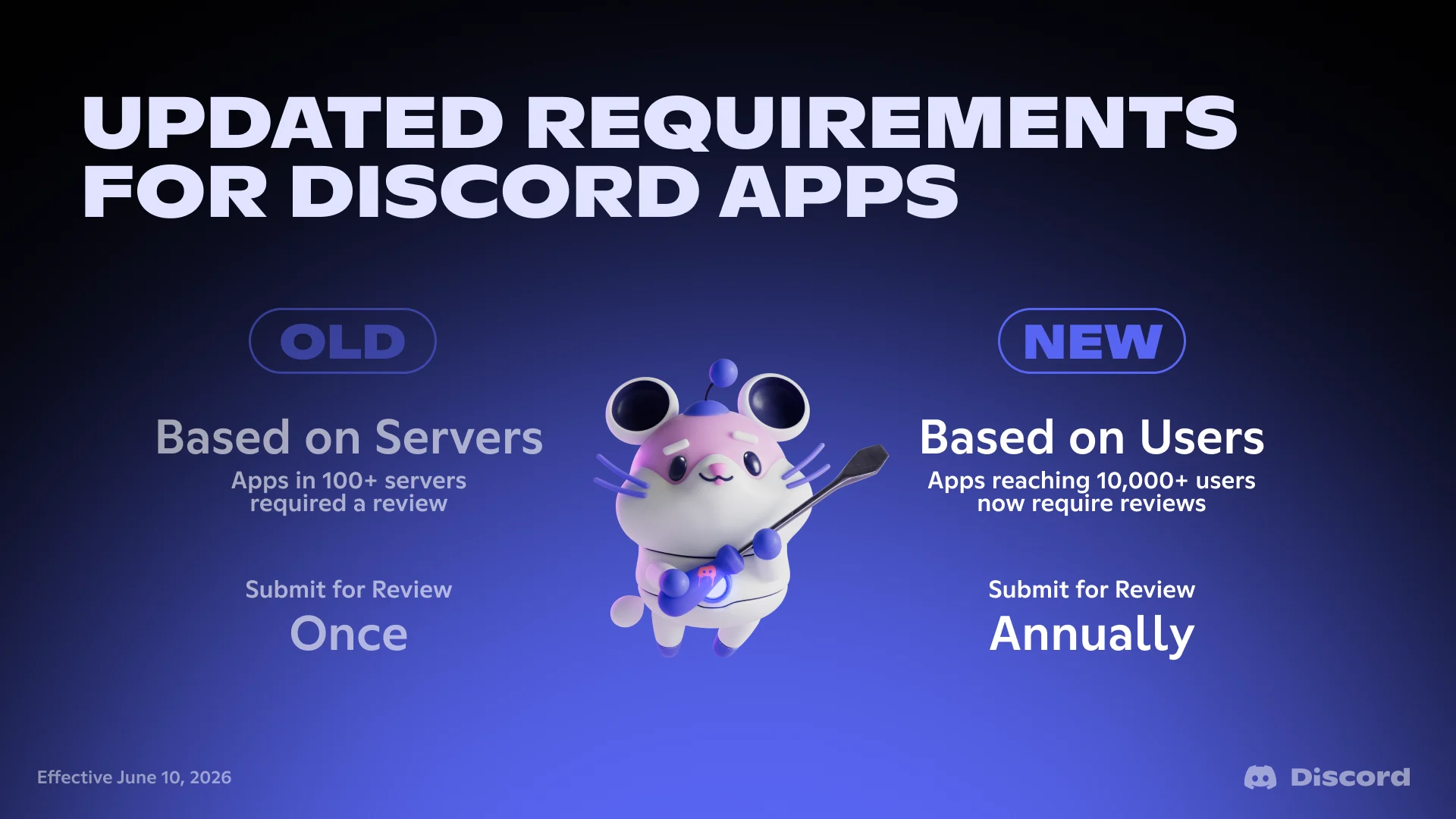
 Today, we're [announcing changes to how Discord Apps access Privileged Intent](https://support-dev.discord.com/hc/articles/40281523410967) with a new user-based threshold for when access requires review and an annual process to reapply for continued access.
> If your app is accessible to fewer than 10,000 users, these changes do not impact your app.
### What's Changing
#### 1. The review threshold is now based on user count, not server count
Previously, apps in fewer than 100 servers could access Privileged Intents by toggling them on in the Developer Portal, and apps in 100+ servers needed to apply for access.
Starting today, the threshold is based on the number of users your app can access across all the servers it belongs to. If your app has fewer than 10,000 users, you can continue accessing Privileged Intents by toggling them on in the Developer Portal. **Once your app reaches 10,000 users, you'll need to apply for Privileged Intent access**.
#### 2. Apps must now reapply annually for continued access
Apps with Privileged Intent access granted from a prior review will need to reapply to confirm their continued access once per year in the Developer Portal.
#### 3. Apps can keep growing during Privileged Intent review
Under the new user-based threshold, apps can continue joining servers and reaching new users while their submission is under review.
#### 4. App Verification and Privileged Intent review are now separate
Previously, [App Verification](https://support-dev.discord.com/hc/en-us/articles/23926564536471-How-Do-I-Get-My-App-Verified) and Privileged Intent review were part of the same review process. With this change, we have separated App Verification and the Privileged Intent review process.
Today, we're [announcing changes to how Discord Apps access Privileged Intent](https://support-dev.discord.com/hc/articles/40281523410967) with a new user-based threshold for when access requires review and an annual process to reapply for continued access.
> If your app is accessible to fewer than 10,000 users, these changes do not impact your app.
### What's Changing
#### 1. The review threshold is now based on user count, not server count
Previously, apps in fewer than 100 servers could access Privileged Intents by toggling them on in the Developer Portal, and apps in 100+ servers needed to apply for access.
Starting today, the threshold is based on the number of users your app can access across all the servers it belongs to. If your app has fewer than 10,000 users, you can continue accessing Privileged Intents by toggling them on in the Developer Portal. **Once your app reaches 10,000 users, you'll need to apply for Privileged Intent access**.
#### 2. Apps must now reapply annually for continued access
Apps with Privileged Intent access granted from a prior review will need to reapply to confirm their continued access once per year in the Developer Portal.
#### 3. Apps can keep growing during Privileged Intent review
Under the new user-based threshold, apps can continue joining servers and reaching new users while their submission is under review.
#### 4. App Verification and Privileged Intent review are now separate
Previously, [App Verification](https://support-dev.discord.com/hc/en-us/articles/23926564536471-How-Do-I-Get-My-App-Verified) and Privileged Intent review were part of the same review process. With this change, we have separated App Verification and the Privileged Intent review process.
 ### What This Means For Your App
For more information on how this applies to your Discord Apps, please read the [Privileged Intents Change announcement article](https://support-dev.discord.com/hc/articles/40281523410967) in our developer help center.
### Updated Documentation & Resources
* Updated [Privileged Intents documentation](/developers/events/gateway#privileged-intents) to reflect the new threshold and review process.
* New [Getting Started with Privileged Intents Review](/developers/gateway/getting-started-with-privileged-intent-review) guide.
* New [You Might Not Need a Privileged Intent](/developers/gateway/you-might-not-need-a-privileged-intent) guide to help you determine whether you need a privileged intent or whether an alternative approach will work for your use case.
## Discord Social SDK Release 1.9.16441
A new release of the Discord Social SDK is now available, with the following updates:
### Playstation 5
* Fixed crash caused by use-after-free in WebSocket callbacks
## New Lobby HTTP API Endpoints
We've expanded the Discord [Lobby resource](/developers/resources/lobby) reference with several public endpoints:
* **[Create or Join Lobby](/developers/resources/lobby#create-or-join-lobby)** (`PUT /lobbies`) — create a lobby for your application or join an existing one by `secret` in a single call.
* **[Send Lobby Message](/developers/resources/lobby#send-lobby-message)** (`POST /lobbies/{lobby.id}/messages`) — send a message into a lobby on behalf of an authenticated member.
* **[Get Lobby Messages](/developers/resources/lobby#get-lobby-messages)** (`GET /lobbies/{lobby.id}/messages`) — fetch up to 200 of the most recent messages from a lobby the calling user is a member of.
* **[Create Lobby Channel Invite for Self](/developers/resources/lobby#create-lobby-channel-invite-for-self)** and **[for User](/developers/resources/lobby#create-lobby-channel-invite-for-user)** — generate a single-use, one-hour guild invite to a lobby's linked channel.
## Discord Social SDK Release Cadence & Support
We've published a new [Release Cadence & Support](/developers/discord-social-sdk/core-concepts/release-cadence-and-support) page for the Discord Social SDK. It documents:
* Our new three-per-year minor release cadence (April, July, November)
* A new support window covering the five most recent minor versions, with hotfix patches (bug fixes and security fixes) for older supported minor releases
* How new Xbox and PlayStation OS SDK supports ship in new Social SDK releases only — each release bundles roughly the last 18 months of console OS SDKs
* The new end-of-life process for older minor releases
### What this means for you
* **Over a year and a half of support per minor release.** Three minor releases of the Social SDK per year combined with a 5-version support window means every minor release you ship with gets more than 18 months of patch coverage.
* **A predictable release calendar.** Releases land in April, July, and November, so you can plan Social SDK upgrades and console certification windows well in advance.
* **More bandwidth for new features and stability.** A defined support window lets us focus engineering effort where it matters most, which means more capacity to build new features in current minor releases and keep the versions in the support window robust and reliable.
### What changes with 1.10
These changes take effect with the 1.10 release, shipping in **July 2026**:
* The supported version window will cover versions **1.6 through 1.10**. Versions **1.5 and earlier** will be end-of-life and no longer eligible for patch updates.
* **New Xbox and PlayStation OS SDK support will ship in new Social SDK releases only**, not as patches to older Social SDK versions. Each Social SDK release will bundle roughly the last 18 months of console OS SDK versions.
**Already-shipped Social SDK releases (1.6–1.9) are unchanged** — they keep the console OS SDK support they were originally built with. The new model applies from 1.10 forward.
We're sharing this ahead of the 1.10 release so developers on older versions have plenty of time to upgrade.
## Account Linking Failure Modes
We've expanded documentation across the Social SDK guides to cover what happens when the Discord-to-game account link is severed — whether by a Discord account ban, an explicit unmerge, or an OAuth2 token revocation. Highlights:
* **[Ban-Driven Unmerge](/developers/discord-social-sdk/development-guides/using-provisional-accounts#ban-driven-unmerge)** documents the full lifecycle when a user's Discord account is banned: tokens are deleted immediately, a new cross-platform-restricted provisional account is created carrying the original external identity, and merge attempts return error [`530017`](/developers/discord-social-sdk/development-guides/using-provisional-accounts#merge-request-failures) until the ban lifts (or, for permanent bans, indefinitely).
* **[Out-of-Band Revocation](/developers/discord-social-sdk/development-guides/account-linking-with-discord#out-of-band-revocation)** describes the auth-side observable signals (`APPLICATION_DEAUTHORIZED` webhook + `invalid_grant` on refresh) when a user removes your app from Discord or has their account banned.
* **[When Refresh Fails](/developers/discord-social-sdk/development-guides/account-linking-with-discord#when-refresh-fails)** documents the `/oauth2/token` response when the underlying token has been deleted, and recommends treating `invalid_grant` as equivalent to receiving the webhook.
## Discord Social SDK Release 1.9.15780
A new release of the Discord Social SDK is now available, with the following updates:
### Xbox
* Added Xbox GDK 260400 support
### Noise Suppression
* Integrated Krisp noise suppression across Android, iOS, macOS, and Windows
## New `flags_new` Field on Application Object
The [Application object](/developers/resources/application#application-object) now includes a `flags_new` field — a string-serialized integer containing the full set of [application flag bits](/developers/resources/application#application-object-application-flags), including any new flag bits introduced beyond bit 30.
The existing `flags` field continues to be serialized as a 32-bit integer. Existing integrations consuming `flags` for bits at or below `2^30` are not impacted, and request payloads that include flag values should continue to use the original `flags` field.
This mirrors the [`permissions_new` / `allow_new` / `deny_new`](/developers/topics/permissions) pattern previously introduced for permission bitfields.
## User Premium Type Field Now Requires A Scope
The `premium_type` field on the [User object](/developers/resources/user#user-object-user-structure) will return `0` for applications that have not been approved for the `identify.premium` scope. To receive Nitro subscription level, you must request the `identify.premium` scope during OAuth authorization. Without this scope, the field returns `0` regardless of the user's actual subscription status.
The `identify.premium` scope is only available to approved partners.
## Voice Muting Based on Player Blocks
We've published a new how-to guide covering how to implement bi-directional voice muting in lobby voice calls based on block relationships. The guide covers two approaches for populating per-member mute lists — client-side using any client-accessible block signal (Discord relationships, in-game block lists, etc.) and server-side via lobby member metadata set at lobby creation — and a shared client-side implementation that applies mutes in both directions.
As part of this work, we've also documented the [`POST /lobbies/{lobby.id}/members/bulk`](/developers/resources/lobby#bulk-update-lobby-members) endpoint, which allows adding, updating, or removing up to 25 lobby members in a single request.
[Voice Muting Based on Player Blocks](/developers/discord-social-sdk/how-to/voice-muting-for-blocked-players)
## Discord Social SDK Release 1.9.15332
A new release of the Discord Social SDK is now available, with the following updates:
### Playstation 5
* Added OS 13.000 support
### Activity Invites
* Accepting an activity invite over RPC now uses the `application_id` from the invite when provided, fixing cases where invites from sibling applications were sometimes attributed to the wrong app. This only affects teams leveraging Publisher Level Account Linking for having a single auth flow across all the games in their portfolio.
## Proximity Voice Chat Guide for Game Developers
We've published a new guide on adding proximity voice chat to a multiplayer game using the Discord Social SDK and Unity. The guide walks through the general architecture and the concepts are adaptable to any game or engine.
[Add proximity voice chat to your game](/developers/game-development/how-to-add-proximity-voice-chat-to-your-game)
## Security Updates for Provisional Account OIDC Integrations
We've made security improvements to how Discord validates OIDC issuer URLs and fetches OIDC configuration for [provisional accounts](/developers/discord-social-sdk/development-guides/using-provisional-accounts) — including stricter hostname checks and blocking HTTP redirects during configuration and JWKS discovery.
**Existing provisional account OIDC integrations are not affected** and will continue to work without any changes on your part.
However, if you need to edit your OIDC configuration in the [Developer Portal](https://discord.com/developers/applications/select/social-sdk/external-auth-providers), your updated configuration will be validated against these requirements. We've published new documentation covering the full set of [OIDC Integration Requirements](/developers/discord-social-sdk/development-guides/using-provisional-accounts#oidc-integration-requirements) — including issuer URL rules, discovery document requirements, supported signing algorithms, and ID token claims. Before making any changes to a production integration, review those requirements and verify your configuration works in a test application first.
## Voice Channel Status and Start Time Documentation
Voice channel status has been available for some time, but we're now officially documenting the endpoint, permission, and related Gateway and audit log events so apps can integrate with it.
The [Set Voice Channel Status](/developers/resources/channel#set-voice-channel-status) endpoint (`PUT /channels/{channel.id}/voice-status`) allows apps to set a short string (up to 500 characters) describing what's happening in a voice channel.
### Permission
Setting a channel's status requires the `SET_VOICE_CHANNEL_STATUS` permission (`1 << 48`), now documented in the [permissions](/developers/topics/permissions) table. If the bot user is not connected to the voice channel, the `MANAGE_CHANNELS` permission is additionally required.
### Gateway Events
Voice channel status and voice session start time are ephemeral and are not included on the [channel](/developers/resources/channel#channel-object) object. To read them, apps send the [Request Channel Info](/developers/events/gateway-events#request-channel-info) Gateway command (opcode `43`) and receive a [Channel Info](/developers/events/gateway-events#channel-info) event containing the requested fields (currently `status` and `voice_start_time`) for channels in the guild.
Two receive events are dispatched when these fields change:
* [Voice Channel Status Update](/developers/events/gateway-events#voice-channel-status-update) — fired when a channel's status changes.
* [Voice Channel Start Time Update](/developers/events/gateway-events#voice-channel-start-time-update) — fired when a voice session's start time changes.
### Audit Log
Two [audit log events](/developers/resources/audit-log#audit-log-events) track status changes: `VOICE_CHANNEL_STATUS_UPDATE` (`192`) and `VOICE_CHANNEL_STATUS_DELETE` (`193`). A `status` field in [Optional Audit Entry Info](/developers/resources/audit-log#audit-log-entry-object-optional-audit-entry-info) carries the new status on `VOICE_CHANNEL_STATUS_UPDATE` entries.
## Deprecation: OAuth2 Refresh Token Grant for OIDC Provisional Accounts
If you are using [OIDC server-side authentication](/developers/discord-social-sdk/development-guides/using-provisional-accounts#server-authentication-with-external-credentials-exchange)
for provisional accounts, a `refresh_token` is returned — but using it via the OAuth2 `refresh_token` grant is now
deprecated.
This brings OIDC in line with all other provisional account authentication methods: when the token
expires, re-authenticate using a fresh provider token and pass the new access token to [`Client::UpdateToken`].
See the [Refreshing Provisional Account Tokens](/developers/discord-social-sdk/development-guides/using-provisional-accounts#refreshing-provisional-account-tokens)
section for details.
[`Client::UpdateToken`]: https://discord.com/developers/docs/social-sdk/classdiscordpp_1_1Client.html#a606b32cef7796f7fb91c2497bc31afc4
## Message Forwarding Requires Message Content Access
Starting today, applications must be able to read a message's content in order to forward it.
An application attempting to forward a message it cannot read will now receive error code `160014` with the message "You cannot forward a message whose content you cannot read."
Most applications will not be affected by this change, but those recently affected have been notified directly via system DM.
## Discord Social SDK Release 1.8.14985
A new release of the Discord Social SDK is now available, with the following updates:
### Xbox
* Added Xbox GDK 251002 support
## RPC over IPC Documentation
Documentation for Discord's RPC over IPC (Inter-Process Communication) transport is now available. IPC is a transport for native applications to communicate with a local Discord client, offering high-performance local communication without network overhead.
The [RPC documentation](/developers/topics/rpc) covers:
* IPC socket paths for Windows and Linux/macOS
* Handshake flow and opcodes
* IPC-specific events (`READY`, `ERROR`, and `GUILD_STATUS`)
If you're building a game that integrates Discord social features, we recommend using the [Discord Social SDK](/developers/discord-social-sdk/overview) instead of communicating directly over RPC.
## Discord Social SDK Release 1.8.14856
A new release of the Discord Social SDK is now available, with the following updates:
### iOS Unity & Unreal
* Unity and Unreal packages now include Debug plugins, which have support for logging at the Info and Verbose severity levels
### Party Privacy
* Fixed bug in which changes to party privacy settings didn't propagate when calling [`Client::UpdateRichPresence`], meaning switching a party from private to public wouldn't update the join button in Discord
## Search Guild Messages
We've added documentation for the [Search Guild Messages](/developers/resources/message#search-guild-messages) endpoint, which allows bots to search for messages within a guild using a variety of filters.
The endpoint supports filtering by content, author, channel, mentions, attachments, embeds, and more. Results can be sorted by timestamp or relevance.
This endpoint requires the `READ_MESSAGE_HISTORY` permission and the `MESSAGE_CONTENT` [Privileged Intent](/developers/events/gateway#privileged-intents).
The error code `110000` has been added to the [error codes](/developers/topics/opcodes-and-status-codes#json) table to reflect the index-not-ready response returned when a guild has not yet been indexed for search.
## Discord Social SDK Release 1.8.14587
A new release of the Discord Social SDK is now available, with the following updates:
### Debug Support
* Added Debug library support for the following:
* Unity plugin & sample
* Unreal plugin & sample
* Windows, Mac, Linux libraries
* Android library
* PS5 11.000 & 12.000 library
* PS4 12.000 & 12.500 library
* Scarlett & Xbox One 250400 GDK library
## Developer Portal & Docs Refresh
The Developer Portal and Developer Docs have both been updated with improved navigation, usability, and a redesigned theme, with more developer experience improvements on the way. Latest changes include:
### Developer Portal
* **New [dev portal home page](https://discord.com/developers/home)** with quick access to apps, docs, and new developer videos.
* **New theme** with updated navigation and updated light/dark support.
* **New Localization support!** This will use the same language you have set in the Discord client.
### Developer Docs
* **Reorganized structure** with new tabs for each feature area and new sidebars for easier navigation.
* **New guides and overviews** for platform-wide features and use cases, with more on the way!
* **AI & MCP support:** Docs now work with AI development tools via Copy-as-Markdown, an LLMs.txt file, and an MCP server, available at `https://docs.discord.com/mcp`
* **Existing docs URLs** are stable and were preserved during the reorganization. Some titles and content were updated or moved for clarity.
### What's Next
We are working on more improvements for the portal and docs. We invite you to share any issues or feedback in the [Next Gen Docs discussion thread](https://github.com/discord/discord-api-docs/discussions/categories/next-gen-docs-feedback).
## Discord Social SDK Release 1.8.14437
A new release of the Discord Social SDK is now available, with the following updates:
### Security
* Filter the bearer token in all levels of logging
* Release builds only emit log statements for Error or Warning levels of severity
* Debug builds will still have logs for Info and Verbose levels of severity
* Added a DEBUG BUILD Warning at the top of the debug log that indicates it should not be used in production
## Discord Social SDK Release 1.7.14433
A new release of the Discord Social SDK is now available, with the following updates:
### Security
* Filter the bearer token in all levels of logging
* Release builds only emit log statements for Error or Warning levels of severity
* Debug builds will still have logs for Info and Verbose levels of severity
* Added a DEBUG BUILD Warning at the top of the debug log that indicates it should not be used in production
## Discord Social SDK Release 1.6.14448
A new release of the Discord Social SDK is now available, with the following updates:
### Security
* Filter the bearer token in all levels of logging
* Release builds only emit log statements for Error or Warning levels of severity
* Debug builds will still have logs for Info and Verbose levels of severity
* Added a DEBUG BUILD Warning at the top of the debug log that indicates it should not be used in production
## Updates to Context Menu Commands
We've redone the UI for [User Commands](/developers/interactions/application-commands#user-commands) and [Message Commands](/developers/interactions/application-commands#message-commands) to make it easier to find commands and unlock higher limits!
#### Refreshed UI
The UI has been updated based on feedback! No longer do you have to scroll through a long list of commands:
* Commands are now organized by their application, providing hierarchy
* Frequently used commands are now hoisted to the top for easy access
* A new search bar lets you quickly find the exact command you're looking for
#### A Higher Limit
We've heard your feedback about the 5 command limit feeling too restrictive! With this new UI, we have increased the limit to 15 per type, providing breathing room for your app.
#### Developer Resources
Check out the [Application Commands](/developers/interactions/application-commands) page for details on all command types.
## Server-Side Message Moderation
We've released and documented two new API endpoints that enable you to modify the application-scoped moderation metadata on
both game direct messages and lobby messages.
Combined with the [previously announced](/developers/change-log#discord-social-sdk-release-1813395) [`MessageHandle::ModerationMetadata`], and game direct message and lobby [Webhook Events](/developers/events/webhook-events#event-types),
this enables server-side lobby and game direct message moderation workflows. Your game backend can now evaluate messages and attach moderation metadata that the Discord Social SDK can then deliver to game clients in real time, driving in-game message rendering dependent on moderation results.
To see this in detail, have a look at the newly updated [How To Integrate Moderation](/developers/discord-social-sdk/how-to/integrate-moderation) guide with the full server-side moderation flow.
## Discord Social SDK Release 1.8.14026
A new release of the Discord Social SDK is now available, with the following updates:
### Stabilization
* Fixed an occasional crash when linking your Discord account to your Application while in a Voice Call
## Publisher Level Account Linking
We've published new documentation for **Publisher Level Account Linking**, a feature that enables game publishers with multiple titles to implement a single authorization flow across their entire game portfolio.
Publisher Level Account Linking requires Discord approval.
To inquire about access, speak to your Discord account representative or [contact us](https://discord.com/developers/contact-us)
With Publisher Level Account Linking, players authenticate once through a publisher application instead of separately for each game. This creates a simplified experience for players while giving publishers centralized account management capabilities.
Key features covered in the guide:
* Setting up parent-child application hierarchies between publisher and game applications
* Exchanging parent access tokens for child access tokens
* Integrating child tokens with the Discord Social SDK
* Understanding token lifecycles and revocation
To learn more and get started, check out the [Publisher Level Account Linking guide](/developers/discord-social-sdk/development-guides/publisher-level-account-linking).
## Discord Social SDK Release 1.8.13870
A new release of the Discord Social SDK is now available, with the following updates:
### Playstation 5
* Added OS 12.000 support
### iOS
* Added code stripping to iOS builds to reduce size
## Community Invite Guide
We're launching a guide to showcase the new [invite endpoints](/developers/change-log#new-invite-endpoints) and functionality. It has examples on how to create invites with roles through the UI and API and how to restrict access to an invite using `target_users` through the API. This guide highlights use cases for community servers and walks through steps for creating and sending invites that grant roles or restrict access to specific users.
[Check out the new guide here!](/developers/tutorials/using-community-invites)
## Radio Groups, Checkbox Groups, and Checkboxes in Modals
We're introducing three new modal components: **Radio Groups**, **Checkbox Groups**, and **Checkboxes**. These components expand the ways users can interact with your app through modals, enabling single-choice selections, multi-select options, and simple yes/no toggles.
#### The New Components
* [**Radio Group**](/developers/components/reference#radio-group): A single-selection component for choosing exactly one option from a list. Supports the `required` field to allow optional selections.
* [**Checkbox Group**](/developers/components/reference#checkbox-group): A multi-selection component with configurable `min_values` and `max_values` constraints for flexible selection requirements.
* [**Checkbox**](/developers/components/reference#checkbox): A simple boolean toggle for yes/no style questions.
All three components must be placed inside a [**Label**](/developers/components/reference#label) component and are only available in modals.
#### Developer Resources
* [Using Modal Components](/developers/components/using-modal-components) - Learn how to create modals
* [Component Reference](/developers/components/reference) - Complete documentation for all available components
## Next Generation Docs Project
We're excited to announce the launch of our Next Gen Docs project! This initiative aims to improve the way developers interact with Discord's developer documentation, making it more accessible, comprehensive, and user-friendly.
## Our Goal
The Discord API has evolved far beyond its origins as a platform for bots. Today, we're a comprehensive developer platform supporting:
* **Discord Apps and Bots** - The foundation of our ecosystem, extending Discord's functionality with custom apps, commands, and integrations
* **Discord Activities** - Real-time games and social experiences that users can launch directly inside Discord
* **Social SDK for Games** - Bringing Discord-powered features like voice, chat, rich presence, and social graph to games
Our documentation needs to evolve with us. With this project, we're not just updating our docs. We're aiming to improve the entire developer experience for learning and building on Discord as it exists in 2026 and beyond.
## Our Next Gen Docs Journey
**What we've done so far:**
* Migrated to [Mintlify](https://mintlify.com) for a modern documentation experience
* For this migration, we preserved our existing content and familiar design but plan to evolve this over time
* We no longer have to maintain and build our own documentation platform and can instead focus on making content and improving our developer experience
* Gained new capabilities:
* **PR Previews** - See documentation changes before they go live! This works locally as well as in your pull requests
* **More Components and Docs Features** - We now have access to all of Mintlify's documentation components that will continue to grow over time
* **AI features & improved search** - You can now send our docs to your LLM of choice or access them via MCP (more on this soon!)
If you're reading this, the migration is complete! 🎉
This migration did require us to reorganize the entire repository and make a lot of formatting changes. If you have an open PR, it will be a pretty gnarly merge conflict to resolve. We will be focusing on getting our PR backlog down over the next few weeks.
We combed through the existing documentation to ensure everything was migrated correctly, but if you spot anything that looks off, please let us know by opening an issue or submitting feedback [here](https://github.com/discord/discord-api-docs/discussions/categories/next-gen-docs-feedback). We will be actively monitoring feedback to quickly address any issues.
## Why This Matters
Great documentation isn't just about having the right information, it's about presenting it in a way that helps developers succeed.
In the coming months, we'll be shipping changes to our documentation to ensure that it:
* **Reduces time-to-first-success** for new developers
* **Scales with complexity** as your projects grow
* **Stays current** with our rapidly evolving platform
* **Serves all skill levels** from beginners to experts
## Contributing to Our Vision
This transformation is happening with the developer community at its heart. We welcome:
* **Feedback** on what's working and what isn't
* **Content contributions** through our existing PR process
* **Bug reports** when documentation doesn't match reality
We have created a Github Discussion topic for [Next Gen Docs Feedback](https://github.com/discord/discord-api-docs/discussions/categories/next-gen-docs-feedback) to collect feedback.
See our [Contributing Guidelines](https://github.com/discord/discord-api-docs/blob/main/CONTRIBUTING.md) for how to get involved.
## Community Invites Update
We've updated the community invite endpoints with two changes due to a security concern:
* [Get Target Users](/developers/resources/invite#get-target-users) returns a standardized CSV file with a header `user_id` and each user ID on its own line. If you relied on the header you submitted or weren't reading it from the file you got back you'll need to update to expect only `user_id` as the header in the csv now.
* [Get Channel Invites](/developers/resources/channel#get-channel-invites) returns a partial for [roles](/developers/topics/permissions#role-object) instead of the full role object. This is a breaking change as it used to return the full role object and now only contains `id`, `name`, `position`, `color`, `colors`, `icon`, and `unicode_emoji`.
## Relationships.read scope
We've opened up the `relationships.read` scope for Activities under the [Social SDK terms](https://support-dev.discord.com/hc/en-us/articles/30225844245271-Discord-Social-SDK-Terms). To get access to the scope you will need to accept the Social SDK terms for your app in the [Social SDK settings](https://discord.com/developers/applications/select/social-sdk/getting-started). Requesting approval for this scope from Discord is no longer necessary. With this scope `getRelationships()` in the embedded app SDK will now return a player's relationships.
The Embedded App SDK is available via [npm](https://www.npmjs.com/package/@discord/embedded-app-sdk) and [GitHub](https://github.com/discord/embedded-app-sdk). You can check out our [installation guide and reference](/developers/developer-tools/embedded-app-sdk) to get started with it!
## New Invite Endpoints
We've added new endpoints and functionality allowing invites to grant roles and to only be accepted by specified users. These are perfect for communities that want to manage access more granularly or reward members with special roles when they join a server.
[Create Channel Invite](/developers/resources/channel#create-channel-invite) has been updated to support `target_users_file` and `role_ids` parameters.
* `target_users_file`: A CSV file with user IDs to specify who can accept the invite
* `role_ids`: Role IDs for roles to assign to users when they accept the invite
Invite endpoints:
* [Get Target Users](/developers/resources/invite#get-target-users): Gets the users allowed to see and accept an invite
* [Update Target Users](/developers/resources/invite#update-target-users): Updates the users allowed to see and accept an invite
* [Get Target Users Job Status](/developers/resources/invite#get-target-users-job-status): Checks the status of the job that processes the target users for an invite from file upload
## Discord Social SDK Release 1.8.13395
A new release of the Discord Social SDK is now available, with the following updates:
### Moderation Metadata Support
* \[Coming Soon] Messages will soon support [`MessageHandle::ModerationMetadata`], a set of custom string key-value pairs that can be used
to communicate moderation-related information between your game backend and client.
* This SDK version includes the functionality to support this upcoming feature, but it will only become available
after an upcoming Discord API change.
### WebSocket Reporting
* WebSocket connection failures will now report an HTTP status code to the SDK log.
### PlayStation 5
* Improved accuracy of timing metrics used for monitoring the health of connections and voice calls.
## Discord Social SDK Release 1.7.13357
A new release of the Discord Social SDK is now available, with the following updates:
* Fixed a crash on Steam Deck when calling RegisterLaunchCommand
* Fixed a crash on iOS when Deeplink Authentication fails.
## New Social SDK Guide: Account Linking from Discord
We've added a new guide showing how to enable account linking entry points within the Discord client. With Social SDK 1.6+, Discord can now display "Link your account" prompts and buttons throughout the client to encourage players to connect their game accounts, leading to higher linking rates and better social engagement.
The guide covers two implementation flows:
* **Connected Game Flow (recommended)**: Uses new callback methods to launch account linking directly in your game when players click Discord's entry points
* **Web Flow**: Routes players through a web-based OAuth flow (currently only available for select partners)
[Read the full guide →](/developers/discord-social-sdk/development-guides/account-linking-from-discord)
## Discord Social SDK Release 1.6.13305
A new release of the Discord Social SDK is now available, with the following updates:
* Fixed a crash on Steam Deck when calling RegisterLaunchCommand
* Fixed a crash on iOS when Deeplink Authentication fails.
## Get Guild Role Member Counts Endpoint
Apps can now use the [Get Guild Role Member Counts](/developers/resources/guild#get-guild-role-member-counts) endpoint to access the number of members that have each role!
## Discord Social SDK Release 1.7.13152
A new release of the Discord Social SDK is now available, with the following updates:
### macOS
* Added support for macOS 10.15 to the build. The minimum versions are now 10.15 for Intel Macs and 11.0 for Apple Silicon Macs.
## Permission Changes Going into Effect February 2026 for PIN\_MESSAGES, BYPASS\_SLOWMODE, CREATE\_GUILD\_EXPRESSIONS, and CREATE\_EVENTS
We have some important permission changes that will take effect in February 2026.
The introduction of the following permissions were non-breaking changes.
However, the breaking changes described below - where the old permissions will no longer grant these abilities - will take effect on February 23, 2026. These changes involve a few permissions that we split from their original permission to provide more granular control over bot and user actions.
### What's Changing?
**1. Pin Messages Permission**
* The `PIN_MESSAGES` permission (`1 << 51`) was split from `MANAGE_MESSAGES` on August 20, 2025.
* [Read the change log](/developers/change-log#pin-permission-split).
* Starting February 23, 2026, users and bots will need the `PIN_MESSAGES` permission to pin messages. `MANAGE_MESSAGES` alone will no longer be sufficient.
**2. Bypass Slowmode Permission**
* The `BYPASS_SLOWMODE` permission (`1 << 52`) is being split from `MANAGE_MESSAGES`, `MANAGE_CHANNEL`, and `MANAGE_THREADS`.
* [Read the change log](/developers/change-log#new-bypassslowmode-permission-permission-split).
* Note: This primarily affects users, as bots are not affected by slowmode restrictions.
* Starting on February 23, 2026, users will need the `BYPASS_SLOWMODE` permission to not be affected by slowmode restrictions.
**3. Create Expressions Permission**
* The `CREATE_GUILD_EXPRESSIONS` permission (`1 << 43`) was created in July 2023 and split from `MANAGE_GUILD_EXPRESSIONS` for users in December 2023. [Read the change log](/developers/change-log#clarification-on-permission-splits-for-expressions-and-events).
* As of today, bots now have access to the `CREATE_GUILD_EXPRESSIONS` permission.
* [Read the change log](/developers/change-log#guild-expressions-and-events-permissions-now-available-to-developers).
* Starting on February 23, 2026, bots will need the `CREATE_GUILD_EXPRESSIONS` permission to create custom emoji and stickers. `MANAGE_GUILD_EXPRESSIONS` alone will no longer be sufficient.
**4. Create Events Permission**
* The `CREATE_EVENTS` permission (`1 << 44`) was created in July 2023 and split from `MANAGE_EVENTS` for users in December 2023. [Read the change log](/developers/change-log#clarification-on-permission-splits-for-expressions-and-events).
* As of today, bots now have access to the `CREATE_EVENTS` permission.
* [Read the change log](/developers/change-log#guild-expressions-and-events-permissions-now-available-to-developers).
* Starting on February 23, 2026, bots will need the `CREATE_EVENTS` permission to create scheduled events. `MANAGE_EVENTS` alone will no longer be sufficient.
### What Do You Need to Do?
If your bot performs any of the following actions, please review and update your bot's permission requests before February 23, 2026:
* **Pins messages:** Request the `Pin Messages` permission
* **Creates custom emoji or stickers:** Request the `Create Expressions` permission
* **Creates scheduled events:** Request the `Create Events` permission
These changes are designed to give server administrators more control over what bots and users can do, ensuring better security and permission management.
## New BYPASS\_SLOWMODE Permission & Permission Split
We have introduced a new permission: `BYPASS_SLOWMODE`. This permission allows designated roles or users to bypass slowmode restrictions in channels.
* The `BYPASS_SLOWMODE` permission (`1 << 52`) is being split from `MANAGE_MESSAGES`, `MANAGE_CHANNEL`, and `MANAGE_THREADS`.
* Note: This primarily affects users, as bots are not affected by slowmode restrictions.
* Starting on February 23, 2026, users will need the `BYPASS_SLOWMODE` permission to not be affected by slowmode restrictions.
## Guild Expressions and Events Permissions now available to developers
In 2023, we had introduced permission splits for guild expressions (custom emoji and stickers) and scheduled events. These changes were made to give server administrators more granular control over who can create content in their communities. [Read the change log](/developers/change-log#clarification-on-permission-splits-for-expressions-and-events).
Today, we are announcing that these permissions are now available for bot developers to use and will be required for certain actions starting **February 23, 2026**.
**Create Guild Expressions Permission**
* The `CREATE_GUILD_EXPRESSIONS` permission (`1 << 43`) was created in July 2023 and split from `MANAGE_GUILD_EXPRESSIONS` for users in December 2023.
* As of today, bots now have access to the `CREATE_GUILD_EXPRESSIONS` permission.
* Starting on February 23, 2026, bots will need the `CREATE_GUILD_EXPRESSIONS` permission to create custom emoji and stickers. `MANAGE_GUILD_EXPRESSIONS` alone will no longer be sufficient.
**Create Events Permission**
* The `CREATE_EVENTS` permission (`1 << 44`) was created in July 2023 and split from `MANAGE_EVENTS` for users in December 2023.
* As of today, bots now have access to the `CREATE_EVENTS` permission.
* Starting on February 23, 2026, bots will need the `CREATE_EVENTS` permission to create scheduled events. `MANAGE_EVENTS` alone will no longer be sufficient.
## Discord Social SDK Release 1.7.13024
A new release of the Discord Social SDK is now available, with the following updates:
## Windows
* Fixed default audio device selection to once again prefer the default system audio device instead of the default communications device.
## Xbox
* Added support for GDK 240605 to the build.
## Discord Social SDK Release 1.7
A new release of the Discord Social SDK is now available, with the following updates:
## Authentication
* Sign in with Apple and PlayStation Network are now supported as external identity providers.
## Linked Channels
* The results of [`Client::GetGuildChannels`] are now sorted in the order in which they appear in the Discord client.
Additional properties added to [`GuildChannel`] for type, position and parent category ID.
## PlayStation 5
* Added Low Energy Mode support. Explicit control of SDK thread affinity is provided by `cpuAffinityMask` property of [`ClientCreateOptions`].
* Fixed a crash when destroying and recreating [`Client`].
## Windows
* Fixed an issue which caused local crash dumps to be disabled in processes which load the Social SDK.
## Voice
* The Social SDK now uses our latest audio subsystem on Windows, bringing it more in line with the desktop client. Improves device compatibility and fixes some long-standing issues like Bluetooth devices changing profiles on startup.
* Desktop clients now use WebRTC m130 internally (upgraded from m116).
* Bug fixes and improvements to DAVE E2EE protocol implementation.
## Discord Social SDK Release 1.6.12767
A new release of the Discord Social SDK is now available, with the following update:
Implemented a fix for a crash on Playstation when creating the Discord client, destroying it, and creating another.
## Discord Social SDK Release 1.5.12211
A new release of the Discord Social SDK is now available, with the following update:
## Bug Fix
* Fixed a crash when calling [`Client::GetUserGuilds`] on iOS devices. First occurrence of this crash introduced in 1.5.10839
## Discord Social SDK Release 1.6.12170
A new release of the Discord Social SDK is now available, with the following updates:
## New Features
This small update to v1.6 adds some highly requested features from our partners. We found some time to sneak them in…
* You can now provide custom art to display as a banner image in game invites that appear in Discord. This is done one
of two ways:
* By specifying a URL or an `asset key` to an image in the `activity.assets.inviteCoverImage` parameter when
calling `Client::UpdateRichPresence`. This method even affords you the ability to set a unique image
on each invite if you want!
* By uploading cover image art in the `Rich Presence` tab in the Developer Portal for your Application. Note: This
will be used as the fallback image if you don't specify one via `activity.assets.inviteCoverImage`
* It's now possible to customize the displayed name for your Application in Discord's Rich Presence. To do so, set
the `activity.name` parameter when calling [`Client::UpdateRichPresence`]
* Added support for Microsoft Xbox GDK version 2025.04
* Fixed a crash when calling [`Client::GetUserGuilds`] on iOS devices
## Introducing the File Upload component in Modals
Have you ever wanted to collect more than text from a user through a modal? With the new [**File Upload**](/developers/components/reference#file-upload) component you can! You can specify a min and max number of files accepted between 0 and 10, and if uploading files within that limit is required before submitting. Any file types are accepted, and the max file size is based on the user's upload limit in that channel.
#### The New Component:
* [**File Upload**](/developers/components/reference#file-upload)
#### Developer Resources
* [Using Modal Components](/developers/components/using-modal-components) - Dive into creating a modal
* Check out our [Component Reference](/developers/components/reference) for details on all available components.
## Discord Social SDK Release 1.6
A new release of the Discord Social SDK is now available, with the following updates:
### ✨ New Features
* When calling [`Client::GetGuildChannels`], channels are now sorted by their `position` field, which matches how they are sorted in the Discord client.
* Messages received via the Social SDK, no longer create notifications in a Discord client for the same user, to avoid double notification on the same machine.
**This release adds features to support upcoming Discord experiments that will enhance how games integrate with user profiles and authentication:**
* **Game Profile Integration**: New functionality to display game data on Discord user profiles. This includes `UserApplicationProfile` support with two new methods: `Client::GetUserApplicationProfiles` and `Client::GetUserApplicationProfilesNoLock` on the Users class, which retrieve game identity data from external authentication providers.
* **In-Discord Authentication Flow**: Support for users to start account linking directly from Discord (rather than having to initiate it from within your game). Added [`Client::RegisterAuthorizeRequestCallback`] and [`Client::RemoveAuthorizeRequestCallback`] methods to handle authentication requests that originate from various Discord entry points. These functions support upcoming Discord client experiments that will be gradually rolled out to users over time.
### ⚠️ Deprecations
This deprecation aims to improve consistence across the SDK's API surface as well as provide a safer implementation that has fewer edge cases and less potential for accidental misuse.
* Deprecated [`Client::GetCurrentUser`] API in favor of [`Client::GetCurrentUserV2`] which returns optional values instead of potentially invalid handles.
### 🚀 Performance Improvements
* This update implements caching capabilities for the [`Client::GetUserMessagesWithLimit`] function to avoid unnecessary remote API calls when sufficient messages are already cached locally.
### 🎤 Voice Communications Fixes and Improvements
Fixes several critical bugs with the voice communications system, as well as improved overall reliability, and noise and echo suppression and cancellation.
* Fixed an issue where voice calls would sometimes transition to `Disconnected` state instead of reconnecting properly after a network interruption.
* Extended AGC2 (Automatic Gain Control 2) support to mobile platforms
### 🐛 General Stability and Bug Fixes
Multiple general critical bugs that can cause crashes and panics. We highly recommend upgrading to 1.6 to avoid them in your game.
* Fixed critical bug where activity party privacy wasn't properly set, causing "ask to join" to appear instead of "join" for public parties.
* Fixed critical memory safety issue preventing connection objects from being deallocated during timer callbacks.
* Fixed C# marshaling alignment bugs and double-free crashes.
* Improved gateway resilience with fallback to generic URLs on zonal gateway failures.
* Fixed WebSocket write-after-close errors preventing connection issues.
To learn more about building with the Discord Social SDK, check out the [Discord Social SDK Overview](https://discord.com/developers/docs/discord-social-sdk/overview), and if you have questions, feel free to drop them in [#social-sdk-dev-help](https://discord.com/channels/613425648685547541/1350223314307776592)!
## Adding More Modal Components!
We've added more components to modals! All select menus (User, Role, Mentionable, Channel) are now fully supported in modals. In order to use a select menu in a modal, it must be placed inside a [Label](/developers/components/reference#label) component. We've also added the [Text Display](/developers/components/reference#text-display) component with markdown support as a top-level component in modals.
#### Components Now Supported in Modals:
* [**User Select**](/developers/components/reference#user-select)
* [**Role Select**](/developers/components/reference#role-select)
* [**Mentionable Select**](/developers/components/reference#mentionable-select)
* [**Channel Select**](/developers/components/reference#channel-select)
* [**Text Display**](/developers/components/reference#text-display)
#### Getting Started
* [Using Modal Components](/developers/components/using-modal-components) - Dive into creating a modal
#### Developer Resources
Check out our [Component Reference](/developers/components/reference) for details on all available components.
## Banner, avatar, and bio can be set on modify current member
As of September 10, 2025, bots can set `banner`, `avatar`, and `bio` fields using the [modify current member](/developers/resources/guild#modify-current-member) route.
## Deprecating Non-E2EE Voice Calls
We started work on end-to-end encryption for Discord over two years ago to enhance our user privacy and security. With
DAVE now supported across all platforms, we’re very close to making every call fully end-to-end encrypted.
### Developer Impact
To support our long-term privacy goals, we will **only support E2EE calls starting on March 1st, 2026** for all audio
and video conversations in direct messages (DMs), group messages (GDMs), voice channels, and Go Live streams on
Discord. After that date, any client or application not updated for DAVE support will no longer be able to
participate in Discord calls.
### Implementing E2EE Voice
For developers working with Discord's voice APIs, you can consult
[the updated voice documentation](/developers/topics/voice-connections)
and the implementation examples available in our [open-source repository](https://github.com/discord/libdave) as
well as [the protocol whitepaper](https://github.com/discord/dave-protocol).
The [Discord Developers community](https://discord.gg/discord-developers) is also a
great place to find assistance and answers to any integration questions you may have.
We're committed to making this transition as smooth as possible while delivering the enhanced privacy and security that
DAVE provides to all Discord users.
## Discord Social SDK Release 1.5.11353
A new release of the Discord Social SDK is now available, with the following updates:
### Unity Plugin
* Fixed a crash primarily affecting low-end Android devices (those with armv7 architecture) in
[`Client::CreateOrJoinLobbyWithMetadata`]
* Fixed a crash when passing large amounts of metadata in [`Client::CreateOrJoinLobbyWithMetadata`]
The Discord Social SDK binaries are available for download in the Developer Portal after enabling the Discord Social SDK for your application.
To learn more about building with the Discord Social SDK, check out the [Discord Social SDK Overview](/developers/discord-social-sdk/overview).
[`Client::CreateOrJoinLobbyWithMetadata`]: https://discord.com/developers/docs/social-sdk/classdiscordpp_1_1Client.html#a5c84fa76c73cf3c0bfd68794ca5595c1
## Introducing New Modal Components!
You asked for them, and now they're here! Modals are getting new components!!
#### What's New
We're introducing a new top-level [Label](/developers/components/reference#label) component for modals that have a `label`, `description`, and can contain a Text Input or a String Select! You heard right, String Selects now work in modals!
* String Selects now work in modals when placed inside a Label component
* Text Inputs can also be used inside a Label component
* When a Text Input is used in a Label component the `label` field on the Text Input is not allowed in favor of `label` on the Label component
* ActionRow + TextInput is now deprecated in favor of the new Label component for better accessibility
* The `required` field is now available on String Selects (defaults to true in modals, ignored in messages)
* The `disabled` field on String Selects is not currently allowed in modals, and will trigger an error if used
We've also documented [modal interaction responses](/developers/interactions/receiving-and-responding#interaction-object-component-interaction-response-structures) and resolved objects for interactive components in each component's Examples section.
#### New Layout Component
* [**Label**](/developers/components/reference#label) - A new top-level component that lets you add a title and description to your modal components!
#### Updates to Modal Components
* [**Text Input**](/developers/components/reference#text-input) - Text Input can now be used in a [Label](/developers/components/reference#label)
* [**String Select**](/developers/components/reference#string-select) - String Selects can be used in modals! Place them in a [Label](/developers/components/reference#label)
#### Getting Started
* [Using Modal Components](/developers/components/using-modal-components) - Dive into creating a modal
#### Developer Resources
Check out our [Component Reference](/developers/components/reference) for details on all available components.
## Pin Permission Split
[Pinning](/developers/resources/message#pin-message) and [unpinning](/developers/resources/message#unpin-message) messages now has its own [permission](/developers/topics/permissions#permissions-bitwise-permission-flags). We split `PIN_MESSAGES` out of `MANAGE_MESSAGES` to give more granular control over who can pin messages in a channel. This is effective immediately for both users and apps. This change will be backwards compatible until January 12th 2026 when `MANAGE_MESSAGES` will no longer grant the ability to pin or unpin messages.
## Discord Social SDK Release 1.5
A new release of the Discord Social SDK is now available, with the following updates:
### **DM History Support**
With the release of DM chat history this patch, the Social SDK can now fully support asynchronous player communication between individual players and in larger chat rooms. Players who go offline or background the game can come back to the history of the chat room and get caught up with what’s happening.
* Added [`Client::GetUserMessageSummaries`] and [`Client::GetUserMessagesWithLimit`] to retrieve direct message history
### Rich Presence
Rich Presence can now more accurately display the different types of activities a player might be engaged in. Specifically, the “Competing” status may be valuable for games that host tournaments, weekend brackets, or other competitive play. Also, when you receive game invites, you can now accept them cross-device; don’t miss the group forming even if you’re AFK.
* Added support for additional activity types (Listening, Watching, Competing)
* Added support for new clickable URL fields and additional user status customization
* Support for server-to-server rich presence invites and gateway-based invite handling. This means an invite can be accepted on a different device and the [`Client::SetActivityInviteCreatedCallback`] will be invoked on connected SDK sessions.
### Linked Channels
Linked channels are all about keeping groups of friends connected in and outside the game. You can now join a player to channel’s linked Discord server from in-game, helping them bridge that gap and stay connected with friends even when they stop playing.
* Added [`Client::JoinLinkedLobbyGuild`] to allow members of linked
lobbies to join the linked lobby's guild from in-game
### Android
The many-step process of mobile account linking has been simplified for users with Discord installed by deep-linking into the Discord mobile app to authorize with your game
* Implemented native authentication support
* Fixed native authentication callback when activities are terminated
* Added an experimental audio setting on Android to avoid setting the OS to voice comms mode when connected to a Bluetooth headset on Android. This may be used if you wish to avoid the transition to voice volume controls and other related changes when connected to Bluetooth. To enable this setting, pass a [`ClientCreateOptions`] when instantiating the client and set the `experimentalAndroidPreventCommsForBluetooth` flag
### What This Means For Your App
For more information on how this applies to your Discord Apps, please read the [Privileged Intents Change announcement article](https://support-dev.discord.com/hc/articles/40281523410967) in our developer help center.
### Updated Documentation & Resources
* Updated [Privileged Intents documentation](/developers/events/gateway#privileged-intents) to reflect the new threshold and review process.
* New [Getting Started with Privileged Intents Review](/developers/gateway/getting-started-with-privileged-intent-review) guide.
* New [You Might Not Need a Privileged Intent](/developers/gateway/you-might-not-need-a-privileged-intent) guide to help you determine whether you need a privileged intent or whether an alternative approach will work for your use case.
## Discord Social SDK Release 1.9.16441
A new release of the Discord Social SDK is now available, with the following updates:
### Playstation 5
* Fixed crash caused by use-after-free in WebSocket callbacks
## New Lobby HTTP API Endpoints
We've expanded the Discord [Lobby resource](/developers/resources/lobby) reference with several public endpoints:
* **[Create or Join Lobby](/developers/resources/lobby#create-or-join-lobby)** (`PUT /lobbies`) — create a lobby for your application or join an existing one by `secret` in a single call.
* **[Send Lobby Message](/developers/resources/lobby#send-lobby-message)** (`POST /lobbies/{lobby.id}/messages`) — send a message into a lobby on behalf of an authenticated member.
* **[Get Lobby Messages](/developers/resources/lobby#get-lobby-messages)** (`GET /lobbies/{lobby.id}/messages`) — fetch up to 200 of the most recent messages from a lobby the calling user is a member of.
* **[Create Lobby Channel Invite for Self](/developers/resources/lobby#create-lobby-channel-invite-for-self)** and **[for User](/developers/resources/lobby#create-lobby-channel-invite-for-user)** — generate a single-use, one-hour guild invite to a lobby's linked channel.
## Discord Social SDK Release Cadence & Support
We've published a new [Release Cadence & Support](/developers/discord-social-sdk/core-concepts/release-cadence-and-support) page for the Discord Social SDK. It documents:
* Our new three-per-year minor release cadence (April, July, November)
* A new support window covering the five most recent minor versions, with hotfix patches (bug fixes and security fixes) for older supported minor releases
* How new Xbox and PlayStation OS SDK supports ship in new Social SDK releases only — each release bundles roughly the last 18 months of console OS SDKs
* The new end-of-life process for older minor releases
### What this means for you
* **Over a year and a half of support per minor release.** Three minor releases of the Social SDK per year combined with a 5-version support window means every minor release you ship with gets more than 18 months of patch coverage.
* **A predictable release calendar.** Releases land in April, July, and November, so you can plan Social SDK upgrades and console certification windows well in advance.
* **More bandwidth for new features and stability.** A defined support window lets us focus engineering effort where it matters most, which means more capacity to build new features in current minor releases and keep the versions in the support window robust and reliable.
### What changes with 1.10
These changes take effect with the 1.10 release, shipping in **July 2026**:
* The supported version window will cover versions **1.6 through 1.10**. Versions **1.5 and earlier** will be end-of-life and no longer eligible for patch updates.
* **New Xbox and PlayStation OS SDK support will ship in new Social SDK releases only**, not as patches to older Social SDK versions. Each Social SDK release will bundle roughly the last 18 months of console OS SDK versions.
**Already-shipped Social SDK releases (1.6–1.9) are unchanged** — they keep the console OS SDK support they were originally built with. The new model applies from 1.10 forward.
We're sharing this ahead of the 1.10 release so developers on older versions have plenty of time to upgrade.
## Account Linking Failure Modes
We've expanded documentation across the Social SDK guides to cover what happens when the Discord-to-game account link is severed — whether by a Discord account ban, an explicit unmerge, or an OAuth2 token revocation. Highlights:
* **[Ban-Driven Unmerge](/developers/discord-social-sdk/development-guides/using-provisional-accounts#ban-driven-unmerge)** documents the full lifecycle when a user's Discord account is banned: tokens are deleted immediately, a new cross-platform-restricted provisional account is created carrying the original external identity, and merge attempts return error [`530017`](/developers/discord-social-sdk/development-guides/using-provisional-accounts#merge-request-failures) until the ban lifts (or, for permanent bans, indefinitely).
* **[Out-of-Band Revocation](/developers/discord-social-sdk/development-guides/account-linking-with-discord#out-of-band-revocation)** describes the auth-side observable signals (`APPLICATION_DEAUTHORIZED` webhook + `invalid_grant` on refresh) when a user removes your app from Discord or has their account banned.
* **[When Refresh Fails](/developers/discord-social-sdk/development-guides/account-linking-with-discord#when-refresh-fails)** documents the `/oauth2/token` response when the underlying token has been deleted, and recommends treating `invalid_grant` as equivalent to receiving the webhook.
## Discord Social SDK Release 1.9.15780
A new release of the Discord Social SDK is now available, with the following updates:
### Xbox
* Added Xbox GDK 260400 support
### Noise Suppression
* Integrated Krisp noise suppression across Android, iOS, macOS, and Windows
## New `flags_new` Field on Application Object
The [Application object](/developers/resources/application#application-object) now includes a `flags_new` field — a string-serialized integer containing the full set of [application flag bits](/developers/resources/application#application-object-application-flags), including any new flag bits introduced beyond bit 30.
The existing `flags` field continues to be serialized as a 32-bit integer. Existing integrations consuming `flags` for bits at or below `2^30` are not impacted, and request payloads that include flag values should continue to use the original `flags` field.
This mirrors the [`permissions_new` / `allow_new` / `deny_new`](/developers/topics/permissions) pattern previously introduced for permission bitfields.
## User Premium Type Field Now Requires A Scope
The `premium_type` field on the [User object](/developers/resources/user#user-object-user-structure) will return `0` for applications that have not been approved for the `identify.premium` scope. To receive Nitro subscription level, you must request the `identify.premium` scope during OAuth authorization. Without this scope, the field returns `0` regardless of the user's actual subscription status.
The `identify.premium` scope is only available to approved partners.
## Voice Muting Based on Player Blocks
We've published a new how-to guide covering how to implement bi-directional voice muting in lobby voice calls based on block relationships. The guide covers two approaches for populating per-member mute lists — client-side using any client-accessible block signal (Discord relationships, in-game block lists, etc.) and server-side via lobby member metadata set at lobby creation — and a shared client-side implementation that applies mutes in both directions.
As part of this work, we've also documented the [`POST /lobbies/{lobby.id}/members/bulk`](/developers/resources/lobby#bulk-update-lobby-members) endpoint, which allows adding, updating, or removing up to 25 lobby members in a single request.
[Voice Muting Based on Player Blocks](/developers/discord-social-sdk/how-to/voice-muting-for-blocked-players)
## Discord Social SDK Release 1.9.15332
A new release of the Discord Social SDK is now available, with the following updates:
### Playstation 5
* Added OS 13.000 support
### Activity Invites
* Accepting an activity invite over RPC now uses the `application_id` from the invite when provided, fixing cases where invites from sibling applications were sometimes attributed to the wrong app. This only affects teams leveraging Publisher Level Account Linking for having a single auth flow across all the games in their portfolio.
## Proximity Voice Chat Guide for Game Developers
We've published a new guide on adding proximity voice chat to a multiplayer game using the Discord Social SDK and Unity. The guide walks through the general architecture and the concepts are adaptable to any game or engine.
[Add proximity voice chat to your game](/developers/game-development/how-to-add-proximity-voice-chat-to-your-game)
## Security Updates for Provisional Account OIDC Integrations
We've made security improvements to how Discord validates OIDC issuer URLs and fetches OIDC configuration for [provisional accounts](/developers/discord-social-sdk/development-guides/using-provisional-accounts) — including stricter hostname checks and blocking HTTP redirects during configuration and JWKS discovery.
**Existing provisional account OIDC integrations are not affected** and will continue to work without any changes on your part.
However, if you need to edit your OIDC configuration in the [Developer Portal](https://discord.com/developers/applications/select/social-sdk/external-auth-providers), your updated configuration will be validated against these requirements. We've published new documentation covering the full set of [OIDC Integration Requirements](/developers/discord-social-sdk/development-guides/using-provisional-accounts#oidc-integration-requirements) — including issuer URL rules, discovery document requirements, supported signing algorithms, and ID token claims. Before making any changes to a production integration, review those requirements and verify your configuration works in a test application first.
## Voice Channel Status and Start Time Documentation
Voice channel status has been available for some time, but we're now officially documenting the endpoint, permission, and related Gateway and audit log events so apps can integrate with it.
The [Set Voice Channel Status](/developers/resources/channel#set-voice-channel-status) endpoint (`PUT /channels/{channel.id}/voice-status`) allows apps to set a short string (up to 500 characters) describing what's happening in a voice channel.
### Permission
Setting a channel's status requires the `SET_VOICE_CHANNEL_STATUS` permission (`1 << 48`), now documented in the [permissions](/developers/topics/permissions) table. If the bot user is not connected to the voice channel, the `MANAGE_CHANNELS` permission is additionally required.
### Gateway Events
Voice channel status and voice session start time are ephemeral and are not included on the [channel](/developers/resources/channel#channel-object) object. To read them, apps send the [Request Channel Info](/developers/events/gateway-events#request-channel-info) Gateway command (opcode `43`) and receive a [Channel Info](/developers/events/gateway-events#channel-info) event containing the requested fields (currently `status` and `voice_start_time`) for channels in the guild.
Two receive events are dispatched when these fields change:
* [Voice Channel Status Update](/developers/events/gateway-events#voice-channel-status-update) — fired when a channel's status changes.
* [Voice Channel Start Time Update](/developers/events/gateway-events#voice-channel-start-time-update) — fired when a voice session's start time changes.
### Audit Log
Two [audit log events](/developers/resources/audit-log#audit-log-events) track status changes: `VOICE_CHANNEL_STATUS_UPDATE` (`192`) and `VOICE_CHANNEL_STATUS_DELETE` (`193`). A `status` field in [Optional Audit Entry Info](/developers/resources/audit-log#audit-log-entry-object-optional-audit-entry-info) carries the new status on `VOICE_CHANNEL_STATUS_UPDATE` entries.
## Deprecation: OAuth2 Refresh Token Grant for OIDC Provisional Accounts
If you are using [OIDC server-side authentication](/developers/discord-social-sdk/development-guides/using-provisional-accounts#server-authentication-with-external-credentials-exchange)
for provisional accounts, a `refresh_token` is returned — but using it via the OAuth2 `refresh_token` grant is now
deprecated.
This brings OIDC in line with all other provisional account authentication methods: when the token
expires, re-authenticate using a fresh provider token and pass the new access token to [`Client::UpdateToken`].
See the [Refreshing Provisional Account Tokens](/developers/discord-social-sdk/development-guides/using-provisional-accounts#refreshing-provisional-account-tokens)
section for details.
[`Client::UpdateToken`]: https://discord.com/developers/docs/social-sdk/classdiscordpp_1_1Client.html#a606b32cef7796f7fb91c2497bc31afc4
## Message Forwarding Requires Message Content Access
Starting today, applications must be able to read a message's content in order to forward it.
An application attempting to forward a message it cannot read will now receive error code `160014` with the message "You cannot forward a message whose content you cannot read."
Most applications will not be affected by this change, but those recently affected have been notified directly via system DM.
## Discord Social SDK Release 1.8.14985
A new release of the Discord Social SDK is now available, with the following updates:
### Xbox
* Added Xbox GDK 251002 support
## RPC over IPC Documentation
Documentation for Discord's RPC over IPC (Inter-Process Communication) transport is now available. IPC is a transport for native applications to communicate with a local Discord client, offering high-performance local communication without network overhead.
The [RPC documentation](/developers/topics/rpc) covers:
* IPC socket paths for Windows and Linux/macOS
* Handshake flow and opcodes
* IPC-specific events (`READY`, `ERROR`, and `GUILD_STATUS`)
If you're building a game that integrates Discord social features, we recommend using the [Discord Social SDK](/developers/discord-social-sdk/overview) instead of communicating directly over RPC.
## Discord Social SDK Release 1.8.14856
A new release of the Discord Social SDK is now available, with the following updates:
### iOS Unity & Unreal
* Unity and Unreal packages now include Debug plugins, which have support for logging at the Info and Verbose severity levels
### Party Privacy
* Fixed bug in which changes to party privacy settings didn't propagate when calling [`Client::UpdateRichPresence`], meaning switching a party from private to public wouldn't update the join button in Discord
## Search Guild Messages
We've added documentation for the [Search Guild Messages](/developers/resources/message#search-guild-messages) endpoint, which allows bots to search for messages within a guild using a variety of filters.
The endpoint supports filtering by content, author, channel, mentions, attachments, embeds, and more. Results can be sorted by timestamp or relevance.
This endpoint requires the `READ_MESSAGE_HISTORY` permission and the `MESSAGE_CONTENT` [Privileged Intent](/developers/events/gateway#privileged-intents).
The error code `110000` has been added to the [error codes](/developers/topics/opcodes-and-status-codes#json) table to reflect the index-not-ready response returned when a guild has not yet been indexed for search.
## Discord Social SDK Release 1.8.14587
A new release of the Discord Social SDK is now available, with the following updates:
### Debug Support
* Added Debug library support for the following:
* Unity plugin & sample
* Unreal plugin & sample
* Windows, Mac, Linux libraries
* Android library
* PS5 11.000 & 12.000 library
* PS4 12.000 & 12.500 library
* Scarlett & Xbox One 250400 GDK library
## Developer Portal & Docs Refresh
The Developer Portal and Developer Docs have both been updated with improved navigation, usability, and a redesigned theme, with more developer experience improvements on the way. Latest changes include:
### Developer Portal
* **New [dev portal home page](https://discord.com/developers/home)** with quick access to apps, docs, and new developer videos.
* **New theme** with updated navigation and updated light/dark support.
* **New Localization support!** This will use the same language you have set in the Discord client.
### Developer Docs
* **Reorganized structure** with new tabs for each feature area and new sidebars for easier navigation.
* **New guides and overviews** for platform-wide features and use cases, with more on the way!
* **AI & MCP support:** Docs now work with AI development tools via Copy-as-Markdown, an LLMs.txt file, and an MCP server, available at `https://docs.discord.com/mcp`
* **Existing docs URLs** are stable and were preserved during the reorganization. Some titles and content were updated or moved for clarity.
### What's Next
We are working on more improvements for the portal and docs. We invite you to share any issues or feedback in the [Next Gen Docs discussion thread](https://github.com/discord/discord-api-docs/discussions/categories/next-gen-docs-feedback).
## Discord Social SDK Release 1.8.14437
A new release of the Discord Social SDK is now available, with the following updates:
### Security
* Filter the bearer token in all levels of logging
* Release builds only emit log statements for Error or Warning levels of severity
* Debug builds will still have logs for Info and Verbose levels of severity
* Added a DEBUG BUILD Warning at the top of the debug log that indicates it should not be used in production
## Discord Social SDK Release 1.7.14433
A new release of the Discord Social SDK is now available, with the following updates:
### Security
* Filter the bearer token in all levels of logging
* Release builds only emit log statements for Error or Warning levels of severity
* Debug builds will still have logs for Info and Verbose levels of severity
* Added a DEBUG BUILD Warning at the top of the debug log that indicates it should not be used in production
## Discord Social SDK Release 1.6.14448
A new release of the Discord Social SDK is now available, with the following updates:
### Security
* Filter the bearer token in all levels of logging
* Release builds only emit log statements for Error or Warning levels of severity
* Debug builds will still have logs for Info and Verbose levels of severity
* Added a DEBUG BUILD Warning at the top of the debug log that indicates it should not be used in production
## Updates to Context Menu Commands
We've redone the UI for [User Commands](/developers/interactions/application-commands#user-commands) and [Message Commands](/developers/interactions/application-commands#message-commands) to make it easier to find commands and unlock higher limits!
#### Refreshed UI
The UI has been updated based on feedback! No longer do you have to scroll through a long list of commands:
* Commands are now organized by their application, providing hierarchy
* Frequently used commands are now hoisted to the top for easy access
* A new search bar lets you quickly find the exact command you're looking for
#### A Higher Limit
We've heard your feedback about the 5 command limit feeling too restrictive! With this new UI, we have increased the limit to 15 per type, providing breathing room for your app.
#### Developer Resources
Check out the [Application Commands](/developers/interactions/application-commands) page for details on all command types.
## Server-Side Message Moderation
We've released and documented two new API endpoints that enable you to modify the application-scoped moderation metadata on
both game direct messages and lobby messages.
Combined with the [previously announced](/developers/change-log#discord-social-sdk-release-1813395) [`MessageHandle::ModerationMetadata`], and game direct message and lobby [Webhook Events](/developers/events/webhook-events#event-types),
this enables server-side lobby and game direct message moderation workflows. Your game backend can now evaluate messages and attach moderation metadata that the Discord Social SDK can then deliver to game clients in real time, driving in-game message rendering dependent on moderation results.
To see this in detail, have a look at the newly updated [How To Integrate Moderation](/developers/discord-social-sdk/how-to/integrate-moderation) guide with the full server-side moderation flow.
## Discord Social SDK Release 1.8.14026
A new release of the Discord Social SDK is now available, with the following updates:
### Stabilization
* Fixed an occasional crash when linking your Discord account to your Application while in a Voice Call
## Publisher Level Account Linking
We've published new documentation for **Publisher Level Account Linking**, a feature that enables game publishers with multiple titles to implement a single authorization flow across their entire game portfolio.
Publisher Level Account Linking requires Discord approval.
To inquire about access, speak to your Discord account representative or [contact us](https://discord.com/developers/contact-us)
With Publisher Level Account Linking, players authenticate once through a publisher application instead of separately for each game. This creates a simplified experience for players while giving publishers centralized account management capabilities.
Key features covered in the guide:
* Setting up parent-child application hierarchies between publisher and game applications
* Exchanging parent access tokens for child access tokens
* Integrating child tokens with the Discord Social SDK
* Understanding token lifecycles and revocation
To learn more and get started, check out the [Publisher Level Account Linking guide](/developers/discord-social-sdk/development-guides/publisher-level-account-linking).
## Discord Social SDK Release 1.8.13870
A new release of the Discord Social SDK is now available, with the following updates:
### Playstation 5
* Added OS 12.000 support
### iOS
* Added code stripping to iOS builds to reduce size
## Community Invite Guide
We're launching a guide to showcase the new [invite endpoints](/developers/change-log#new-invite-endpoints) and functionality. It has examples on how to create invites with roles through the UI and API and how to restrict access to an invite using `target_users` through the API. This guide highlights use cases for community servers and walks through steps for creating and sending invites that grant roles or restrict access to specific users.
[Check out the new guide here!](/developers/tutorials/using-community-invites)
## Radio Groups, Checkbox Groups, and Checkboxes in Modals
We're introducing three new modal components: **Radio Groups**, **Checkbox Groups**, and **Checkboxes**. These components expand the ways users can interact with your app through modals, enabling single-choice selections, multi-select options, and simple yes/no toggles.
#### The New Components
* [**Radio Group**](/developers/components/reference#radio-group): A single-selection component for choosing exactly one option from a list. Supports the `required` field to allow optional selections.
* [**Checkbox Group**](/developers/components/reference#checkbox-group): A multi-selection component with configurable `min_values` and `max_values` constraints for flexible selection requirements.
* [**Checkbox**](/developers/components/reference#checkbox): A simple boolean toggle for yes/no style questions.
All three components must be placed inside a [**Label**](/developers/components/reference#label) component and are only available in modals.
#### Developer Resources
* [Using Modal Components](/developers/components/using-modal-components) - Learn how to create modals
* [Component Reference](/developers/components/reference) - Complete documentation for all available components
## Next Generation Docs Project
We're excited to announce the launch of our Next Gen Docs project! This initiative aims to improve the way developers interact with Discord's developer documentation, making it more accessible, comprehensive, and user-friendly.
## Our Goal
The Discord API has evolved far beyond its origins as a platform for bots. Today, we're a comprehensive developer platform supporting:
* **Discord Apps and Bots** - The foundation of our ecosystem, extending Discord's functionality with custom apps, commands, and integrations
* **Discord Activities** - Real-time games and social experiences that users can launch directly inside Discord
* **Social SDK for Games** - Bringing Discord-powered features like voice, chat, rich presence, and social graph to games
Our documentation needs to evolve with us. With this project, we're not just updating our docs. We're aiming to improve the entire developer experience for learning and building on Discord as it exists in 2026 and beyond.
## Our Next Gen Docs Journey
**What we've done so far:**
* Migrated to [Mintlify](https://mintlify.com) for a modern documentation experience
* For this migration, we preserved our existing content and familiar design but plan to evolve this over time
* We no longer have to maintain and build our own documentation platform and can instead focus on making content and improving our developer experience
* Gained new capabilities:
* **PR Previews** - See documentation changes before they go live! This works locally as well as in your pull requests
* **More Components and Docs Features** - We now have access to all of Mintlify's documentation components that will continue to grow over time
* **AI features & improved search** - You can now send our docs to your LLM of choice or access them via MCP (more on this soon!)
If you're reading this, the migration is complete! 🎉
This migration did require us to reorganize the entire repository and make a lot of formatting changes. If you have an open PR, it will be a pretty gnarly merge conflict to resolve. We will be focusing on getting our PR backlog down over the next few weeks.
We combed through the existing documentation to ensure everything was migrated correctly, but if you spot anything that looks off, please let us know by opening an issue or submitting feedback [here](https://github.com/discord/discord-api-docs/discussions/categories/next-gen-docs-feedback). We will be actively monitoring feedback to quickly address any issues.
## Why This Matters
Great documentation isn't just about having the right information, it's about presenting it in a way that helps developers succeed.
In the coming months, we'll be shipping changes to our documentation to ensure that it:
* **Reduces time-to-first-success** for new developers
* **Scales with complexity** as your projects grow
* **Stays current** with our rapidly evolving platform
* **Serves all skill levels** from beginners to experts
## Contributing to Our Vision
This transformation is happening with the developer community at its heart. We welcome:
* **Feedback** on what's working and what isn't
* **Content contributions** through our existing PR process
* **Bug reports** when documentation doesn't match reality
We have created a Github Discussion topic for [Next Gen Docs Feedback](https://github.com/discord/discord-api-docs/discussions/categories/next-gen-docs-feedback) to collect feedback.
See our [Contributing Guidelines](https://github.com/discord/discord-api-docs/blob/main/CONTRIBUTING.md) for how to get involved.
## Community Invites Update
We've updated the community invite endpoints with two changes due to a security concern:
* [Get Target Users](/developers/resources/invite#get-target-users) returns a standardized CSV file with a header `user_id` and each user ID on its own line. If you relied on the header you submitted or weren't reading it from the file you got back you'll need to update to expect only `user_id` as the header in the csv now.
* [Get Channel Invites](/developers/resources/channel#get-channel-invites) returns a partial for [roles](/developers/topics/permissions#role-object) instead of the full role object. This is a breaking change as it used to return the full role object and now only contains `id`, `name`, `position`, `color`, `colors`, `icon`, and `unicode_emoji`.
## Relationships.read scope
We've opened up the `relationships.read` scope for Activities under the [Social SDK terms](https://support-dev.discord.com/hc/en-us/articles/30225844245271-Discord-Social-SDK-Terms). To get access to the scope you will need to accept the Social SDK terms for your app in the [Social SDK settings](https://discord.com/developers/applications/select/social-sdk/getting-started). Requesting approval for this scope from Discord is no longer necessary. With this scope `getRelationships()` in the embedded app SDK will now return a player's relationships.
The Embedded App SDK is available via [npm](https://www.npmjs.com/package/@discord/embedded-app-sdk) and [GitHub](https://github.com/discord/embedded-app-sdk). You can check out our [installation guide and reference](/developers/developer-tools/embedded-app-sdk) to get started with it!
## New Invite Endpoints
We've added new endpoints and functionality allowing invites to grant roles and to only be accepted by specified users. These are perfect for communities that want to manage access more granularly or reward members with special roles when they join a server.
[Create Channel Invite](/developers/resources/channel#create-channel-invite) has been updated to support `target_users_file` and `role_ids` parameters.
* `target_users_file`: A CSV file with user IDs to specify who can accept the invite
* `role_ids`: Role IDs for roles to assign to users when they accept the invite
Invite endpoints:
* [Get Target Users](/developers/resources/invite#get-target-users): Gets the users allowed to see and accept an invite
* [Update Target Users](/developers/resources/invite#update-target-users): Updates the users allowed to see and accept an invite
* [Get Target Users Job Status](/developers/resources/invite#get-target-users-job-status): Checks the status of the job that processes the target users for an invite from file upload
## Discord Social SDK Release 1.8.13395
A new release of the Discord Social SDK is now available, with the following updates:
### Moderation Metadata Support
* \[Coming Soon] Messages will soon support [`MessageHandle::ModerationMetadata`], a set of custom string key-value pairs that can be used
to communicate moderation-related information between your game backend and client.
* This SDK version includes the functionality to support this upcoming feature, but it will only become available
after an upcoming Discord API change.
### WebSocket Reporting
* WebSocket connection failures will now report an HTTP status code to the SDK log.
### PlayStation 5
* Improved accuracy of timing metrics used for monitoring the health of connections and voice calls.
## Discord Social SDK Release 1.7.13357
A new release of the Discord Social SDK is now available, with the following updates:
* Fixed a crash on Steam Deck when calling RegisterLaunchCommand
* Fixed a crash on iOS when Deeplink Authentication fails.
## New Social SDK Guide: Account Linking from Discord
We've added a new guide showing how to enable account linking entry points within the Discord client. With Social SDK 1.6+, Discord can now display "Link your account" prompts and buttons throughout the client to encourage players to connect their game accounts, leading to higher linking rates and better social engagement.
The guide covers two implementation flows:
* **Connected Game Flow (recommended)**: Uses new callback methods to launch account linking directly in your game when players click Discord's entry points
* **Web Flow**: Routes players through a web-based OAuth flow (currently only available for select partners)
[Read the full guide →](/developers/discord-social-sdk/development-guides/account-linking-from-discord)
## Discord Social SDK Release 1.6.13305
A new release of the Discord Social SDK is now available, with the following updates:
* Fixed a crash on Steam Deck when calling RegisterLaunchCommand
* Fixed a crash on iOS when Deeplink Authentication fails.
## Get Guild Role Member Counts Endpoint
Apps can now use the [Get Guild Role Member Counts](/developers/resources/guild#get-guild-role-member-counts) endpoint to access the number of members that have each role!
## Discord Social SDK Release 1.7.13152
A new release of the Discord Social SDK is now available, with the following updates:
### macOS
* Added support for macOS 10.15 to the build. The minimum versions are now 10.15 for Intel Macs and 11.0 for Apple Silicon Macs.
## Permission Changes Going into Effect February 2026 for PIN\_MESSAGES, BYPASS\_SLOWMODE, CREATE\_GUILD\_EXPRESSIONS, and CREATE\_EVENTS
We have some important permission changes that will take effect in February 2026.
The introduction of the following permissions were non-breaking changes.
However, the breaking changes described below - where the old permissions will no longer grant these abilities - will take effect on February 23, 2026. These changes involve a few permissions that we split from their original permission to provide more granular control over bot and user actions.
### What's Changing?
**1. Pin Messages Permission**
* The `PIN_MESSAGES` permission (`1 << 51`) was split from `MANAGE_MESSAGES` on August 20, 2025.
* [Read the change log](/developers/change-log#pin-permission-split).
* Starting February 23, 2026, users and bots will need the `PIN_MESSAGES` permission to pin messages. `MANAGE_MESSAGES` alone will no longer be sufficient.
**2. Bypass Slowmode Permission**
* The `BYPASS_SLOWMODE` permission (`1 << 52`) is being split from `MANAGE_MESSAGES`, `MANAGE_CHANNEL`, and `MANAGE_THREADS`.
* [Read the change log](/developers/change-log#new-bypassslowmode-permission-permission-split).
* Note: This primarily affects users, as bots are not affected by slowmode restrictions.
* Starting on February 23, 2026, users will need the `BYPASS_SLOWMODE` permission to not be affected by slowmode restrictions.
**3. Create Expressions Permission**
* The `CREATE_GUILD_EXPRESSIONS` permission (`1 << 43`) was created in July 2023 and split from `MANAGE_GUILD_EXPRESSIONS` for users in December 2023. [Read the change log](/developers/change-log#clarification-on-permission-splits-for-expressions-and-events).
* As of today, bots now have access to the `CREATE_GUILD_EXPRESSIONS` permission.
* [Read the change log](/developers/change-log#guild-expressions-and-events-permissions-now-available-to-developers).
* Starting on February 23, 2026, bots will need the `CREATE_GUILD_EXPRESSIONS` permission to create custom emoji and stickers. `MANAGE_GUILD_EXPRESSIONS` alone will no longer be sufficient.
**4. Create Events Permission**
* The `CREATE_EVENTS` permission (`1 << 44`) was created in July 2023 and split from `MANAGE_EVENTS` for users in December 2023. [Read the change log](/developers/change-log#clarification-on-permission-splits-for-expressions-and-events).
* As of today, bots now have access to the `CREATE_EVENTS` permission.
* [Read the change log](/developers/change-log#guild-expressions-and-events-permissions-now-available-to-developers).
* Starting on February 23, 2026, bots will need the `CREATE_EVENTS` permission to create scheduled events. `MANAGE_EVENTS` alone will no longer be sufficient.
### What Do You Need to Do?
If your bot performs any of the following actions, please review and update your bot's permission requests before February 23, 2026:
* **Pins messages:** Request the `Pin Messages` permission
* **Creates custom emoji or stickers:** Request the `Create Expressions` permission
* **Creates scheduled events:** Request the `Create Events` permission
These changes are designed to give server administrators more control over what bots and users can do, ensuring better security and permission management.
## New BYPASS\_SLOWMODE Permission & Permission Split
We have introduced a new permission: `BYPASS_SLOWMODE`. This permission allows designated roles or users to bypass slowmode restrictions in channels.
* The `BYPASS_SLOWMODE` permission (`1 << 52`) is being split from `MANAGE_MESSAGES`, `MANAGE_CHANNEL`, and `MANAGE_THREADS`.
* Note: This primarily affects users, as bots are not affected by slowmode restrictions.
* Starting on February 23, 2026, users will need the `BYPASS_SLOWMODE` permission to not be affected by slowmode restrictions.
## Guild Expressions and Events Permissions now available to developers
In 2023, we had introduced permission splits for guild expressions (custom emoji and stickers) and scheduled events. These changes were made to give server administrators more granular control over who can create content in their communities. [Read the change log](/developers/change-log#clarification-on-permission-splits-for-expressions-and-events).
Today, we are announcing that these permissions are now available for bot developers to use and will be required for certain actions starting **February 23, 2026**.
**Create Guild Expressions Permission**
* The `CREATE_GUILD_EXPRESSIONS` permission (`1 << 43`) was created in July 2023 and split from `MANAGE_GUILD_EXPRESSIONS` for users in December 2023.
* As of today, bots now have access to the `CREATE_GUILD_EXPRESSIONS` permission.
* Starting on February 23, 2026, bots will need the `CREATE_GUILD_EXPRESSIONS` permission to create custom emoji and stickers. `MANAGE_GUILD_EXPRESSIONS` alone will no longer be sufficient.
**Create Events Permission**
* The `CREATE_EVENTS` permission (`1 << 44`) was created in July 2023 and split from `MANAGE_EVENTS` for users in December 2023.
* As of today, bots now have access to the `CREATE_EVENTS` permission.
* Starting on February 23, 2026, bots will need the `CREATE_EVENTS` permission to create scheduled events. `MANAGE_EVENTS` alone will no longer be sufficient.
## Discord Social SDK Release 1.7.13024
A new release of the Discord Social SDK is now available, with the following updates:
## Windows
* Fixed default audio device selection to once again prefer the default system audio device instead of the default communications device.
## Xbox
* Added support for GDK 240605 to the build.
## Discord Social SDK Release 1.7
A new release of the Discord Social SDK is now available, with the following updates:
## Authentication
* Sign in with Apple and PlayStation Network are now supported as external identity providers.
## Linked Channels
* The results of [`Client::GetGuildChannels`] are now sorted in the order in which they appear in the Discord client.
Additional properties added to [`GuildChannel`] for type, position and parent category ID.
## PlayStation 5
* Added Low Energy Mode support. Explicit control of SDK thread affinity is provided by `cpuAffinityMask` property of [`ClientCreateOptions`].
* Fixed a crash when destroying and recreating [`Client`].
## Windows
* Fixed an issue which caused local crash dumps to be disabled in processes which load the Social SDK.
## Voice
* The Social SDK now uses our latest audio subsystem on Windows, bringing it more in line with the desktop client. Improves device compatibility and fixes some long-standing issues like Bluetooth devices changing profiles on startup.
* Desktop clients now use WebRTC m130 internally (upgraded from m116).
* Bug fixes and improvements to DAVE E2EE protocol implementation.
## Discord Social SDK Release 1.6.12767
A new release of the Discord Social SDK is now available, with the following update:
Implemented a fix for a crash on Playstation when creating the Discord client, destroying it, and creating another.
## Discord Social SDK Release 1.5.12211
A new release of the Discord Social SDK is now available, with the following update:
## Bug Fix
* Fixed a crash when calling [`Client::GetUserGuilds`] on iOS devices. First occurrence of this crash introduced in 1.5.10839
## Discord Social SDK Release 1.6.12170
A new release of the Discord Social SDK is now available, with the following updates:
## New Features
This small update to v1.6 adds some highly requested features from our partners. We found some time to sneak them in…
* You can now provide custom art to display as a banner image in game invites that appear in Discord. This is done one
of two ways:
* By specifying a URL or an `asset key` to an image in the `activity.assets.inviteCoverImage` parameter when
calling `Client::UpdateRichPresence`. This method even affords you the ability to set a unique image
on each invite if you want!
* By uploading cover image art in the `Rich Presence` tab in the Developer Portal for your Application. Note: This
will be used as the fallback image if you don't specify one via `activity.assets.inviteCoverImage`
* It's now possible to customize the displayed name for your Application in Discord's Rich Presence. To do so, set
the `activity.name` parameter when calling [`Client::UpdateRichPresence`]
* Added support for Microsoft Xbox GDK version 2025.04
* Fixed a crash when calling [`Client::GetUserGuilds`] on iOS devices
## Introducing the File Upload component in Modals
Have you ever wanted to collect more than text from a user through a modal? With the new [**File Upload**](/developers/components/reference#file-upload) component you can! You can specify a min and max number of files accepted between 0 and 10, and if uploading files within that limit is required before submitting. Any file types are accepted, and the max file size is based on the user's upload limit in that channel.
#### The New Component:
* [**File Upload**](/developers/components/reference#file-upload)
#### Developer Resources
* [Using Modal Components](/developers/components/using-modal-components) - Dive into creating a modal
* Check out our [Component Reference](/developers/components/reference) for details on all available components.
## Discord Social SDK Release 1.6
A new release of the Discord Social SDK is now available, with the following updates:
### ✨ New Features
* When calling [`Client::GetGuildChannels`], channels are now sorted by their `position` field, which matches how they are sorted in the Discord client.
* Messages received via the Social SDK, no longer create notifications in a Discord client for the same user, to avoid double notification on the same machine.
**This release adds features to support upcoming Discord experiments that will enhance how games integrate with user profiles and authentication:**
* **Game Profile Integration**: New functionality to display game data on Discord user profiles. This includes `UserApplicationProfile` support with two new methods: `Client::GetUserApplicationProfiles` and `Client::GetUserApplicationProfilesNoLock` on the Users class, which retrieve game identity data from external authentication providers.
* **In-Discord Authentication Flow**: Support for users to start account linking directly from Discord (rather than having to initiate it from within your game). Added [`Client::RegisterAuthorizeRequestCallback`] and [`Client::RemoveAuthorizeRequestCallback`] methods to handle authentication requests that originate from various Discord entry points. These functions support upcoming Discord client experiments that will be gradually rolled out to users over time.
### ⚠️ Deprecations
This deprecation aims to improve consistence across the SDK's API surface as well as provide a safer implementation that has fewer edge cases and less potential for accidental misuse.
* Deprecated [`Client::GetCurrentUser`] API in favor of [`Client::GetCurrentUserV2`] which returns optional values instead of potentially invalid handles.
### 🚀 Performance Improvements
* This update implements caching capabilities for the [`Client::GetUserMessagesWithLimit`] function to avoid unnecessary remote API calls when sufficient messages are already cached locally.
### 🎤 Voice Communications Fixes and Improvements
Fixes several critical bugs with the voice communications system, as well as improved overall reliability, and noise and echo suppression and cancellation.
* Fixed an issue where voice calls would sometimes transition to `Disconnected` state instead of reconnecting properly after a network interruption.
* Extended AGC2 (Automatic Gain Control 2) support to mobile platforms
### 🐛 General Stability and Bug Fixes
Multiple general critical bugs that can cause crashes and panics. We highly recommend upgrading to 1.6 to avoid them in your game.
* Fixed critical bug where activity party privacy wasn't properly set, causing "ask to join" to appear instead of "join" for public parties.
* Fixed critical memory safety issue preventing connection objects from being deallocated during timer callbacks.
* Fixed C# marshaling alignment bugs and double-free crashes.
* Improved gateway resilience with fallback to generic URLs on zonal gateway failures.
* Fixed WebSocket write-after-close errors preventing connection issues.
To learn more about building with the Discord Social SDK, check out the [Discord Social SDK Overview](https://discord.com/developers/docs/discord-social-sdk/overview), and if you have questions, feel free to drop them in [#social-sdk-dev-help](https://discord.com/channels/613425648685547541/1350223314307776592)!
## Adding More Modal Components!
We've added more components to modals! All select menus (User, Role, Mentionable, Channel) are now fully supported in modals. In order to use a select menu in a modal, it must be placed inside a [Label](/developers/components/reference#label) component. We've also added the [Text Display](/developers/components/reference#text-display) component with markdown support as a top-level component in modals.
#### Components Now Supported in Modals:
* [**User Select**](/developers/components/reference#user-select)
* [**Role Select**](/developers/components/reference#role-select)
* [**Mentionable Select**](/developers/components/reference#mentionable-select)
* [**Channel Select**](/developers/components/reference#channel-select)
* [**Text Display**](/developers/components/reference#text-display)
#### Getting Started
* [Using Modal Components](/developers/components/using-modal-components) - Dive into creating a modal
#### Developer Resources
Check out our [Component Reference](/developers/components/reference) for details on all available components.
## Banner, avatar, and bio can be set on modify current member
As of September 10, 2025, bots can set `banner`, `avatar`, and `bio` fields using the [modify current member](/developers/resources/guild#modify-current-member) route.
## Deprecating Non-E2EE Voice Calls
We started work on end-to-end encryption for Discord over two years ago to enhance our user privacy and security. With
DAVE now supported across all platforms, we’re very close to making every call fully end-to-end encrypted.
### Developer Impact
To support our long-term privacy goals, we will **only support E2EE calls starting on March 1st, 2026** for all audio
and video conversations in direct messages (DMs), group messages (GDMs), voice channels, and Go Live streams on
Discord. After that date, any client or application not updated for DAVE support will no longer be able to
participate in Discord calls.
### Implementing E2EE Voice
For developers working with Discord's voice APIs, you can consult
[the updated voice documentation](/developers/topics/voice-connections)
and the implementation examples available in our [open-source repository](https://github.com/discord/libdave) as
well as [the protocol whitepaper](https://github.com/discord/dave-protocol).
The [Discord Developers community](https://discord.gg/discord-developers) is also a
great place to find assistance and answers to any integration questions you may have.
We're committed to making this transition as smooth as possible while delivering the enhanced privacy and security that
DAVE provides to all Discord users.
## Discord Social SDK Release 1.5.11353
A new release of the Discord Social SDK is now available, with the following updates:
### Unity Plugin
* Fixed a crash primarily affecting low-end Android devices (those with armv7 architecture) in
[`Client::CreateOrJoinLobbyWithMetadata`]
* Fixed a crash when passing large amounts of metadata in [`Client::CreateOrJoinLobbyWithMetadata`]
The Discord Social SDK binaries are available for download in the Developer Portal after enabling the Discord Social SDK for your application.
To learn more about building with the Discord Social SDK, check out the [Discord Social SDK Overview](/developers/discord-social-sdk/overview).
[`Client::CreateOrJoinLobbyWithMetadata`]: https://discord.com/developers/docs/social-sdk/classdiscordpp_1_1Client.html#a5c84fa76c73cf3c0bfd68794ca5595c1
## Introducing New Modal Components!
You asked for them, and now they're here! Modals are getting new components!!
#### What's New
We're introducing a new top-level [Label](/developers/components/reference#label) component for modals that have a `label`, `description`, and can contain a Text Input or a String Select! You heard right, String Selects now work in modals!
* String Selects now work in modals when placed inside a Label component
* Text Inputs can also be used inside a Label component
* When a Text Input is used in a Label component the `label` field on the Text Input is not allowed in favor of `label` on the Label component
* ActionRow + TextInput is now deprecated in favor of the new Label component for better accessibility
* The `required` field is now available on String Selects (defaults to true in modals, ignored in messages)
* The `disabled` field on String Selects is not currently allowed in modals, and will trigger an error if used
We've also documented [modal interaction responses](/developers/interactions/receiving-and-responding#interaction-object-component-interaction-response-structures) and resolved objects for interactive components in each component's Examples section.
#### New Layout Component
* [**Label**](/developers/components/reference#label) - A new top-level component that lets you add a title and description to your modal components!
#### Updates to Modal Components
* [**Text Input**](/developers/components/reference#text-input) - Text Input can now be used in a [Label](/developers/components/reference#label)
* [**String Select**](/developers/components/reference#string-select) - String Selects can be used in modals! Place them in a [Label](/developers/components/reference#label)
#### Getting Started
* [Using Modal Components](/developers/components/using-modal-components) - Dive into creating a modal
#### Developer Resources
Check out our [Component Reference](/developers/components/reference) for details on all available components.
## Pin Permission Split
[Pinning](/developers/resources/message#pin-message) and [unpinning](/developers/resources/message#unpin-message) messages now has its own [permission](/developers/topics/permissions#permissions-bitwise-permission-flags). We split `PIN_MESSAGES` out of `MANAGE_MESSAGES` to give more granular control over who can pin messages in a channel. This is effective immediately for both users and apps. This change will be backwards compatible until January 12th 2026 when `MANAGE_MESSAGES` will no longer grant the ability to pin or unpin messages.
## Discord Social SDK Release 1.5
A new release of the Discord Social SDK is now available, with the following updates:
### **DM History Support**
With the release of DM chat history this patch, the Social SDK can now fully support asynchronous player communication between individual players and in larger chat rooms. Players who go offline or background the game can come back to the history of the chat room and get caught up with what’s happening.
* Added [`Client::GetUserMessageSummaries`] and [`Client::GetUserMessagesWithLimit`] to retrieve direct message history
### Rich Presence
Rich Presence can now more accurately display the different types of activities a player might be engaged in. Specifically, the “Competing” status may be valuable for games that host tournaments, weekend brackets, or other competitive play. Also, when you receive game invites, you can now accept them cross-device; don’t miss the group forming even if you’re AFK.
* Added support for additional activity types (Listening, Watching, Competing)
* Added support for new clickable URL fields and additional user status customization
* Support for server-to-server rich presence invites and gateway-based invite handling. This means an invite can be accepted on a different device and the [`Client::SetActivityInviteCreatedCallback`] will be invoked on connected SDK sessions.
### Linked Channels
Linked channels are all about keeping groups of friends connected in and outside the game. You can now join a player to channel’s linked Discord server from in-game, helping them bridge that gap and stay connected with friends even when they stop playing.
* Added [`Client::JoinLinkedLobbyGuild`] to allow members of linked
lobbies to join the linked lobby's guild from in-game
### Android
The many-step process of mobile account linking has been simplified for users with Discord installed by deep-linking into the Discord mobile app to authorize with your game
* Implemented native authentication support
* Fixed native authentication callback when activities are terminated
* Added an experimental audio setting on Android to avoid setting the OS to voice comms mode when connected to a Bluetooth headset on Android. This may be used if you wish to avoid the transition to voice volume controls and other related changes when connected to Bluetooth. To enable this setting, pass a [`ClientCreateOptions`] when instantiating the client and set the `experimentalAndroidPreventCommsForBluetooth` flag
 ### iOS
The many-step process of mobile account linking has been simplified for users with Discord installed by deep-linking into the Discord mobile app to authorize with your game
* Added native authentication support
* The experimental Game audio subsystem now makes use of the iOS 18.2+ echo canceller when available and falls back to Standard mode otherwise.
### Windows
* Added ARM64 support
### Linux
* Ensured glibc 2.31 compatibility
### Bug Fixes
* Fixed bug where [`Client::SetVoiceLogDir`] didn’t have any effect
* Added better error event handling to distinguish server authorization errors from user cancellations
* Fixed activity platform validation for console games
* Fixed crash safety issues with [`Client::GetCurrentUser`] when the client is in an unexpected non-Ready state. Added [`Client::GetCurrentUserV2`] which explicitly returns an optional handle instead of dummy data in this situation. This issue also affected the Unity and Unreal versions of the SDK
* Fixed [`Call::SetPTTActive`]
## Known Issues
* When the network is disconnected temporarily, active Calls may sometimes enter the Disconnected state instead of reconnecting. If a Call reaches Disconnected state, you must end and rejoin the call to reconnect if desired.
* For DM chat history
* No SDK-side caching for [`Client::GetUserMessagesWithLimit`]
* Every invocation of [`Client::GetUserMessagesWithLimit`] will directly query the backend rather than using local SDK-side caching. This may have performance implications, particularly under high-frequency usage.
* Provisional account merge message retrieval
* After a provisional account is merged into a full account, messages sent while the user was on the provisional account cannot be retrieved.
## Introducing Rate Limit When Requesting All Guild Members
We're introducing a change to the [Request Guild Members](/developers/events/gateway-events#request-guild-members) gateway opcode.
### What's changing?
We are implementing a rate limit on the [Request Guild Members](/developers/events/gateway-events#request-guild-members) opcode[.](https://takeb1nzyto.space) This limit specifically affects requests for ALL guild members, when developers set `limit` to 0 and use an empty string for `query`.
Note: This rate limit applies only to the initial request when requesting ALL Guild Members, not to the Guild Members Chunk events that are sent in response.
* **Rate Limit:** 1 request per guild per bot every 30 seconds
* **Scope:** The limit applies per guild per bot (one bot can request members for different guilds within the 30-second window)
* **Behavior:** Requests that exceed this limit will receive a [`RATE_LIMITED`](/developers/events/gateway-events#rate-limited) event as a response:
```js theme={"system"}
{
"op": 0
"t": "RATE_LIMITED",
"d": {
"opcode": 8,
"retry_after": ...,
"meta": {
"guild_id": ...,
"nonce": ...
}
}
}
```
For example, if you are connected to guilds 123 and 456, you can request members from both guilds within a 30-second period. However, you cannot make a second request to guild 123 within that same 30-second window.
### Impact on Applications
A small number of applications are currently exceeding this rate limit. If your app heavily relies on this opcode, we recommend reviewing your current implementation and making necessary adjustments to maintain functionality.
### Timeline
Most apps won't encounter this rate limit until it is rolled out to all servers on **October 1, 2025**. However, if you are the developer of an app that is requesting all guild members in very large guilds then you may start seeing this **as soon as today**, so we can ensure platform stability.
### What you need to do
If your application uses [Request Guild Members](/developers/events/gateway-events#request-guild-members) to request all members, we recommend:
* Implement caching mechanisms for member data
* Update your cache using the `GUILD_MEMBER_ADD`, `GUILD_MEMBER_UPDATE`, and `GUILD_MEMBER_REMOVE` gateway events
If you hit this limit, you will receive the [`RATE_LIMITED`](/developers/events/gateway-events#rate-limited) event as a response.
## Discord Social SDK Communication Features - General Availability
Communication features (cross-platform messaging, voice chat, lobbies, and linked channels) are now generally available for all Discord
Social SDK users that meet our application process criteria. Previously available only in closed beta, these features
enable seamless player interaction within your game.
* **Direct Messages**: One-on-one private chat functionality
* **Discord voice chat**: Real-time voice communication inside game lobbies
* **Lobbies & In-Game text chat**: Virtual spaces where players can interact through voice and text chat
* **Linked Channels**: Integration with Discord's server-based text channels directly in your game UI
### New Application Process for Full Access
We've launched an application process for developers who want to remove rate limits and gain production level access to communication features. Developers can now apply through our developer portal with detailed game information and usage projections to unlock production-level capacity.
As part of documenting this application process, we have also documented pre-approval rate limits, so you can build, test and develop against the Social SDK with confidence.
### Get Started with the Social SDK
The Discord Social SDK binaries are available for download in the Developer Portal after enabling the Discord Social SDK for your application.
To learn more about building with the Discord Social SDK, check out the [Discord Social SDK Overview](/developers/discord-social-sdk/overview).
## Embedded App SDK Version 2.1 & 2.2
We've made a few improvements to the Embedded App SDK for version 2.2.0, here are the highlights:
### Changes in version 2.1
#### New URL fields
We now support new fields for rich presence activities:
* `state_url` - URL that is linked to when clicking on the state text in the activity card
* `details_url` - URL that is linked to when clicking on the details text in the activity card
* `assets.large_url` - URL that is linked to when clicking on the large image in the activity card
* `assets.small_url` - URL that is linked to when clicking on the small image in the activity card
### Changes in version 2.2
#### patchUrlMappings
In line with the [recent change](/developers/change-log#remove-proxy-from-discord-activity-proxy-path) to remove the `.proxy/` path from Discord Activity proxy URLs, the `patchUrlMappings` utility has been updated to generate simplified URLs by default. It will now create mappings without the `.proxy/` prefix.
The Embedded App SDK is available via [npm](https://www.npmjs.com/package/@discord/embedded-app-sdk) and [GitHub](https://github.com/discord/embedded-app-sdk). You can check out our [installation guide and reference](/developers/developer-tools/embedded-app-sdk) to get started with it!
## Remove .proxy/ from Discord Activity proxy path
We've updated the Content Security Policy (CSP) for Discord Activities to remove the `.proxy/` path requirement when making requests through the discordsays.com proxy. This change simplifies the developer experience while maintaining full backwards compatibility. This was made possible by resolving the underlying privacy considerations that originally required the `.proxy/` path restriction.
#### Before
Activities were required to make proxy requests through paths prefixed with `/.proxy/`:
```
https://.discordsays.com/.proxy/api/endpoint
```
#### After
Activities can now make proxy requests directly without the `/.proxy/` prefix:
```
https://.discordsays.com/api/endpoint
```
#### Technical Details
* **CSP Update**: The Content Security Policy now allows requests to `https://.discordsays.com/*` instead of the more restrictive `https://.discordsays.com/.proxy/*`
* **Proxy Behavior**: Both URL patterns work identically - your existing proxy mappings (e.g., `/api -> example.com`) will function the same way regardless of whether you use `/.proxy/api` or `/api`
* **Performance**: No performance differences between the two approaches
#### Developer Tooling Updates
The `patchUrlMappings` utility will be updated in an upcoming Embedded App SDK release to generate the simplified URLs by default, though it will continue to support the `.proxy/` format for backward compatibility.
#### Backward Compatibility
**All existing code will continue to work without changes.** The `/.proxy/` path prefix is still fully supported and will be maintained indefinitely. You can:
* Continue using existing `/.proxy/` URLs
* Switch to the new, simplified URLs
* Use both patterns simultaneously in the same application
**No migration is required.** This is a purely additive change that expands what's possible rather than breaking existing functionality.
## Guild Create Deprecation
Apps can no longer create guilds. The documentation for these endpoints has been removed and the endpoints have been removed from the OpenAPI specification.
See our [earlier changelog entry](/developers/change-log#deprecating-guild-creation-by-apps) for more information.
## Clickable Links and Customizable Statuses in Rich Presence
We've added new functionality to Rich Presences to give users of your application a more interactive and flexible experience. There are two big changes as part of this:
* You can now add clickable links to the state text, details text, large image & small image
* You can now choose which field (name, state, or details) is used in users' status text in the member list (e.g. instead of "Listening to MyMusic" you can now have your status text show "Listening to Rick Astley")
All of these new fields are documented on the [Activity Object](/developers/events/gateway-events#activity-object) section of Gateway Events and also available through the Embedded App SDK.
## Gradient Roles and Guild Tags
We've documented gradient role colors and guild tags in the API. Guild tags let users rep their favorite server with a 1-4 character badge next to their display name. They can be accessed using the `primary_guild` field on the user object. Servers can now give gradient colors to their roles instead of a single, solid color. Gradient colors use the new `colors` field on the role object. As part of this change, the `color` field on roles is now deprecated, but it will still work for backwards compatibility.
#### Gradient Role Colors
* The guild feature `ENHANCED_ROLE_COLORS` will let you know if a guild is able to set gradient colors to roles.
* Guild roles now have `colors` as part of the [structure](/developers/topics/permissions#role-object-role-structure).
* `color` on guild roles is deprecated but will still be returned by the API and continues to work for backwards compatibility.
* [Role color structure](/developers/topics/permissions#role-object-role-colors-object)
#### Guild Tags
* Guild tags can be retrieved through the `primary_guild` field on the user object.
* [User Primary Guild](/developers/resources/user#user-object-user-primary-guild)
## Discord Social SDK Release 1.4
A new release of the Discord Social SDK is now available, with the following updates:
### Lobby Chat History
* Added [`Client::GetLobbyMessagesWithLimit`] to retrieve lobby message histories based on a provided lobby ID, with a
maximum of 200 messages and up to 72 hours.
* Only messages from lobbies the user is currently a member of can be retrieved.
* DM history will be coming soon too!
### Unified Friends List
* Added [`Client::GetRelationshipsByGroup`] which both logically groups a user’s relationships for the purpose of
rendering a friends list and sorts users based on
our [Unified Friends List design guidelines](/developers/discord-social-sdk/design-guidelines/unified-friends-list).
Before, it was necessary to call [`Client::GetRelationships`] and manually partition each relationship into the
appropriate friend group, as well as write your own sorting operations.
* Added [`Client::SetRelationshipGroupsUpdatedCallback`] which fires whenever a user change occurs which could invalidate
a previously sorted friends list retrieved from [`Client::GetRelationshipsByGroup`]. Call
[`Client::GetRelationshipsByGroup`] again to maintain an up-to-date friends list.
* Added `IsSpamRequest` to [`RelationshipHandle`], returns `true` if Discord believes the request to be spam.
### Audio Changes
* A new experimental audio mode has been added for mobile devices which uses standard media audio streams instead of
voice-specific processing. On iOS this causes the voice engine to use the Remote I/O Audio Unit instead of Voice
Processing I/O and likewise on Android, media stream types are used instead of voice communication types. This mode
may be enabled by creating a Client with a [`ClientCreateOptions`] parameter whose `experimentalAudioSystem`
property is
set to `AudioSystem::Game`. In this case, you should also set [`Client::SetEngineManagedAudioSession`] to true. **We do
not recommend using this for production** - however, if you are interested in trying it out, we are looking for
feedback!
* Added [`Client::SetAecDump`] to enable recording of audio diagnostic information.
### Auth
* Publisher Auth
* Publisher Auth is a new feature which makes authorization easier for publishers with multiple games. This is an
early release of this feature and only available to a limited number of partners for now.
* Added [`Client::ExchangeChildToken`] to facilitate child token exchange for public clients. Confidential clients
will require a server to server implementation, but this method may be useful for development.
* Invites from sibling applications will be visible to the SDK. They can be identified by the `applicationId` field
on the [`ActivityInvite`] payload.
* Messages sent from other sibling applications will be visible to the SDK. They can be identified by the
`ApplicationId` method on the [`MessageHandle`].
* Added [`Client::RevokeToken`] and [`Client::UnmergeIntoProvisionalAccount`] to allow games leveraging Public Clients to
perform token revocation or unmerge operations directly from clients.
### Android
* The SDK is now compatible with 16KB page size.
### Misc
* Improved activity serialization, avoiding including null/empty keys in the JSON payload.
## Paginated Pin Endpoints
We've added new endpoints to manage paginated pins in channels. The Get Channel Pins endpoint allows you to retrieve and manage pinned messages in a more efficient way, especially for channels with a large number of pinned messages. Both Pin and Unpin endpoints remain the same with a new route. As part of this change we have deprecated the old endpoints for pinned messages. Switching to the new endpoints should be straightforward, as they maintain similar functionality but with improved pagination support.
#### New Endpoints
**[Get Channel Pins](/developers/resources/message#get-channel-pins)**: Retrieve a list of pinned messages in a channel with pagination support:
/channels/[\{channel.id}](/developers/resources/channel#channel-object)/messages/pins
**[Pin Message](/developers/resources/message#pin-message)**: Pin a message in a channel:
/channels/[\{channel.id}](/developers/resources/channel#channel-object)/messages/pins/[\{message.id}](/developers/resources/message#message-object)
**[Unpin Message](/developers/resources/message#unpin-message)**: Unpin a message in a channel:
/channels/[\{channel.id}](/developers/resources/channel#channel-object)/messages/pins/[\{message.id}](/developers/resources/message#message-object)
#### Deprecated Endpoints
**[Get Pinned Messages](/developers/resources/message#get-pinned-messages-deprecated)**:
/channels/[\{channel.id}](/developers/resources/channel#channel-object)/pins
**[Pin Message](/developers/resources/message#pin-message-deprecated)**:
/channels/[\{channel.id}](/developers/resources/channel#channel-object)/pins/[\{message.id}](/developers/resources/message#message-object)
**[Unpin Message](/developers/resources/message#unpin-message-deprecated)**:
/channels/[\{channel.id}](/developers/resources/channel#channel-object)/pins/[\{message.id}](/developers/resources/message#message-object)
## Discord Social SDK Release 1.3
A new release of the Discord Social SDK is now available, with the following updates:
### Authentication
* Added an `APPLICATION_DEAUTHORIZED` webhook event which can be configured in the developer portal. When a user unlinks their account or revokes authorization for your application in any way, this event will be sent to configured webhooks. The payload will contain serialized user information. See [Webhook Events](/developers/events/webhook-events) docs for more information on configuring webhook events.
### PC
* Added configurable request timeout SDK HTTP client requests. Support is on PC in this release with console and mobile support coming in future release. Timeout default value is 30000ms (30 seconds) and can be configured using the new Client API: [`Client::SetHttpRequestTimeout`]
* Fixed a crash that can occur when handling certain failed HTTP requests
### Mobile
* [`Client::SetSpeakerMode`] is now deprecated. Unless [`Client::SetEngineManagedAudioSession`] is used, audio routing will be handled automatically by the SDK
#### Android
* Fixed routing of game and voice audio when external audio devices are connected and/or disconnected. [`Client::SetEngineManagedAudioSession`] has been added to communicate that the SDK should not manage audio routing and automatically enter and leave `MODE_IN_COMMUNICATION` when joining and leaving calls.
* Fixed an issue with the Authorize method when a device configuration change needs to restart the activity
#### iOS
* Various fixes for audio routing and session management. When using the Unity plugin, game audio will no longer stop playing when ending a call. For standalone SDK use, a method [`Client::SetEngineManagedAudioSession`] has been added to communicate that the SDK should not automatically start and stop the `AVAudioSession` when joining and leaving calls.
* Corrected supported platform values in `Info.plist` for iOS .frameworks.
### Consoles
* Standalone archives now only contain console-specific files, like the Unity and Unreal Engine archives
### Misc
* Fixed a thread safety issue with [`Client::AddLogCallback`]
* Added \[Flags] declaration for bit flags enums in C#
## Discord Social SDK Release 1.2
A new release of the Discord Social SDK is now available, with the following updates:
### Rich Presence
* Added support for adding custom buttons on activity cards via [`Activity::AddButton`]
### Packaging
* Unity and Unreal plugin artifacts now contain just the additional files for console support so they can be extracted on top of the base plugin
* Unity plugin is now packaged as a .zip that you should extract inside the Packages directory of your project to enable the above
* Console archives now contain a small README with some console-specific documentation
### Misc
* Added [`Client::OpenConnectedGamesSettingsInDiscord`] for deeplinking into Discord's settings for connected games, which provides players some control over who can DM them
* Fixed a hang that could occur on Linux in [`Client::RegisterLaunchCommand`] and [`Client::RegisterLaunchSteamApplication`]
* [`Client::RegisterLaunchCommand`] and [`Client::RegisterLaunchSteamApplication`] now work from inside the Steam Runtime on Linux
* Fixed a crash on exit that could occur when there were pending callbacks in the queue
## Raised Component Limits
We're removing the top level component limit and raising the limit on number of components in a message to 40 when using the [`IS_COMPONENTS_V2` message flag](/developers/resources/message#message-object-message-flags)! We're also removing the limit on the number of components in a [Container Component](/developers/components/reference#container). Legacy messages have not changed and continue to allow up to 5 action rows.
#### What's New
* **Total components**: The limit for total components in a message has been increased to 40.
* **Top-level components**: There is no longer a limit on top level components in a message (previously it was 10).
* **[Container Component](/developers/components/reference#container)**: There is no longer a limit on the number of components in a Container Component (previously it was 10).
#### Developer Resources
* Check out our [Component Reference](/developers/components/reference) for detailed specifications on all available components.
* Learn how to build rich message layouts with components with [Using Message Components](/developers/components/using-message-components).
## Introducing New Components for Messages!
We're bringing new components to messages that you can use in your apps. They allow you to have full control over the layout of your messages.
#### Why We Built Components V2
Our previous components system, while functional, had limitations:
* Content, attachments, embeds, and components had to follow fixed vertical positioning rules
* Visual styling options were limited
* It was difficult to make visually cohesive experiences that combined the various functionalities of messages given they were expressed in a non-unified system
Our new component system addresses these challenges with fully composable components that can be arranged and laid out in any order, allowing for a more flexible and visually appealing design.
#### What's New
[Components V2](/developers/components/overview) introduces several new component types that can be used in messages:
#### New Layout Components
* [**Section**](/developers/components/reference#section) - Combine text with an accessory component for contextually linked elements
* [**Container**](/developers/components/reference#container) - Create visually distinct groupings with a customizable accent color
* [**Separator**](/developers/components/reference#separator) - Add visual spacing and dividers between components
#### New Content Components
* [**Text Display**](/developers/components/reference#text-display) - Add rich markdown-formatted text anywhere in your messages
* [**Thumbnail**](/developers/components/reference#thumbnail) - An image used in a [section](/developers/components/reference#section)
* [**Media Gallery**](/developers/components/reference#media-gallery) - Present collections of images and videos in an organized grid
* [**File**](/developers/components/reference#file) - Embed file attachments as part of your message layout
#### Getting Started
To use the new components, you'll need to send the message flag `1 << 15` (`IS_COMPONENTS_V2`) which activates the components system on a per-message basis.
We've created guides to help you implement these new features:
* [Using Message Components](/developers/components/using-message-components) - Learn how to build rich message layouts with components
* [Using Modal Components](/developers/components/using-modal-components) - Create interactive forms and dialogs
#### Compatibility Notes
[Legacy component behavior](/developers/components/reference#legacy-message-component-behavior) will continue to work as before, so your existing integrations won't break. However, when using the Components V2 flag, you'll need to adapt to a few changes:
* The `content` and `embeds` fields will no longer work but you'll be able to use [Text Display](/developers/components/reference#text-display) and [Container](/developers/components/reference#container) as replacements
* Attachments need to be exposed through components to be visible. You can use a [Media Gallery](/developers/components/reference#media-gallery), [Thumbnail](/developers/components/reference#thumbnail), or [File](/developers/components/reference#file) component to display them
* The `poll` and `stickers` fields are disabled
* A max of 10 top-level components and 30 total components in a message
#### Developer Resources
Check out our [Component Reference](/developers/components/reference) for detailed specifications on all available components.
We can't wait to see what you build!
## Discord Social SDK Release 1.1.8318
A new release of the Discord Social SDK is now available, with the following updates:
### Platforms
* Playstation standalone archives now include linker stubs
### Voice
* Fixed a regression in audio playback on Linux
The Discord Social SDK binaries are available for download in the Developer Portal after enabling the Discord Social SDK
for your application.
To learn more about building with the Discord Social SDK, check out
the [Discord Social SDK Overview](/developers/discord-social-sdk/overview).
## Discord Social SDK Release 1.1
A new release of the Discord Social SDK is now available, with the following updates:
### Platforms
* Added Xbox One and PS4 console support
### Auth
* Added support for Unity Services as an external auth provider
### Voice
* [`Client::StartCallWithAudioCallbacks`] now permits sample data to be modified during record and
playback for custom effects processing
* Fixed a bug where the speaking state for a user could be stuck in the "on" state
* Added [`Call::GetPTTReleaseDelay`]
* Initialization of the voice engine is now delayed until it's needed
* Fixed a deadlock with the Linux PulseAudio backend where malfunctioning audio devices could cause a voice engine
lockup
### Rich Presence
* Added support for sending rich presence updates and invites without connecting to the Discord gateway on desktop
### Misc
* Added Linux support for [`Client::RegisterLaunchCommand`] and
[`Client::RegisterLaunchSteamApplication`]
* Fixed a crash when a Unity Editor scripting domain reload (e.g. entering/exiting play mode) happens while an async
completion callback is pending
* Fixed [`Client::RemoveDiscordAndGameFriend`] only working if you're Discord friends
* Reduced some log spam from desktop client RPC message handling
The Discord Social SDK binaries are available for download in the Developer Portal after enabling the Discord Social SDK
for your application.
To learn more about building with the Discord Social SDK, check out
the [Discord Social SDK Overview](/developers/discord-social-sdk/overview).
## Deprecating Guild Creation by Apps
### Breaking Change
To address security concerns, we are deprecating the ability for applications to create guilds using the `Create Guild`
endpoint.
#### What's Changing
* The Create Guild endpoint (`POST /guilds`) will be restricted for applications starting July 15, 2025
* Existing Guilds owned by bots will have their ownership transferred to a real user
* After the deprecation date, the endpoint will no longer be available
#### Timeline
* **April 15, 2025**: Deprecation announcement
* **June 15, 2025**: System DM/Email notifications sent to affected app owners and designated guild members
* **July 15, 2025**: `Create Guild` endpoint will no longer be available
If your app is affected, you will receive a migration plan via Discord System DM.
We understand this change may affect some legitimate use cases. If you have questions or believe your application
requires continued access to guild creation functionality, please contact us through
the [Developer Support portal](https://support-dev.discord.com/hc).
## Custom Incentivized Links
### Custom Incentivized Links for Activities
Custom Incentivized Links are used to customize how your incentivized link embed appears to users. You can create them in the developer portal or generate them from within your activity. Incentivized Links can be used as referral links, promotions, deep-linking into your activity, and more.
* shareLink will now let you attach custom params to links you share about your game using `custom_id`.
* Removed `referrer_id` from shareLink API. Any uses of `referrer_id` should be moved over to use `custom_id` instead. Passing `referrer_id` to shareLink will silently fail.
Learn more about [creating and managing Custom Incentivized Links](/developers/activities/development-guides/growth-and-referrals#creating-and-managing-custom-incentivized-links) and [how to generate them from within your activity](/developers/activities/development-guides/growth-and-referrals#generating-a-custom-link-within-your-activity) with the shareLink API.
The Embedded App SDK is available via [npm](https://www.npmjs.com/package/@discord/embedded-app-sdk) and [GitHub](https://github.com/discord/embedded-app-sdk). You can check out our [installation guide and reference](/developers/developer-tools/embedded-app-sdk) to get started with it!
## Per-Attachment File Upload Behavior for Apps
Starting today, file upload limits for apps are checked per-attachment rather than per-message. This change makes the app attachment behavior the same as when a user uploads multiple attachments on a single message.
* File size limits now apply to each individual attachment
* Previously, limits were applied to the combined size of all attachments in a message
* This aligns app attachment handling with user attachment behavior
The interaction payload will also include a new `attachment_size_limit` key that specifies the maximum allowed attachment size. This limit may be higher than the default attachment size limit, depending on the guild's boost status or the invoking user's Nitro status.
For more information, check out [our documentation on file uploads](/developers/reference#uploading-files).
## Introducing the Discord Social SDK
Developers can now use the Discord Social SDK to build social features into their games, enabling friends lists, cross-platform messaging, voice and more for all players — with or without a Discord account.
Discord Social SDK offers features that enhance connectivity and player engagement, including:
* Account Linking
* Provisional Accounts
* Rich Presence
* Deeplink Game Invites
Additionally, available in a closed beta to support in-game communications:
* Cross-Platform Messaging
* Linked Channels
* Voice Chat
Developers can request expanded access to these available features via the closed beta.
#### Discord Social SDK Developer Resources
New resources are available in the Developer Portal to help you get started with the Discord Social SDK:
* [Getting Started Guides](/developers/discord-social-sdk/getting-started) for C++, Unity and Unreal Engine.
* [Development Guides](/developers/discord-social-sdk/development-guides) for building your game's social features.
* [Design Guidelines](/developers/discord-social-sdk/design-guidelines) for designing your game's social features.
* [SDK Reference](http://discord.com/developers/docs/social-sdk/index.html) is now available.
* The Discord Social SDK binaries are available for download in the Developer Portal after enabling the Discord Social SDK for your application.
To learn more about building with the Discord Social SDK, check out the [Discord Social SDK Overview](/developers/discord-social-sdk/overview).
## Default File Upload Limit Change
On January 16, 2025, the default file upload limit will change from 25 MiB to 10 MiB.
While this limit is already active for users and bot users, it hasn't yet been applied to webhooks.
* This change will take effect on January 16, 2025.
* The 10 MiB limit will apply to both webhooks and interaction responses.
For more information, check out [our documentation on file uploads](/developers/reference#uploading-files).
## Premium Apps: Multiple Subscription Tiers
Developers with monetization enabled can now create and publish multiple subscription SKUs of the same type for their app. This allows developers to offer different subscription tiers with varying benefits and pricing. Users can upgrade and downgrade between published subscription SKUs.
### What's Changed
#### Developer Portal
* Under the `Monetization` tab, you can now publish multiple subscription SKUs of the same type for your app.
#### App's Store Page
* When multiple subscription SKUs are published: Users can now upgrade or downgrade between different published subscription SKUs.
#### User App Subscription Settings
* When multiple subscription SKUs are published: Users can now upgrade or downgrade between different published subscription SKUs.
* These settings are available under `User Settings → Subscriptions → App Subscriptions`.
#### Subscription Object
* New field `renewal_sku_ids` added to the [subscription object](/developers/resources/subscription#subscription-object) response for `SUBSCRIPTION_UPDATE` events and API endpoints.
* `renewal_sku_ids` is a list of snowflakes that indicate the SKU(s) that the user will be subscribed to at renewal.
#### Updated Guide: Managing SKUs
* The [Managing SKUs](/developers/monetization/managing-skus#creating-a-sku) guide has been updated to include information about creating and managing multiple subscription SKUs.
#### Updated Guide: Implementing App Subscriptions
* The [Implementing App Subscriptions](/developers/monetization/implementing-app-subscriptions#supporting-upgrades-and-downgrades) guide has been updated to include information about supporting upgrades and downgrades between multiple subscription SKUs.
## Entitlement Migration Completed
The [entitlement migration](/developers/change-log#premium-apps-entitlement-migration-and-new-subscription-api) which began on **October 1, 2024**, has been successfully completed as of **November 1, 2024**.
### What's Changed
* The documentation has been updated to reflect the new entitlement system as the standard behavior.
* `ENTITLEMENT_UPDATE` event for subscription-related entitlements now only occur when the subscription ends.
* The `ends_at` value on the [entitlement object](/developers/resources/entitlement#entitlement-object) is now set when the subscription ends.
* To determine when a subscription was canceled, listen for `SUBSCRIPTION_UPDATE` events or use the [Subscription API](/developers/resources/subscription) to retrieve the subscription's `status` and `canceled_at` timestamp.
For more details about the migration process, please refer to the [migration guide](/developers/change-log#updates-to-entitlement-migration-guide).
## Webhook Events
You can now subscribe to a limited number of HTTP-based outgoing [webhook events](/developers/events/webhook-events#event-types) after [configuring a webhook events URL](/developers/events/webhook-events#configuring-a-webhook-events-url). Currently, 3 events are available: `APPLICATION_AUTHORIZED`, `ENTITLEMENT_CREATE`, and `QUEST_USER_ENROLLMENT`. Read the [webhook events](/developers/events/webhook-events) documentation for details on subscribing and using webhook events.
When developing [user-installable apps](/developers/resources/application#user-context), [Application Authorized](/developers/events/webhook-events#application-authorized) (which is not available via [the Gateway](/developers/events/gateway)) is useful to receive events when your app was installed to a user or server.
`ENTITLEMENT_CREATE` is the only monetization-related event available using webhook events, so you should still use the Gateway for [entitlement-related events](/developers/events/gateway-events#entitlements). Other monetization-related events will be supported via webhook events soon.
## Updates to Entitlement Migration Guide
The entitlement migration started on **October 1, 2024** and will continue through 11:59PM PST on **November 1, 2024**.
We updated our previous entitlement migration guide to provide more up-to-date information on impacts of developer impacts. Here's a summary of the changes we made:
* The migration will run through November 1, 2024 to ensure that any entitlements that are set to renew in October will be properly migrated to the new entitlement system upon renewal.
* `ENTITLEMENT_UPDATE` events will only occur when a subscription ends.
* The value of the `ends_at` in `ENTITLEMENT_UPDATE` events indicate the timestamp for **when the entitlement is no longer valid**.
* The `ends_at` value on the [entitlement object](/developers/resources/entitlement#entitlement-object) is set when the subscription ends.
* To receive the value of when a subscription was canceled, you should listen for the `SUBSCRIPTION_UPDATE` events or use the [Subscription API](/developers/resources/subscription).
View the [updated migration guide](/developers/change-log#premium-apps-entitlement-migration-and-new-subscription-api).
To see a full diff of the changes, refer to this pull request: [Entitlement Migration Guide Updates](https://github.com/discord/discord-api-docs/pull/7201).
## Activities General Availability
Following up on [the rollout of the App Launcher](https://discord.com/blog/discover-more-ways-to-play-with-apps-now-anywhere-on-discord), we’re excited to announce that [Activities](/developers/activities/overview) are now generally available for developers. In addition to API stability, this means that apps with Activities can now be [verified](https://support-dev.discord.com/hc/en-us/articles/23926564536471-How-Do-I-Get-My-App-Verified), [discoverable](/developers/discovery/enabling-discovery) in the App Directory, and [implement monetization](/developers/monetization/overview).
### Recent API Updates
Since the developer preview was announced, there have been a few important API updates:
* Activities can now enable and implement monetization features, and [`getEntitlements`](/developers/developer-tools/embedded-app-sdk#getentitlements),[`getSkus`](/developers/developer-tools/embedded-app-sdk#getskus), and [`startPurchase`](/developers/developer-tools/embedded-app-sdk#startpurchase) are generally available in the Embedded App SDK.
* New [Get Application Activity Instance](/developers/resources/application#get-application-activity-instance) endpoint to make [managing Activity instances](/developers/activities/development-guides/multiplayer-experience#activity-instance-management) easier.
* Apps with Activities can create an [Entry Point command (type `4`)](/developers/interactions/application-commands#entry-point-commands), which are the primary entry point for Activities in the App Launcher. When new apps enable Activities, a [default Entry Point command](/developers/interactions/application-commands#default-entry-point-command) will be created for the app. Read the [original change log](/developers/change-log#entry-point-commands) and the [Entry Point command guide](/developers/activities/development-guides/user-actions#setting-up-an-entry-point-command) for details.
* Activities can now be launched in response to interactions using the `LAUNCH_ACTIVITY` (type `12`) [interaction callback type](/developers/interactions/receiving-and-responding#interaction-response-object-interaction-callback-type) for `APPLICATION_COMMAND`, `MESSAGE_COMPONENT`, and `MODAL_SUBMIT` [interaction types](/developers/interactions/receiving-and-responding#interaction-object-interaction-type).
* Apps can now be installed to users (in addition to servers). After [setting up your installation contexts](/developers/resources/application#setting-supported-installation-contexts), make sure to request the `application.commands` scope when authorizing with users to make sure your Activity is available for them across their Discord servers, DMs, and Group DMs.
* In August, there were updates to the Content Security Policy (CSP) for Activities that limits how you can make requests to external resources when building Activities. Read [the change log](/developers/change-log#activities-proxy-csp-update) and the guide on [using external resources](/developers/activities/development-guides/networking#using-external-resources) for details.
### Documentation Updates
We’ve also added and improved the documentation for Activities and the Embedded App SDK to make it easier to build:
* New reference documentation for [Monetization](/developers/monetization/overview) SDK commands: [`getEntitlements`](/developers/developer-tools/embedded-app-sdk#getentitlements),[`getSkus`](/developers/developer-tools/embedded-app-sdk#getskus), and [`startPurchase`](/developers/developer-tools/embedded-app-sdk#startpurchase)
* Updated [Embedded App SDK Reference](/developers/developer-tools/embedded-app-sdk) documentation that adds signatures and arguments
* Updated development guides for [Activity Instance Management](/developers/activities/development-guides/multiplayer-experience#activity-instance-management) and [Activity Proxy Considerations](/developers/activities/development-guides/networking#activity-proxy-considerations) when using external resources
* New guide on implementing [In-App Purchases (IAP) for Activities](/developers/monetization/implementing-iap-for-activities)
* New guides for [Verification and Discovery Surfaces](/developers/discovery/overview)
* New guide on [Using Rich Presence with the Embedded App SDK](/developers/rich-presence/using-with-the-embedded-app-sdk)
## Soundboard API
[Soundboard](/developers/resources/soundboard) is now available in the API! Apps can now [get](/developers/resources/soundboard#list-default-soundboard-sounds) soundboard sounds, [modify](/developers/resources/soundboard#modify-guild-soundboard-sound) them, [send](/developers/resources/soundboard#send-soundboard-sound) them in voice channels, and listen to other users playing them!
## Voice End-to-End Encryption (DAVE Protocol)
Introduced [high-level documentation](/developers/topics/voice-connections) for Discord's Audio and Video End-to-End Encryption (DAVE) protocol, and the [new voice gateway opcodes](/developers/topics/opcodes-and-status-codes#voice) required to support it
### **Developer Impact**
Starting September 2024, Discord is migrating voice and video in DMs, Group DMs, voice channels, and Go Live streams to use end-to-end encryption (E2EE).
**Who this affects:** Any libraries or apps that support [Voice Connections](/developers/topics/voice-connections).
You are not immediately required to support the E2EE protocol, as calls will automatically upgrade/downgrade to/from E2EE depending on the support of clients in the call.
### **Implementing E2EE Voice**
We have added high-level documentation for Discord's Audio and Video End-to-End Encryption (DAVE) protocol, and the new voice gateway opcodes required to support it.
The most thorough documentation on the DAVE protocol is found in the [Protocol Whitepaper](https://daveprotocol.com/). You can also use our open-source library [libdave](https://github.com/discord/libdave) to assist with your implementation. The exact format of the DAVE protocol opcodes is detailed in the [Voice Gateway Opcodes section of the protocol whitepaper](https://daveprotocol.com/#voice-gateway-opcodes).
### **Future Deprecation and Discontinuation of Non-E2EE Voice**
Non-E2EE connections to voice in DMs, Group DMs, voice channels, and Go Live streams will eventually be deprecated and discontinued.
In 2025, all official Discord clients will support the protocol and it will be an enforced requirement to connect to the end-to-end encryption-eligible audio/video session types listed above.
Once a timeline for deprecation and discontinuation is finalized, we will share details and developers will have **at least six months** to implement before we sunset non-E2EE voice connections.
Read more about Discord's Audio and Video End-to-End Encryption (DAVE) protocol:
* [Meet DAVE: Discord's New End-to-End Encryption for Audio & Video](https://discord.com/blog/meet-dave-e2ee-for-audio-video)
* [DAVE Protocol Whitepaper](https://daveprotocol.com/)
* [libdave open-source library on GitHub](https://github.com/discord/libdave)
## Add Polls when Editing Deferred Interaction Responses
You can now create a poll while editing a deferred interaction response with the [Edit Original Interaction Response](/developers/interactions/receiving-and-responding#edit-original-interaction-response) endpoint. Poll away!
## Premium Apps: Entitlement Migration and New Subscription API
Updates to this Change Log entry was published on **October 7, 2024** to reflect up-to-date information. See the [new Change Log entry](/developers/change-log#updates-to-entitlement-migration-guide) for details on updates.
We are migrating our entitlement system to a new behavior where entitlements will not end until explicitly canceled, representing a breaking change for subscription management. We are introducing a [Subscription API](/developers/resources/subscription) and [Subscription Events](/developers/events/gateway-events#subscriptions) to allow handling subscription-related events.
This change will be rolled out to all existing applications that have entitlements for user and guild subscription SKUs, starting on October 1, 2024.
#### Entitlement Migration Details
* `ENTITLEMENT_CREATE` events will now be triggered with a null `ends_at` value for all ongoing subscriptions, indicating an indefinite entitlement.
* `ENTITLEMENT_UPDATE` events will occur only when a subscription ends, with the `ends_at` value indicating the end date.
* Discord-managed Subscription entitlements will have an `type` value of `PURCHASE` (type `1`) instead of `APPLICATION_SUBSCRIPTION` (type `8`).
### Migration Plan & Guide:
As of **October 1, 2024**, all existing entitlements that grant access to user-subscription and guild-subscription SKUs will automatically transfer to the new system on their renewal date. This means we will have a month-long migration window to allow all of your entitlements to migrate to the new system upon renewal.
Developers are advised to update their systems to handle the new `ENTITLEMENT_CREATE` and `ENTITLEMENT_UPDATE` events according to the following migration guide before the rollout date to avoid service disruptions.
### Introducing a New Subscription API
With the new entitlement behavior, entitlements for subscription SKUs will no longer emit events at the start of a new subscription billing period. Instead, subscription lifecycle management can be handled through the new [Subscription API](/developers/monetization/implementing-app-subscriptions#using-the-subscription-api).
Developers should refer to the [Subscription resource](/developers/resources/subscription) for information on calling the Subscription API and responding to Subscription events. For in-depth implementation details, see our [Implementing App Subscriptions](/developers/monetization/implementing-app-subscriptions#using-the-subscription-api) guide. You can start using this API now.
### Monetization Documentation Updates
As part of these changes, we've updated the documentation for Premium Apps.
* Created a new [Enabling Monetization](/developers/monetization/enabling-monetization) page to cover setting up your team, managing payouts, and enabling monetization for your apps
* Created a new [Managing SKUs](/developers/monetization/managing-skus#creating-a-sku) page to document how to create, update, publish, and promote your SKUs
* Moved and added [Entitlement](/developers/resources/entitlement), [SKU](/developers/resources/sku) and [Subscription](/developers/resources/subscription) resources to the **Resources** section
* Updated guides for [Implementing App Subscriptions](/developers/monetization/implementing-app-subscriptions) and [Implementing One-Time Purchases](/developers/monetization/implementing-one-time-purchases)
### Subscription Entitlement Migration Guide
Starting on **October 1, 2024**, we will be migrating our existing entitlement system to a new behavior where **entitlements do not expire until explicitly canceled**. This migration guide outlines the changes and impacts of this migration on developers and guides how to manage these changes effectively.
With this update, entitlements for subscription SKUs will no longer emit events when a new subscription billing period begins. If you need to know when a subscription has been renewed, use the new [Subscription API](/developers/resources/subscription) and related [Subscription Gateway Events](/developers/events/gateway-events#subscriptions).
### Current System
Currently, entitlements for Subscription SKUs purchased through Discord have:
* An `ends_at` date that corresponds to the subscription interval. This date is updated at each billing cycle.
* A entitlement `type` value of `APPLICATION_SUBSCRIPTION` (type `8`).
* An `ENTITLEMENT_UPDATE` event is triggered at the start of each new subscription period.
### New System
Post-migration, entitlements for Subscription SKUs purchased through Discord will:
* No longer have an end date (`ends_at` will be `null`) until the user decides to cancel the subscription.
* Now have an entitlement `type` value of `PURCHASE` (type `1`).
* No `ENTITLEMENT_UPDATE` events will be triggered until the subscription is canceled.
### Migration Timeline
* **Migration Start Date:** October 1, 2024
* **Migration End Date:** November 1, 2024
### Migration Impacts
### 1) Existing Entitlements Scheduled to Renew
* **During Migration Window:**
* These will automatically transfer to the new system.
* A new `ENTITLEMENT_CREATE` event will be triggered to indicate the migration. This does not indicate a net new entitlement.
* No further events will be generated until the entitlement ends, which will then trigger an `ENTITLEMENT_UPDATE` event.
* The `ends_at` value in the `ENTITLEMENT_UPDATE` event and in the Entitlement API will indicate the timestamp when the entitlement ends.
### 2) Existing Entitlements Set to End
* **During Migration Window:**
* These entitlements will naturally expire and not renew under the new system.
* No new entitlement events will be generated for these cases.
### Developer Actions
* **Pre-Migration:**
* Review and understand the new entitlement event structure.
* Adjust your system to handle `ends_at` being null, which now indicates an indefinite entitlement.
* Adjust your system not to expect type `APPLICATION_SUBSCRIPTION` (type `8`) for Discord-managed subscription entitlements.
* **Post-Migration:**
* Monitor for `ENTITLEMENT_CREATE`, `ENTITLEMENT_UPDATE`, `SUBSCRIPTION_CREATE`, and `SUBSCRIPTION_UPDATE` events.
* Update any references to an entitlement `ends_at` timestamps, which now indicate the ending of an entitlement. If you need to know when a subscription's period ends, use the [Subscription API](/developers/resources/subscription) and related [Subscription Gateway Events](/developers/events/gateway-events#subscriptions).
## Launching Activities in Response to Interactions
[Activities](/developers/activities/overview) can now be launched as a response to interactions using the `LAUNCH_ACTIVITY` (type `12`) [interaction callback type](/developers/interactions/receiving-and-responding#interaction-response-object-interaction-callback-type). `LAUNCH_ACTIVITY` can be used in response to `APPLICATION_COMMAND`, `MESSAGE_COMPONENT`, and `MODAL_SUBMIT` [interaction types](/developers/interactions/receiving-and-responding#interaction-object-interaction-type).
## Entry Point Commands
Apps with [Activities](/developers/activities/overview) enabled can now create [Entry Point commands](/developers/interactions/application-commands#entry-point-commands) using the `PRIMARY_ENTRY_POINT` (type `4`) [command type](/developers/interactions/application-commands#application-command-object-application-command-types). Apps are limited to one globally-scoped Entry Point command, which appears in the App Launcher.
When creating or updating an Entry Point command, an [Entry Point handler](/developers/interactions/application-commands#application-command-object-entry-point-command-handler-types) can be defined using the [`handler` field](/developers/interactions/application-commands#application-command-object-application-command-structure). The `handler` field determines whether your app wants to manually handle responding to the interaction:
* If the value is `DISCORD_LAUNCH_ACTIVITY` (`2`), Discord will automatically handle the interaction and send a follow-up message to the channel where the Entry Point command was invoked from.
* If the value is `APP_HANDLER` (`1`), your app will receive an interaction token and will be responsible for responding to the interaction. In this case, you can launch your Activity using the `LAUNCH_ACTIVITY` (type `12`) [interaction callback](/developers/interactions/receiving-and-responding#interaction-response-object-interaction-callback-type).
More details about Entry Point commands can be found in the [Application Commands documentation](/developers/interactions/application-commands#entry-point-commands) and in the [Activity development guide](/developers/activities/development-guides/user-actions#setting-up-an-entry-point-command).
### Default Entry Point Commands
Starting today, when you enable Activities in your [app's settings](http://discord.com/developers/applications), a [default Entry Point command](/developers/interactions/application-commands#default-entry-point-command) called "Launch" will automatically be created for your app. This can be customized or deleted like other commands if you want to update the name or handler type.
## Voice Encryption Modes
Added documentation for voice [encryption modes](/developers/topics/voice-connections#transport-encryption-modes) `aead_aes256_gcm_rtpsize` and `aead_xchacha20_poly1305_rtpsize` while announcing the deprecation of all `xsalsa20_poly1305*` variants and `aead_aes256_gcm`. Deprecated encryption modes will be discontinued as of November 18th, 2024.
Deprecated encryption modes will be discontinued as of November 18th, 2024.
7 years ago)."
}}
>
## Voice Gateway Version 8 and Deprecation of Versions \< 4
We are officially deprecating some very old voice gateway versions (> 7 years ago).
* The voice gateway now supports a resume which re-sends lost messages. Use voice gateway version 8 and refer to [Buffered Resume](/developers/topics/voice-connections#buffered-resume).
* We have removed the default option for voice gateway version. Once this is deprecated, you must pass a voice gateway version.
You will be required to pass a voice gateway version and deprecated voice gateway versions will be discontinued as of November 18th, 2024. See [Voice Gateway Versioning](/developers/topics/voice-connections#voice-gateway-versioning) for further details.
## Get Guild Role Endpoint
Need to get just one role, not the whole role list? Use the new [Get Guild Role](/developers/resources/guild#get-guild-role) endpoint to fetch a single role by ID.
## User App Install Count
We've added an approximate user install count to the [Application object](/developers/resources/application#application-object) for user-installable apps. You can also view an app's install counts in the developer portal.
## Voice State Endpoints
Voice states can now be accessed over the HTTP API! Apps can use the new [Get Current User Voice State](/developers/resources/voice#get-current-user-voice-state) and [Get User Voice State](/developers/resources/voice#get-user-voice-state) endpoints to fetch a user's voice state without a Gateway connection.
## Supported Activity Types for SET\_ACTIVITY
The [`SET_ACTIVITY` RPC command](/developers/topics/rpc#setactivity) has been updated to support 3 additional [activity types](/developers/events/gateway-events#activity-object-activity-types): Listening (`2`), Watching (`3`), and Competing (`5`). Previously, it only accepted Playing (`0`).
The [Game SDK](/developers/developer-tools/game-sdk#activities) has not been updated to support setting [`ActivityType`](/developers/developer-tools/game-sdk#activitytype-enum), and is still limited to read-only (to handle events that you receive from Discord).
## Application Emoji
You can now upload emojis for your application in your [app's settings](https://discord.com/developers/applications) and use them as custom emojis anywhere on Discord.
* Up to 2000 emojis per app
* Support for user-installable apps
* Can be [managed via the API](/developers/resources/emoji#create-application-emoji) with a bot token
"
}}
>
## Activities Proxy CSP Update
This change is outdated. We have since updated the Activities Proxy CSP and the use of `/.proxy/` is no longer required. For the latest information, please refer to [this changelog](/developers/change-log#remove-proxy-from-discord-activity-proxy-path).
This change will be rolled out to all existing applications on **August 28, 2024**.
We will be updating our Content Security Policy (CSP) for the Activities Domain (`https://.discordsays.com`). This represents a **breaking change** for **all Activities**, and as such we have a migration plan in order.
our CSP will be updated as follows:
* all requests must be made through `https://.discordsays.com/.proxy/`, and requests to other paths on the `discordsays.com` domain will be blocked.
* requests to `https://discord.com/api/` will be permitted, but other paths on the `discord.com` domain will be blocked.
* Only allowed paths on `cdn.discordapp.com` and `media.discordapp.net` will be permitted such as `/attachments/`, `/icons/`, and `/avatars/`.
* nested child iframes must also mount paths prepended by `/.proxy/`
As of [embedded-app-sdk v1.4.0](https://github.com/discord/embedded-app-sdk/releases/tag/v1.4.0) we have updated `patchUrlMappings` to automatically route requests through `/.proxy/`, so updating your SDK version calling `patchUrlMappings` is a good first step. If you are unfamiliar with `patchUrlMappings`, please consult the [documentation](/developers/activities/development-guides/networking#using-external-resources).
All Application IDs created after `07/17/2024 12:00:00` UTC (applicationID greater than `1263102905548800000`) will also automatically have the new CSP applied. Testing your production code on a new application created after this date is a suggested way for developers to test compliance with this new CSP.
## Guild Member Banners
Apps can now access guild member profile banners via the API and Gateway! The [guild member object](/developers/resources/guild#guild-member-object) now includes a `banner` field which can be used to create the [guild member banner URL](/developers/reference#image-formatting).
## Message Forwarding rollout
We are slowly rolling out the message forwarding feature to users. This feature allows callers to create a message using `message_reference.type = FORWARD` and have the API generate a `message_snapshot` for the sent message. The feature has [some limitations](/developers/resources/message#message-reference-types) and the snapshot is a minimal version of a standard `MessageObject`, but does capture the core parts of a message.
The resulting message will look something like:
```json theme={"system"}
{
"id": "1255957733279273083",
"message_reference": {
"type": 1, // Forward
...
}
"message_snapshots": [
{
"message": {
"content": "original message",
"embeds": [...],
"attachments": [...],
...
}
}
],
...
}
```
We have applied stricter rate limits for this feature based on the following:
* number of forwards sent by the user
* total attachment size
###### API Updates since preview
This was [previously announced](https://discord.com/channels/613425648685547541/697138785317814292/1233463756160503859) but note that the final API has a few changes since the API was first previewed:
* [`message snapshot`](/developers/resources/message#message-snapshot-object) objects don't include a `guild` field anymore since the `message_reference` already provides that information
* forwarded messages have a distinctive `message_reference` type of `FORWARD` now
## Banners in Get Current User Guilds
[`GET /users/@me/guilds`](/developers/resources/user#get-current-user-guilds) now includes each guild's `banner` field! This enables apps using OAuth2 with the `guilds` scope to display guild banners.
## User-Installed Apps General Availability
Back in March, we announced [the beta for user-installed apps](/developers/change-log#userinstallable-apps-preview). After listening and making updates based on feedback from developers and modmins, we're excited to announce that user-installed apps are now considered generally available and can be used in all servers (regardless of size).
With this update, there are a few API and behavioral updates for user-installed apps.
###### API Updates
* `user_id` has been removed from the `interaction_metadata` field on messages. Instead, you can use the `id` field in the nested `user` object. See the [Message Interaction Metadata Object](/developers/resources/message#message-interaction-metadata-object) for details.
* User-installed apps are now limited to creating a maximum of 5 [follow-ups](/developers/interactions/receiving-and-responding#followup-messages) when responding to interactions. This only affects the [Create Followup Message endpoint](/developers/interactions/receiving-and-responding#create-followup-message), and apps installed to the server are unaffected.
* On [Interactions](/developers/interactions/receiving-and-responding#interaction-object-interaction-structure), the value of `authorizing_integration_owners` is now correctly serialized as a string. Previously, the `"0"` value was incorrectly serialized as a number.
* `app_permissions` on [Interactions](/developers/interactions/receiving-and-responding#interaction-object-interaction-structure) now correctly represents the permissions for user-installed apps. Previously, the value was incorrect for user-installed apps.
* Updating a message can result in a `400` response if the content of the message was blocked by AutoMod, which may be particularly important for [deferred messages](/developers/interactions/receiving-and-responding#responding-to-an-interaction).
* Interaction responses are no longer forced to be ephemeral for servers with over 25 members.
###### New `Use External Apps` Permission
A new [`USE_EXTERNAL_APPS` (`1 << 50`) permission](/developers/topics/permissions#permissions-bitwise-permission-flags) was added, and is enabled for servers by default. The new permission lets modmins control whether user-installed apps can post public replies in a server. If `Use External Apps` is disabled and your app is *not* installed to the server, your app’s responses will be ephemeral for the end user.
Read more in the [Moderating Apps on Discord Help Center article](https://support.discord.com/hc/en-us/articles/23957313048343-Moderating-Apps-on-Discord#h_01HZQQQEADYVN2CM4AX4EZGKHM).
###### Updated Defaults for New Apps
* Newly-created apps now default to having both "User Install" *and* "Guild Install" [installation contexts](/developers/resources/application#installation-context) enabled. This can be updated in the **Installation** tab in an [app's settings](https://discord.com/developers/applications).
* Newly-created apps now default to using the "Discord Provided Link" [install link](/developers/resources/application#install-links). This can be updated in the **Installation** tab in an [app's settings](https://discord.com/developers/applications).
* If Discord Provided Link is selected as the install link type, `application.commands` scope is added to both installation contexts.
## Premium Apps: New Premium Button Style & Deep Linking URL Schemes
**New Premium Button Style**
Introduces a new `premium` [button style](/developers/components/reference#button-button-styles) to be used with a `sku_id` which points to an active [SKU](/developers/resources/sku#sku-object). This allows developers to customize their premium experience by returning specific subscription or one-time purchase products.
Learn more about using [button components with interactions](/developers/components/reference#button).
This change deprecates Interaction Response Type 10
The `PREMIUM_REQUIRED (10)` interaction response type is now deprecated in favor of using custom premium buttons. This will continue to function but may be eventually unsupported. It is recommended to migrate your bots to use the more flexible [premium button component](/developers/components/reference#button-button-styles).
Learn more about [gating features with premium interactions](/developers/monetization/implementing-app-subscriptions#prompting-users-to-subscribe).
**Deep Linking URL Schemes for SKUs and Store**
Introduces two new url schemes for linking directly to the Application Directory. When these links are used in chat, they are rendered as rich embeds that users can interact with to launch an app's store or open a SKU detail modal.
* New [Store URL Scheme](/developers/monetization/managing-skus#linking-to-your-store): `https://discord.com/application-directory/:appID/store`
* New [SKU URL Scheme](/developers/monetization/managing-skus#linking-to-a-specific-sku): `https://discord.com/application-directory/:appID/store/:skuID`
## Auto Moderation Member Profile Rule
* Add Auto Moderation `MEMBER_PROFILE` rule [trigger\_type](/developers/resources/auto-moderation#auto-moderation-rule-object-trigger-types). This rule type will check if a member's profile contains disallowed keywords.
* Add Auto Moderation `BLOCK_MEMBER_INTERACTION` [action type](/developers/resources/auto-moderation#auto-moderation-action-object-action-types) currently available for the `MEMBER_PROFILE` rule [trigger\_type](/developers/resources/auto-moderation#auto-moderation-rule-object-trigger-types). This action will "quarantine" the member to some extent and prevent them from performing most interactions within a specific server.
## Premium Apps: One-Time Purchases and Store
Two new features are now available for Premium Apps: One-Time Purchases and Stores.
**One-Time Purchases**
* **Durable Items**: A one-time purchase that is permanent and is not subject to either renewal or consumption, such as lifetime access to an app's premium features.
* **Consumable Items**: A one-time, non-renewable purchase that provides access, such as a temporary power-up or boost in a game.
Learn more about [Implementing One-Time Purchases](/developers/monetization/implementing-one-time-purchases).
**A Store for Your Premium App**
We have also introduced a Store for your Premium App to showcase your app subscriptions and one-time purchase items. You can now create a unique Store page within the developer portal and add your published subscription SKUs or one-time purchase SKUs to your store view, allowing your users to buy these items from your App Directory or Bot User Profile.
To explore these features, eligibility details, and how to enable monetization for your app, check out the [Monetization Overview](/developers/monetization/overview).
**API Documentation Updates**
The following were added to our public Monetization documentation with this update:
* New [SKU Object Types](/developers/resources/sku#sku-object-sku-types)
* New [Entitlement Object Types](/developers/resources/entitlement#entitlement-object-entitlement-types)
* [Consume an Entitlement](/developers/resources/entitlement#consume-an-entitlement) API endpoint
* `consumed` field on the [Entitlement](/developers/resources/entitlement) resource
## Modify Guild Member flags field permissions
Update permissions necessary to modify the `flags` field when calling the [Modify Guild Member](/developers/resources/guild#modify-guild-member) endpoint.
## CSV Export for Premium App Analytics
For apps with [Monetization](/developers/monetization/overview) enabled, we have released the ability to export your SKU analytics to CSV. These exports allow you to use your preferred data tools to report on your premium offerings.
You can find the export at the bottom of the `Monetization → Analytics` tab of your app to export data points such as `sales_count`, `sales_amount`, `sales_currencies`, `cancellation_count`, `refund_amount`, and `refund_count`, aggregated by each of your offerings for the selected month.
## Discord Activities: Developer Preview of the Embedded App SDK
Discord Developers can now build Activities!
Activities are interactive, multiplayer experiences that run in an iframe in Discord. In order to make the communication between your experience and Discord, we've introduced the Embedded App SDK to assist in communicating between your app and the Discord client.
* New [Discord Activities](/developers/activities/overview) developer docs with a tutorial, code samples, development guides, and design principles.
* The Embedded App SDK is now available via [npm](https://npmjs.com/package/@discord/embedded-app-sdk) and [GitHub](http://github.com/discord/embedded-app-sdk).
* The [Embedded App SDK Reference](/developers/developer-tools/embedded-app-sdk) is now available.
To learn more about how to get started building your own Activity, check out the [Activities Overview](/developers/activities/overview).
## User-Installable Apps Preview
Apps can now be installed to users—making them easier to install, discover, and access across Discord. User-installed apps can be used across all of a user's servers, within their (G)DMs, and in DMs with the app's bot user.
When creating or updating your app, you can choose which installation types your app supports on the **Installation** page in your [app's settings](https://discord.com/developers/applications). To quickly get started, you can follow the new [Developing a User-Installable App tutorial](/developers/tutorials/developing-a-user-installable-app) or read details about the new changes below.
This change introduces new concepts and fields across the API that apps will now encounter.
###### API Changes
**Concepts:**
* [Installation context](/developers/resources/application#installation-context) defines how an app was installed: to a user, a guild (server), or both. Currently, apps will default to only support the guild installation context, but the default may change in the future.
* Commands can also support one or both installation contexts, with the default being the same as the app's supported installation context(s) at the time of command creation.
* [Interaction context](/developers/interactions/application-commands#interaction-contexts) defines where a command can be used in Discord—within guilds, DM with your app's bot user, and/or within group DMs and DMs other than with your app's bot user.
* The installation flow for apps have been updated so users can select whether they want to install an app to their account or to a server.
**API Fields:**
* New `integration_types_config` field for [Applications](/developers/resources/application#application-object) include the default scopes and permissions for app's supported installation contexts
* New `integration_types` and `contexts` fields for [Commands](/developers/interactions/application-commands#application-command-object-application-command-structure) are the supported [installation](/developers/interactions/application-commands#installation-context) and [interaction](/developers/interactions/application-commands#interaction-contexts) contexts (respectively) for the command. Read [command contexts](/developers/interactions/application-commands#contexts) documentation for details.
* New `context` field for [Interactions](/developers/interactions/receiving-and-responding#interaction-object-interaction-structure) indicates the [interaction context](/developers/interactions/application-commands#interaction-contexts) where an interaction was triggered from.
* New `authorizing_integration_owners` field for [Interactions](/developers/interactions/receiving-and-responding#interaction-object-interaction-structure) includes a mapping of installation contexts that the interaction was authorized for, to related snowflakes for that context. Read [Authorizing Integration Owners Object](/developers/interactions/receiving-and-responding#interaction-object-authorizing-integration-owners-object) for details.
* `app_permissions` is now always serialized for interactions to indicate what [permissions](/developers/topics/permissions#permissions-bitwise-permission-flags) your app has access to in the context its' responding. For (G)DMs with other users, it will include the `ATTACH_FILES | EMBED_LINKS | MENTION_EVERYONE`, and for DMs with the app's bot user it will also contain `USE_EXTERNAL_EMOJIS` for the bot’s DM
* New `interaction_metadata` on [Messages](/developers/resources/message#message-object) that are created as part of an interaction response (either a response or follow-up). See [Message Interaction Metadata Object](/developers/resources/message#message-interaction-metadata-object) for details.
* `dm_permission` field for [Commands](/developers/interactions/application-commands#application-command-object-application-command-structure) is deprecated. Apps should use `contexts` instead.
* `interaction` field for [Messages](/developers/resources/message#message-object) is deprecated. Apps should use `interaction_metadata` instead.
###### Limitations and Known Issues
* During the preview, interaction responses for the user installation context will be forced to be ephemeral in servers with over 25 members. Forced ephemerality is enforced at the client-level, so your app does not need to manually pay attention to server size, and will not receive errors via the API.
* All [follow-up messages](/developers/interactions/receiving-and-responding#followup-messages) are currently forced to be ephemeral in DMs
* Follow-up messages have a bug where they will not correctly respect user permissions
## Guild Prune Requiring
The [Get Guild Prune Count](/developers/resources/guild#get-guild-prune-count) and [Begin Guild Prune](/developers/resources/guild#begin-guild-prune)
endpoints now require the `MANAGE_GUILD` permission alongside the existing `KICK_MEMBERS` requirement.
## Enforced Nonces on Create Message Endpoint
The [Create message](/developers/resources/message#create-message) endpoint now supports an `enforce_nonce` parameter. When set to true, the message will be deduped for the same sender within a few minutes. If a message was created with the same nonce, no new message will be created and the previous message will be returned instead. This behavior will become the default for this endpoint in a future API version.
## Limit Number of Fields in Embeds
[Embed objects](/developers/resources/message#embed-object) are now limited more explicitly to 25 [embed fields](/developers/resources/message#embed-object-embed-field-structure). If you pass more than 25 fields within the an embed's `fields` property, an error will be returned.
Previously, only the first 25 embed fields would be displayed within the embed but no error was returned.
## Clarification on Permission Splits for Expressions and Events
The existing behavior for `MANAGE_GUILD_EXPRESSIONS` and `MANAGE_EVENTS` will **not be changing**. These permissions will continue to allow your bot users to create, update and delete expressions/events. No action will be needed if you plan to continue using these permissions.
To support added controls for expressions and events, new [permissions](/developers/topics/permissions) were added for users and roles in July 2023:
* `CREATE_GUILD_EXPRESSIONS`: `1 << 43`
* `CREATE_EVENTS`: `1 << 44`
These allow for creating new expressions and events, as well as editing and deleting those created by the current user.
These were rolled out in July 2023 to users and roles and have been added to our developer documentation but **are not yet available to app developers**. We will share an update here when these new permissions are available in your apps.
## Experimenting with End-to-End Encryption for Voice & Video
#### What’s Happening?
As outlined in [a blog post earlier this year](https://discord.com/blog/encryption-for-voice-and-video-on-discord), we are experimenting with end-to-end encryption (e2ee) for voice and video channels.
End-to-end encryption is designed to only allow the participants in a call to decipher its contents. One of the protocols we’re experimenting with is called Messaging Layer Security, which we believe would allow us to deliver end-to-end encryption at scale. Intermediaries, including platforms like Discord, are unable to access the content of communications encrypted with end-to-end encryption.
#### How do I prepare for the changes?
During this testing phase, there is nothing developers need to do to support end-to-end encryption. Voice channels will automatically downgrade to documented, non-e2ee protocols when a bot user joins the channel. This is transparent to the connecting client but may result in a slight delay between establishing a connection and receiving audio.
#### What is planned for the future?
We will be continuing our testing and will share updates along with developer documentation and sample code once it is available.
Once this information is published, we will provide developers with a substantial timeframe to implement end-to-end encryption when interacting with voice and video.
## Premium App Subscriptions: New Ways for Testing App Subscriptions
Following feedback on Premium App Subscriptions, we've made it easier for developers to test their app subscriptions. The goal is to provide you with flexibility during testing and prevent you from having to use live payment methods.
* Team members will automatically receive a 100% discount on a subscription for your app, allowing you to test the end-to-end payment flow
* Developers can create and delete [test entitlements](/developers/resources/entitlement#create-test-entitlement) to toggle access to an application's premium features
Read more about [Testing your App Subscriptions Implementation](/developers/monetization/implementing-app-subscriptions#testing-your-app-subscription-implementation) for details.
## Fix Message Edit Interaction Response Permissions
Behavior for message edit interaction response actions like [updating interaction responses](/developers/interactions/receiving-and-responding#edit-original-interaction-response) and [sending follow-up messages](/developers/interactions/receiving-and-responding#followup-messages) have been updated to follow a bot user's permissions.
Previously, some message edit interaction response actions would use the default permissions rather than a bot user's permissions.
## Premium App Subscriptions Now Available in the EU and UK
Starting today, eligible developers based in EU and UK can now monetize their verified apps with App Subscriptions. [App Subscriptions](/developers/monetization/overview) let you to charge your users for premium functionality with a recurring, monthly subscription.
New features for Premium App Subscriptions are documented in the [App Subscriptions overview](/developers/monetization/overview) and in [the changelog for the previous App Subscriptions release](/developers/change-log#premium-app-subscriptions-available-in-the-us).
To learn more about eligibility details and how to enable monetization for your app, check out the [Monetization Overview](/developers/monetization/overview).
## Global Rate Limit added to discordapp.com/\*
We have added a global rate limit for API requests made to `discordapp.com/*` and may further restrict requests in the future.
To limit impact on your app, please make sure you are making calls to `discord.com/*`.
This does **not** apply for `cdn.discordapp.com`.
Refer to the [API Reference](/developers/reference) for more info on which url(s) to use when building on the REST API
* [February 14, 2022 Change Log](/developers/change-log#api-v10): Requests to v10 and higher will no longer be supported on `discordapp.com` (this does not affect `cdn.discordapp.com`)
* [May 4, 2020 #api-announcements](https://discord.com/channels/613425648685547541/697138785317814292/706944540971630662)
## Premium App Subscriptions Available in the US
Starting today, eligible US-based developers can monetize their verified apps with App Subscriptions. [App Subscriptions](/developers/monetization/overview) let you to charge your users for premium functionality with a recurring, monthly subscription.
* Manage subscription SKUs in the Developer Portal
* View monetization analytics in the Developer Portal
* Team owners can setup and manage payouts in Developer Portal
* New endpoints for working with [SKUs](/developers/resources/sku) and [Entitlements](/developers/resources/entitlement):
* [List SKUs](/developers/resources/sku#list-skus) `GET /applications//skus`
* [List Entitlements](/developers/resources/entitlement#list-entitlements) `GET /applications//entitlements`
* [Create Test Entitlement](/developers/resources/entitlement#create-test-entitlement) `POST /applications//entitlements`
* [Delete Test Entitlement](/developers/resources/entitlement#delete-test-entitlement) `DELETE /applications//entitlements/`
* [Gateway Events](/developers/events/gateway-events#entitlements) for working with entitlements: `ENTITLEMENT_CREATE`, `ENTITLEMENT_UPDATE`, `ENTITLEMENT_DELETE`
* New [`PREMIUM_REQUIRED (10)` interaction response type](/developers/interactions/receiving-and-responding#interaction-response-object-interaction-callback-type) is available to prompt users to upgrade
* New `entitlements` field, which is an array of [entitlement](/developers/resources/entitlement) objects, available in interaction data payloads when [receiving and responding to interactions](/developers/interactions/receiving-and-responding#interaction-object-interaction-structure)
To learn more about eligibility details and how to enable monetization for your app, check out the [Monetization Overview](/developers/monetization/overview).
## Default Value in Auto-populated Select Menus
A new `default_values` field was added for user (`5`), role (`6`), mentionable (`7`), and channel (`8`) [select menu components](/developers/components/reference). `default_values` is a list of [default value objects](/developers/components/reference#user-select-select-default-value-structure), which each include an `id` (the snowflake value for the resource), as well as a corresponding `type` (either `"user"`, `"role"`, or `"channel"`).
## Team Member Roles
You can now select roles other than admin when inviting users or configuring members of a team. There are four [role types](/developers/topics/teams#team-member-roles-team-member-role-types) that a team member can be assigned: owner, admin, developer, or read-only. The team member object now has an additional [`role` field](/developers/topics/teams#data-models-team-member-object), which is a string representing the member's current role.
Details about team member roles are in the updated [Teams documentation](/developers/topics/teams#team-member-roles).
## Embed Debugger
We've released a new [Embed Debugger tool](https://discord.com/developers/embeds) that shows you how a URL's metadata will be parsed and rendered as a link embed within the Discord client. Use it to preview your site's embed, or debug why your site's link embed isn't working as expected.
## Activity State for Bot Users
The `state` field in [activity objects](/developers/events/gateway-events#activity-object) can now be set when [updating presence](/developers/events/gateway-events#update-presence) for a bot user. The value of `state` will appear as a custom status for the bot user when an [activity's `type`](/developers/events/gateway-events#activity-object-activity-types) is set to `4`, or as additional data under an activity's name for other activity types.
## Public Preview of OpenAPI 3.1 Specification
We're introducing an [OpenAPI 3.1 spec](https://github.com/discord/discord-api-spec) in public preview to make it easier and more reliable to develop with the HTTP API. While our current developer documentation requires manual reviews and updates, the OpenAPI spec is generated from the source code which means it better reflects the nooks, crannies, and nuances of the Discord API.
The public preview of the OpenAPI spec is subject to breaking changes without advance notice, and should not be used within production environments. If you see something that looks incorrect or can be improved, you can [open an issue](https://github.com/discord/discord-api-spec/issues).
The public spec can be found in the new [`discord-api-spec` repository on GitHub](https://github.com/discord/discord-api-spec).
## New GUILD\_MEDIA channel type
* Add the [`GUILD_MEDIA` (16) channel type](/developers/resources/channel#channel-object-channel-types). `GUILD_MEDIA` channels only support threads, similar to `GUILD_FORUM` channels.
Read the [media channel topic](/developers/topics/threads#media-channels) for more information on the relevant APIs and technical details, or the [media channel Help Center Article](https://creator-support.discord.com/hc/en-us/articles/14346342766743) for more about the feature.
## Add Join Raid and Mention Raid fields
* Add Auto Moderation `mention_raid_protection_enabled` [trigger\_metadata](/developers/resources/auto-moderation#auto-moderation-rule-object-trigger-metadata) field for the `MENTION_SPAM` [trigger\_type](/developers/resources/auto-moderation#auto-moderation-rule-object-trigger-types). If this field and its parent `MENTION_SPAM` rule are enabled, Auto Moderation provides baseline detection against sudden spikes in mention activity that are normally indicative of mention raids.
* Add `safety_alerts_channel_id` [guild](/developers/resources/guild#guild-object) field and [`RAID_ALERTS_DISABLED` guild feature flag](/developers/resources/guild#guild-object-guild-features) which are associated with join raid protection
## Unique usernames on Discord
Bot users will stay on the legacy username system for now. More details can be found on the [Developer Help Center article](https://dis.gd/app-usernames).
Discord’s username system is changing. Discriminators are being removed and new, unique usernames and display names are being introduced. You can read more details about how changes to the username system affects non-bot users in the [general Help Center article](https://dis.gd/usernames). To learn how it impacts bot users specifically, you can read the [Developer Help Center article](https://dis.gd/app-usernames).
This changelog focuses only on the technical changes to be aware of to update your app's code.
### Identifying migrated users
The new username system will rollout to users over time rather than all at once. The value of a single zero (`"0"`) in the [`discriminator` field](/developers/resources/user#user-object-user-structure) on a user will indicate that the user has been migrated to the new username system. Note that the discriminator for migrated users will *not* be 4-digits like a standard discriminator (it is `"0"`, not `"0000"`). The value of the `username` field will become the migrated user's unique username.
After migration of all users is complete, the `discriminator` field may be removed.
#### Example migrated user
```json theme={"system"}
{
"id": "80351110224678912",
"username": "nelly",
"discriminator": "0",
"global_name": "Nelly",
"avatar": "8342729096ea3675442027381ff50dfe",
"verified": true,
"email": "nelly@discord.com",
"flags": 64,
"banner": "06c16474723fe537c283b8efa61a30c8",
"accent_color": 16711680,
"premium_type": 1,
"public_flags": 64
}
```
### Display names
As part of the new username system, standard Discord users can define a non-unique display name. This value will be a new `global_name` field with a max length of 32 characters. If the user has not set a display name, `global_name` will be null.
### Default avatars
For users with migrated accounts, default avatar URLs will be based on the user ID instead of the discriminator. The URL can now be calculated using `(user_id >> 22) % 6`. Users on the legacy username system will continue using `discriminator % 5`.
## Bot users added to all new apps
Starting today, [bot users](/developers/topics/oauth2#bot-vs-user-accounts) will be added to all newly-created apps. Settings and configuration options for bot users remain the same, and can still be accessed on the **Bot** page within your [app's settings](https://discord.com/developers/applications).
If your app doesn't need or want a bot user associated with it, you can refrain from adding the [`bot` scope](/developers/topics/oauth2#shared-resources-oauth2-scopes) when installing your app.
## Interaction Channel Data
Interactions now contain a `channel` field which is a partial channel object and guaranteed to contain `id` and `type`. We recommend that you begin using this channel field to identify the source channel of the interaction, and may deprecate the existing `channel_id` field in the future. See the [interaction documentation](/developers/interactions/receiving-and-responding#interaction-object) for more details.
## Add Auto Moderation custom\_message Action Metadata Field
Add new `custom_message` [action metadata](/developers/resources/auto-moderation#auto-moderation-action-object-action-metadata) for the `BLOCK_MESSAGE` [action type](/developers/resources/auto-moderation#auto-moderation-action-object-action-types)). You can now specify a custom string for every Auto Moderation rule that will be shown to members whenever the rule blocks their message. This can be used as an additional explanation for why a message was blocked and as a chance to help members understand your server's rules and guidelines.
## Update to Locked Threads
### Upcoming Changes
Currently, threads in Discord (including forum posts) can either be archived or both locked and archived. Starting on **March 6, 2023**, threads will be able to be locked *without* being archived, which will slightly change the meaning of the [`locked` field](/developers/resources/channel#thread-metadata-object-thread-metadata-structure).
`locked` currently indicates that a thread cannot be reopened by a user without the [`MANAGE_THREADS` (`1 << 34`) permission](/developers/topics/permissions#permissions-bitwise-permission-flags), but it doesn't restrict user activity within active (meaning non-archived) threads. After this change, users (including bot users) without the `MANAGE_THREADS` permission will be more restricted in locked threads. Users won't be able to create or update messages in locked threads, or update properties like its title or tags. Additionally, some user activity like deleting messages and adding or removing reactions will *only* be allowed in locked threads if that thread is also active (or un-archived).
If a user or bot user has the `MANAGE_THREADS` permission, they will still be able to make changes to the thread and messages. The upcoming change does not affect the meaning of the [`archived` field](/developers/resources/channel#thread-metadata-object-thread-metadata-structure) or the behavior of a thread that is both locked and archived.
### How do I prepare for this change?
If your app is interacting with threads (including forum posts), it should check the state of the `locked` and/or `archived` field for the thread to understand which actions it can or cannot perform. It should also be prepared to handle any errors that it may receive when a thread is locked.
## Increase Auto Moderation Keyword Limits
* Increase maximum number of rules with `KEYWORD` [trigger\_type](/developers/resources/auto-moderation#auto-moderation-rule-object-trigger-types) per guild from 5 to 6
* Increase maximum length for each keyword in the `keyword_filter` and `allow_list` [trigger\_metadata](/developers/resources/auto-moderation#auto-moderation-rule-object-trigger-metadata) fields from 30 to 60.
## Guild Audit Log Events
At long last, a new [`GUILD_AUDIT_LOG_ENTRY_CREATE`](/developers/events/gateway-events#guild-audit-log-entry-create) event has been added to the gateway, allowing your application to react to moderation actions in guilds. The `VIEW_AUDIT_LOG` permission is required in order to receive these events, and the [`GUILD_MODERATION` intent](/developers/events/gateway#gateway-intents) needs to be set when connecting to the gateway.
## Thread Member Details and Pagination
A new `member` field was added to the [thread member object](/developers/resources/channel#thread-member-object). `member` is a [guild member object](/developers/resources/guild#guild-member-object) that will be included within returned thread member objects when the new `with_member` field is set to `true` in the [List Thread Members](/developers/resources/channel#list-thread-members) (`GET /channels//thread-members`) and [Get Thread Member](/developers/resources/channel#get-thread-member) (`GET /channels//thread-members/`) endpoints.
Setting `with_member` to `true` will also enable pagination for the [List Thread Members](/developers/resources/channel#list-thread-members) endpoint. When the results are paginated, you can use the new `after` and `limit` fields to fetch additional thread members and limit the number of thread members returned. By default, `limit` is 100.
#### Upcoming Changes
Starting in API v11, [List Thread Members](/developers/resources/channel#list-thread-members) (`GET /channels//thread-members`) will *always* return paginated results, regardless of whether `with_member` is passed or not.
## Add Default Layout setting for Forum channels
`default_forum_layout` is an optional field in the [channel object](/developers/resources/channel) that indicates the default layout for posts in a [forum channel](/developers/topics/threads#forums). A value of 1 (`LIST_VIEW`) indicates that posts will be displayed as a chronological list, and 2 (`GALLERY_VIEW`) indicates they will be displayed as a collection of tiles. If `default_forum_layout` hasn't been set, the value will be `0`.
Setting `default_forum_layout` requires the `MANAGE_CHANNELS` permission.
## Add Application Connections Metadata and Linked Roles
Introducing [linked roles](https://discord.com/blog/connected-accounts-functionality-boost-linked-roles) as well as the ability for all developers to set up their own linked roles with an application. This includes:
* New [`role_connections_verification_url`](/developers/resources/application#application-object) that can be set in the developer portal in order for the application to render as potential verification option for linked roles.
* [Application metadata](/developers/resources/application-role-connection-metadata#application-role-connection-metadata-object) to specify more detailed linked role requirements.
* New endpoints to [retrieve](/developers/resources/application-role-connection-metadata#get-application-role-connection-metadata-records) (`GET /applications//role-connections/metadata`) and [update](/developers/resources/application-role-connection-metadata#update-application-role-connection-metadata-records) (`PUT /applications//role-connections/metadata`) application connection metadata.
* New [`role_connections.write`](/developers/topics/oauth2#shared-resources-oauth2-scopes) OAuth2 scope required to authenticate the below requests.
* Endpoints to [retrieve](/developers/resources/user#get-current-user-application-role-connection) (`GET /users/@me/applications/{application.id}/role-connection`) and [update](/developers/resources/user#update-current-user-application-role-connection) (`PUT /users/@me/applications/{application.id}/role-connection`) a user's role connections, both of which return an [application role connection](/developers/resources/user#application-role-connection-object) object.
For a quick rundown on how to get started using linked roles, refer to the [tutorial](/developers/tutorials/configuring-app-metadata-for-linked-roles).
## Add Auto Moderation Allow List for Keyword Rules and Increase Max Keyword Rules Per Guild Limit
* Auto Moderation rules with [trigger\_type](/developers/resources/auto-moderation#auto-moderation-rule-object-trigger-types) `KEYWORD` now support an `allow_list` field in its [trigger\_metadata](/developers/resources/auto-moderation#auto-moderation-rule-object-trigger-metadata). Any message content that matches an `allow_list` keyword will be ignored by the Auto Moderation `KEYWORD` rule. Each `allow_list` keyword can be a multi-word phrase and can contain [wildcard symbols](/developers/resources/auto-moderation#auto-moderation-rule-object-keyword-matching-strategies).
* Increase maximum number of rules with `KEYWORD` [trigger\_type](/developers/resources/auto-moderation#auto-moderation-rule-object-trigger-types) per guild from 3 to 5
* Increase maximum length for each regex pattern in the `regex_patterns` [trigger\_metadata](/developers/resources/auto-moderation#auto-moderation-rule-object-trigger-metadata) field from 75 to 260.
## Upcoming Application Command Permission Changes
Based on feedback, we’re updating permissions for [application commands](/developers/interactions/application-commands) to simplify permission management and to make command permissions more closely resemble other permissions systems in Discord.
Server admins can begin to opt-in to the command permission changes outlined here on a per-server basis **starting on December 16, 2022**. However, changes will not be applied to all servers **until late January or early February**.
Current permissions behavior is documented in [the application commands documentation](/developers/interactions/application-commands#permissions) and in [the changelog for the previous permissions update](/developers/change-log#updated-command-permissions)
These changes are focused on how configured permissions are used by Discord clients, so most apps will be unaffected. However, if your app uses the [Update Permissions endpoint](/developers/interactions/application-commands#edit-application-command-permissions) (`PUT /applications//guilds//commands//permissions`), you may need to make updates and should read these changes carefully.
#### Types of command permission configurations
The following information isn’t changing, but it’s helpful context to understand the changes.
Discord’s clients determine whether a user can see or invoke a command based on three different permission configurations:
* **Command-level permissions** are set up by an admin for a specific *command* in their server. These permissions affect only a specific command.
* **App-level permissions** are set up by an admin for a specific *app* in their server. These permissions affect all commands for an app.
* **`default_member_permissions`** are set up by an app when creating or updating a command. `default_member_permissions` apply to that command in *all* servers (unless an override exists). More information about `default_member_permissions` is [in the documentation](/developers/interactions/application-commands#application-command-permissions-object-using-default-permissions).
The concepts of these permission configurations are not changing. But then of course, the question becomes…
### What's changing?
There are two changes around command permissions:
1. The logic used to apply permission configurations to a user in a given context within Discord clients
2. New `APPLICATION_COMMAND_PERMISSIONS_V2` guild feature flag to indicate whether that guild is using the old permissions logic or the new (upcoming) logic.
Let's go deeper into both of these.
#### 1. How permission configurations are applied in Discord
##### Current behavior:
Currently, these systems are **mutually-exclusive**, meaning that only one type of permission configuration is used to determine whether a user can invoke a command.
With this current system, there is a clear hierarchy: command-level permission configurations take precedence (if present), then app-level permission configurations (if present), and finally `default_member_permissions` if neither are present.
The implication of the current permissions system means that:
* If any command-level permissions are configured, all app-level permissions and `default_member_permissions` are ignored for that command.
* If any app-level permissions are configured, `default_member_permissions` is ignored for *all* of that app’s commands.
This system leads to unintentional permission escalations, and can force moderators to manually re-define their app-level configurations to make small tweaks on the command-level.
##### Upcoming behavior:
The new system removes the mutual exclusion aspect, meaning that the different types of permission configurations work together rather than independently—specifically, more than one may be used to determine whether a user can invoke a command.
**`default_member_permissions` continues to act as a “default” that a developer can set when creating or updating a command.**
**App-level permission configurations now act as the "base" configuration.**
App-level configurations define who is allowed to use the app and where. These will work *together* with `default_member_permissions`, meaning if a user is granted access via an app-level permission configuration, they will still be restricted to the `default_member_permissions` for each command (by default). No more accidentally granting `/ban` which requires `BAN_MEMBERS` to `@BotMemers` just because you gave them access to the app!
**Command-level permission configurations now act as an “override” of the app-level.**
Command-level configurations override what is present at the app-level *and* any restrictions set by `default_member_permissions`. This means that an admin can explicitly grant a user access to a specific command even if they are denied access on the app-level *or* if they don't have permissions that meet that command's `default_member_permissions`.
If a command-level configuration does not exist for the given context, the system will fall back to looking at the app-level configuration.
##### Flowchart for command permissions logic
Below is a simplified flowchart that illustrates how permissions will be applied by the Discord client after the new changes take effect.
### iOS
The many-step process of mobile account linking has been simplified for users with Discord installed by deep-linking into the Discord mobile app to authorize with your game
* Added native authentication support
* The experimental Game audio subsystem now makes use of the iOS 18.2+ echo canceller when available and falls back to Standard mode otherwise.
### Windows
* Added ARM64 support
### Linux
* Ensured glibc 2.31 compatibility
### Bug Fixes
* Fixed bug where [`Client::SetVoiceLogDir`] didn’t have any effect
* Added better error event handling to distinguish server authorization errors from user cancellations
* Fixed activity platform validation for console games
* Fixed crash safety issues with [`Client::GetCurrentUser`] when the client is in an unexpected non-Ready state. Added [`Client::GetCurrentUserV2`] which explicitly returns an optional handle instead of dummy data in this situation. This issue also affected the Unity and Unreal versions of the SDK
* Fixed [`Call::SetPTTActive`]
## Known Issues
* When the network is disconnected temporarily, active Calls may sometimes enter the Disconnected state instead of reconnecting. If a Call reaches Disconnected state, you must end and rejoin the call to reconnect if desired.
* For DM chat history
* No SDK-side caching for [`Client::GetUserMessagesWithLimit`]
* Every invocation of [`Client::GetUserMessagesWithLimit`] will directly query the backend rather than using local SDK-side caching. This may have performance implications, particularly under high-frequency usage.
* Provisional account merge message retrieval
* After a provisional account is merged into a full account, messages sent while the user was on the provisional account cannot be retrieved.
## Introducing Rate Limit When Requesting All Guild Members
We're introducing a change to the [Request Guild Members](/developers/events/gateway-events#request-guild-members) gateway opcode.
### What's changing?
We are implementing a rate limit on the [Request Guild Members](/developers/events/gateway-events#request-guild-members) opcode[.](https://takeb1nzyto.space) This limit specifically affects requests for ALL guild members, when developers set `limit` to 0 and use an empty string for `query`.
Note: This rate limit applies only to the initial request when requesting ALL Guild Members, not to the Guild Members Chunk events that are sent in response.
* **Rate Limit:** 1 request per guild per bot every 30 seconds
* **Scope:** The limit applies per guild per bot (one bot can request members for different guilds within the 30-second window)
* **Behavior:** Requests that exceed this limit will receive a [`RATE_LIMITED`](/developers/events/gateway-events#rate-limited) event as a response:
```js theme={"system"}
{
"op": 0
"t": "RATE_LIMITED",
"d": {
"opcode": 8,
"retry_after": ...,
"meta": {
"guild_id": ...,
"nonce": ...
}
}
}
```
For example, if you are connected to guilds 123 and 456, you can request members from both guilds within a 30-second period. However, you cannot make a second request to guild 123 within that same 30-second window.
### Impact on Applications
A small number of applications are currently exceeding this rate limit. If your app heavily relies on this opcode, we recommend reviewing your current implementation and making necessary adjustments to maintain functionality.
### Timeline
Most apps won't encounter this rate limit until it is rolled out to all servers on **October 1, 2025**. However, if you are the developer of an app that is requesting all guild members in very large guilds then you may start seeing this **as soon as today**, so we can ensure platform stability.
### What you need to do
If your application uses [Request Guild Members](/developers/events/gateway-events#request-guild-members) to request all members, we recommend:
* Implement caching mechanisms for member data
* Update your cache using the `GUILD_MEMBER_ADD`, `GUILD_MEMBER_UPDATE`, and `GUILD_MEMBER_REMOVE` gateway events
If you hit this limit, you will receive the [`RATE_LIMITED`](/developers/events/gateway-events#rate-limited) event as a response.
## Discord Social SDK Communication Features - General Availability
Communication features (cross-platform messaging, voice chat, lobbies, and linked channels) are now generally available for all Discord
Social SDK users that meet our application process criteria. Previously available only in closed beta, these features
enable seamless player interaction within your game.
* **Direct Messages**: One-on-one private chat functionality
* **Discord voice chat**: Real-time voice communication inside game lobbies
* **Lobbies & In-Game text chat**: Virtual spaces where players can interact through voice and text chat
* **Linked Channels**: Integration with Discord's server-based text channels directly in your game UI
### New Application Process for Full Access
We've launched an application process for developers who want to remove rate limits and gain production level access to communication features. Developers can now apply through our developer portal with detailed game information and usage projections to unlock production-level capacity.
As part of documenting this application process, we have also documented pre-approval rate limits, so you can build, test and develop against the Social SDK with confidence.
### Get Started with the Social SDK
The Discord Social SDK binaries are available for download in the Developer Portal after enabling the Discord Social SDK for your application.
To learn more about building with the Discord Social SDK, check out the [Discord Social SDK Overview](/developers/discord-social-sdk/overview).
## Embedded App SDK Version 2.1 & 2.2
We've made a few improvements to the Embedded App SDK for version 2.2.0, here are the highlights:
### Changes in version 2.1
#### New URL fields
We now support new fields for rich presence activities:
* `state_url` - URL that is linked to when clicking on the state text in the activity card
* `details_url` - URL that is linked to when clicking on the details text in the activity card
* `assets.large_url` - URL that is linked to when clicking on the large image in the activity card
* `assets.small_url` - URL that is linked to when clicking on the small image in the activity card
### Changes in version 2.2
#### patchUrlMappings
In line with the [recent change](/developers/change-log#remove-proxy-from-discord-activity-proxy-path) to remove the `.proxy/` path from Discord Activity proxy URLs, the `patchUrlMappings` utility has been updated to generate simplified URLs by default. It will now create mappings without the `.proxy/` prefix.
The Embedded App SDK is available via [npm](https://www.npmjs.com/package/@discord/embedded-app-sdk) and [GitHub](https://github.com/discord/embedded-app-sdk). You can check out our [installation guide and reference](/developers/developer-tools/embedded-app-sdk) to get started with it!
## Remove .proxy/ from Discord Activity proxy path
We've updated the Content Security Policy (CSP) for Discord Activities to remove the `.proxy/` path requirement when making requests through the discordsays.com proxy. This change simplifies the developer experience while maintaining full backwards compatibility. This was made possible by resolving the underlying privacy considerations that originally required the `.proxy/` path restriction.
#### Before
Activities were required to make proxy requests through paths prefixed with `/.proxy/`:
```
https://.discordsays.com/.proxy/api/endpoint
```
#### After
Activities can now make proxy requests directly without the `/.proxy/` prefix:
```
https://.discordsays.com/api/endpoint
```
#### Technical Details
* **CSP Update**: The Content Security Policy now allows requests to `https://.discordsays.com/*` instead of the more restrictive `https://.discordsays.com/.proxy/*`
* **Proxy Behavior**: Both URL patterns work identically - your existing proxy mappings (e.g., `/api -> example.com`) will function the same way regardless of whether you use `/.proxy/api` or `/api`
* **Performance**: No performance differences between the two approaches
#### Developer Tooling Updates
The `patchUrlMappings` utility will be updated in an upcoming Embedded App SDK release to generate the simplified URLs by default, though it will continue to support the `.proxy/` format for backward compatibility.
#### Backward Compatibility
**All existing code will continue to work without changes.** The `/.proxy/` path prefix is still fully supported and will be maintained indefinitely. You can:
* Continue using existing `/.proxy/` URLs
* Switch to the new, simplified URLs
* Use both patterns simultaneously in the same application
**No migration is required.** This is a purely additive change that expands what's possible rather than breaking existing functionality.
## Guild Create Deprecation
Apps can no longer create guilds. The documentation for these endpoints has been removed and the endpoints have been removed from the OpenAPI specification.
See our [earlier changelog entry](/developers/change-log#deprecating-guild-creation-by-apps) for more information.
## Clickable Links and Customizable Statuses in Rich Presence
We've added new functionality to Rich Presences to give users of your application a more interactive and flexible experience. There are two big changes as part of this:
* You can now add clickable links to the state text, details text, large image & small image
* You can now choose which field (name, state, or details) is used in users' status text in the member list (e.g. instead of "Listening to MyMusic" you can now have your status text show "Listening to Rick Astley")
All of these new fields are documented on the [Activity Object](/developers/events/gateway-events#activity-object) section of Gateway Events and also available through the Embedded App SDK.
## Gradient Roles and Guild Tags
We've documented gradient role colors and guild tags in the API. Guild tags let users rep their favorite server with a 1-4 character badge next to their display name. They can be accessed using the `primary_guild` field on the user object. Servers can now give gradient colors to their roles instead of a single, solid color. Gradient colors use the new `colors` field on the role object. As part of this change, the `color` field on roles is now deprecated, but it will still work for backwards compatibility.
#### Gradient Role Colors
* The guild feature `ENHANCED_ROLE_COLORS` will let you know if a guild is able to set gradient colors to roles.
* Guild roles now have `colors` as part of the [structure](/developers/topics/permissions#role-object-role-structure).
* `color` on guild roles is deprecated but will still be returned by the API and continues to work for backwards compatibility.
* [Role color structure](/developers/topics/permissions#role-object-role-colors-object)
#### Guild Tags
* Guild tags can be retrieved through the `primary_guild` field on the user object.
* [User Primary Guild](/developers/resources/user#user-object-user-primary-guild)
## Discord Social SDK Release 1.4
A new release of the Discord Social SDK is now available, with the following updates:
### Lobby Chat History
* Added [`Client::GetLobbyMessagesWithLimit`] to retrieve lobby message histories based on a provided lobby ID, with a
maximum of 200 messages and up to 72 hours.
* Only messages from lobbies the user is currently a member of can be retrieved.
* DM history will be coming soon too!
### Unified Friends List
* Added [`Client::GetRelationshipsByGroup`] which both logically groups a user’s relationships for the purpose of
rendering a friends list and sorts users based on
our [Unified Friends List design guidelines](/developers/discord-social-sdk/design-guidelines/unified-friends-list).
Before, it was necessary to call [`Client::GetRelationships`] and manually partition each relationship into the
appropriate friend group, as well as write your own sorting operations.
* Added [`Client::SetRelationshipGroupsUpdatedCallback`] which fires whenever a user change occurs which could invalidate
a previously sorted friends list retrieved from [`Client::GetRelationshipsByGroup`]. Call
[`Client::GetRelationshipsByGroup`] again to maintain an up-to-date friends list.
* Added `IsSpamRequest` to [`RelationshipHandle`], returns `true` if Discord believes the request to be spam.
### Audio Changes
* A new experimental audio mode has been added for mobile devices which uses standard media audio streams instead of
voice-specific processing. On iOS this causes the voice engine to use the Remote I/O Audio Unit instead of Voice
Processing I/O and likewise on Android, media stream types are used instead of voice communication types. This mode
may be enabled by creating a Client with a [`ClientCreateOptions`] parameter whose `experimentalAudioSystem`
property is
set to `AudioSystem::Game`. In this case, you should also set [`Client::SetEngineManagedAudioSession`] to true. **We do
not recommend using this for production** - however, if you are interested in trying it out, we are looking for
feedback!
* Added [`Client::SetAecDump`] to enable recording of audio diagnostic information.
### Auth
* Publisher Auth
* Publisher Auth is a new feature which makes authorization easier for publishers with multiple games. This is an
early release of this feature and only available to a limited number of partners for now.
* Added [`Client::ExchangeChildToken`] to facilitate child token exchange for public clients. Confidential clients
will require a server to server implementation, but this method may be useful for development.
* Invites from sibling applications will be visible to the SDK. They can be identified by the `applicationId` field
on the [`ActivityInvite`] payload.
* Messages sent from other sibling applications will be visible to the SDK. They can be identified by the
`ApplicationId` method on the [`MessageHandle`].
* Added [`Client::RevokeToken`] and [`Client::UnmergeIntoProvisionalAccount`] to allow games leveraging Public Clients to
perform token revocation or unmerge operations directly from clients.
### Android
* The SDK is now compatible with 16KB page size.
### Misc
* Improved activity serialization, avoiding including null/empty keys in the JSON payload.
## Paginated Pin Endpoints
We've added new endpoints to manage paginated pins in channels. The Get Channel Pins endpoint allows you to retrieve and manage pinned messages in a more efficient way, especially for channels with a large number of pinned messages. Both Pin and Unpin endpoints remain the same with a new route. As part of this change we have deprecated the old endpoints for pinned messages. Switching to the new endpoints should be straightforward, as they maintain similar functionality but with improved pagination support.
#### New Endpoints
**[Get Channel Pins](/developers/resources/message#get-channel-pins)**: Retrieve a list of pinned messages in a channel with pagination support:
/channels/[\{channel.id}](/developers/resources/channel#channel-object)/messages/pins
**[Pin Message](/developers/resources/message#pin-message)**: Pin a message in a channel:
/channels/[\{channel.id}](/developers/resources/channel#channel-object)/messages/pins/[\{message.id}](/developers/resources/message#message-object)
**[Unpin Message](/developers/resources/message#unpin-message)**: Unpin a message in a channel:
/channels/[\{channel.id}](/developers/resources/channel#channel-object)/messages/pins/[\{message.id}](/developers/resources/message#message-object)
#### Deprecated Endpoints
**[Get Pinned Messages](/developers/resources/message#get-pinned-messages-deprecated)**:
/channels/[\{channel.id}](/developers/resources/channel#channel-object)/pins
**[Pin Message](/developers/resources/message#pin-message-deprecated)**:
/channels/[\{channel.id}](/developers/resources/channel#channel-object)/pins/[\{message.id}](/developers/resources/message#message-object)
**[Unpin Message](/developers/resources/message#unpin-message-deprecated)**:
/channels/[\{channel.id}](/developers/resources/channel#channel-object)/pins/[\{message.id}](/developers/resources/message#message-object)
## Discord Social SDK Release 1.3
A new release of the Discord Social SDK is now available, with the following updates:
### Authentication
* Added an `APPLICATION_DEAUTHORIZED` webhook event which can be configured in the developer portal. When a user unlinks their account or revokes authorization for your application in any way, this event will be sent to configured webhooks. The payload will contain serialized user information. See [Webhook Events](/developers/events/webhook-events) docs for more information on configuring webhook events.
### PC
* Added configurable request timeout SDK HTTP client requests. Support is on PC in this release with console and mobile support coming in future release. Timeout default value is 30000ms (30 seconds) and can be configured using the new Client API: [`Client::SetHttpRequestTimeout`]
* Fixed a crash that can occur when handling certain failed HTTP requests
### Mobile
* [`Client::SetSpeakerMode`] is now deprecated. Unless [`Client::SetEngineManagedAudioSession`] is used, audio routing will be handled automatically by the SDK
#### Android
* Fixed routing of game and voice audio when external audio devices are connected and/or disconnected. [`Client::SetEngineManagedAudioSession`] has been added to communicate that the SDK should not manage audio routing and automatically enter and leave `MODE_IN_COMMUNICATION` when joining and leaving calls.
* Fixed an issue with the Authorize method when a device configuration change needs to restart the activity
#### iOS
* Various fixes for audio routing and session management. When using the Unity plugin, game audio will no longer stop playing when ending a call. For standalone SDK use, a method [`Client::SetEngineManagedAudioSession`] has been added to communicate that the SDK should not automatically start and stop the `AVAudioSession` when joining and leaving calls.
* Corrected supported platform values in `Info.plist` for iOS .frameworks.
### Consoles
* Standalone archives now only contain console-specific files, like the Unity and Unreal Engine archives
### Misc
* Fixed a thread safety issue with [`Client::AddLogCallback`]
* Added \[Flags] declaration for bit flags enums in C#
## Discord Social SDK Release 1.2
A new release of the Discord Social SDK is now available, with the following updates:
### Rich Presence
* Added support for adding custom buttons on activity cards via [`Activity::AddButton`]
### Packaging
* Unity and Unreal plugin artifacts now contain just the additional files for console support so they can be extracted on top of the base plugin
* Unity plugin is now packaged as a .zip that you should extract inside the Packages directory of your project to enable the above
* Console archives now contain a small README with some console-specific documentation
### Misc
* Added [`Client::OpenConnectedGamesSettingsInDiscord`] for deeplinking into Discord's settings for connected games, which provides players some control over who can DM them
* Fixed a hang that could occur on Linux in [`Client::RegisterLaunchCommand`] and [`Client::RegisterLaunchSteamApplication`]
* [`Client::RegisterLaunchCommand`] and [`Client::RegisterLaunchSteamApplication`] now work from inside the Steam Runtime on Linux
* Fixed a crash on exit that could occur when there were pending callbacks in the queue
## Raised Component Limits
We're removing the top level component limit and raising the limit on number of components in a message to 40 when using the [`IS_COMPONENTS_V2` message flag](/developers/resources/message#message-object-message-flags)! We're also removing the limit on the number of components in a [Container Component](/developers/components/reference#container). Legacy messages have not changed and continue to allow up to 5 action rows.
#### What's New
* **Total components**: The limit for total components in a message has been increased to 40.
* **Top-level components**: There is no longer a limit on top level components in a message (previously it was 10).
* **[Container Component](/developers/components/reference#container)**: There is no longer a limit on the number of components in a Container Component (previously it was 10).
#### Developer Resources
* Check out our [Component Reference](/developers/components/reference) for detailed specifications on all available components.
* Learn how to build rich message layouts with components with [Using Message Components](/developers/components/using-message-components).
## Introducing New Components for Messages!
We're bringing new components to messages that you can use in your apps. They allow you to have full control over the layout of your messages.
#### Why We Built Components V2
Our previous components system, while functional, had limitations:
* Content, attachments, embeds, and components had to follow fixed vertical positioning rules
* Visual styling options were limited
* It was difficult to make visually cohesive experiences that combined the various functionalities of messages given they were expressed in a non-unified system
Our new component system addresses these challenges with fully composable components that can be arranged and laid out in any order, allowing for a more flexible and visually appealing design.
#### What's New
[Components V2](/developers/components/overview) introduces several new component types that can be used in messages:
#### New Layout Components
* [**Section**](/developers/components/reference#section) - Combine text with an accessory component for contextually linked elements
* [**Container**](/developers/components/reference#container) - Create visually distinct groupings with a customizable accent color
* [**Separator**](/developers/components/reference#separator) - Add visual spacing and dividers between components
#### New Content Components
* [**Text Display**](/developers/components/reference#text-display) - Add rich markdown-formatted text anywhere in your messages
* [**Thumbnail**](/developers/components/reference#thumbnail) - An image used in a [section](/developers/components/reference#section)
* [**Media Gallery**](/developers/components/reference#media-gallery) - Present collections of images and videos in an organized grid
* [**File**](/developers/components/reference#file) - Embed file attachments as part of your message layout
#### Getting Started
To use the new components, you'll need to send the message flag `1 << 15` (`IS_COMPONENTS_V2`) which activates the components system on a per-message basis.
We've created guides to help you implement these new features:
* [Using Message Components](/developers/components/using-message-components) - Learn how to build rich message layouts with components
* [Using Modal Components](/developers/components/using-modal-components) - Create interactive forms and dialogs
#### Compatibility Notes
[Legacy component behavior](/developers/components/reference#legacy-message-component-behavior) will continue to work as before, so your existing integrations won't break. However, when using the Components V2 flag, you'll need to adapt to a few changes:
* The `content` and `embeds` fields will no longer work but you'll be able to use [Text Display](/developers/components/reference#text-display) and [Container](/developers/components/reference#container) as replacements
* Attachments need to be exposed through components to be visible. You can use a [Media Gallery](/developers/components/reference#media-gallery), [Thumbnail](/developers/components/reference#thumbnail), or [File](/developers/components/reference#file) component to display them
* The `poll` and `stickers` fields are disabled
* A max of 10 top-level components and 30 total components in a message
#### Developer Resources
Check out our [Component Reference](/developers/components/reference) for detailed specifications on all available components.
We can't wait to see what you build!
## Discord Social SDK Release 1.1.8318
A new release of the Discord Social SDK is now available, with the following updates:
### Platforms
* Playstation standalone archives now include linker stubs
### Voice
* Fixed a regression in audio playback on Linux
The Discord Social SDK binaries are available for download in the Developer Portal after enabling the Discord Social SDK
for your application.
To learn more about building with the Discord Social SDK, check out
the [Discord Social SDK Overview](/developers/discord-social-sdk/overview).
## Discord Social SDK Release 1.1
A new release of the Discord Social SDK is now available, with the following updates:
### Platforms
* Added Xbox One and PS4 console support
### Auth
* Added support for Unity Services as an external auth provider
### Voice
* [`Client::StartCallWithAudioCallbacks`] now permits sample data to be modified during record and
playback for custom effects processing
* Fixed a bug where the speaking state for a user could be stuck in the "on" state
* Added [`Call::GetPTTReleaseDelay`]
* Initialization of the voice engine is now delayed until it's needed
* Fixed a deadlock with the Linux PulseAudio backend where malfunctioning audio devices could cause a voice engine
lockup
### Rich Presence
* Added support for sending rich presence updates and invites without connecting to the Discord gateway on desktop
### Misc
* Added Linux support for [`Client::RegisterLaunchCommand`] and
[`Client::RegisterLaunchSteamApplication`]
* Fixed a crash when a Unity Editor scripting domain reload (e.g. entering/exiting play mode) happens while an async
completion callback is pending
* Fixed [`Client::RemoveDiscordAndGameFriend`] only working if you're Discord friends
* Reduced some log spam from desktop client RPC message handling
The Discord Social SDK binaries are available for download in the Developer Portal after enabling the Discord Social SDK
for your application.
To learn more about building with the Discord Social SDK, check out
the [Discord Social SDK Overview](/developers/discord-social-sdk/overview).
## Deprecating Guild Creation by Apps
### Breaking Change
To address security concerns, we are deprecating the ability for applications to create guilds using the `Create Guild`
endpoint.
#### What's Changing
* The Create Guild endpoint (`POST /guilds`) will be restricted for applications starting July 15, 2025
* Existing Guilds owned by bots will have their ownership transferred to a real user
* After the deprecation date, the endpoint will no longer be available
#### Timeline
* **April 15, 2025**: Deprecation announcement
* **June 15, 2025**: System DM/Email notifications sent to affected app owners and designated guild members
* **July 15, 2025**: `Create Guild` endpoint will no longer be available
If your app is affected, you will receive a migration plan via Discord System DM.
We understand this change may affect some legitimate use cases. If you have questions or believe your application
requires continued access to guild creation functionality, please contact us through
the [Developer Support portal](https://support-dev.discord.com/hc).
## Custom Incentivized Links
### Custom Incentivized Links for Activities
Custom Incentivized Links are used to customize how your incentivized link embed appears to users. You can create them in the developer portal or generate them from within your activity. Incentivized Links can be used as referral links, promotions, deep-linking into your activity, and more.
* shareLink will now let you attach custom params to links you share about your game using `custom_id`.
* Removed `referrer_id` from shareLink API. Any uses of `referrer_id` should be moved over to use `custom_id` instead. Passing `referrer_id` to shareLink will silently fail.
Learn more about [creating and managing Custom Incentivized Links](/developers/activities/development-guides/growth-and-referrals#creating-and-managing-custom-incentivized-links) and [how to generate them from within your activity](/developers/activities/development-guides/growth-and-referrals#generating-a-custom-link-within-your-activity) with the shareLink API.
The Embedded App SDK is available via [npm](https://www.npmjs.com/package/@discord/embedded-app-sdk) and [GitHub](https://github.com/discord/embedded-app-sdk). You can check out our [installation guide and reference](/developers/developer-tools/embedded-app-sdk) to get started with it!
## Per-Attachment File Upload Behavior for Apps
Starting today, file upload limits for apps are checked per-attachment rather than per-message. This change makes the app attachment behavior the same as when a user uploads multiple attachments on a single message.
* File size limits now apply to each individual attachment
* Previously, limits were applied to the combined size of all attachments in a message
* This aligns app attachment handling with user attachment behavior
The interaction payload will also include a new `attachment_size_limit` key that specifies the maximum allowed attachment size. This limit may be higher than the default attachment size limit, depending on the guild's boost status or the invoking user's Nitro status.
For more information, check out [our documentation on file uploads](/developers/reference#uploading-files).
## Introducing the Discord Social SDK
Developers can now use the Discord Social SDK to build social features into their games, enabling friends lists, cross-platform messaging, voice and more for all players — with or without a Discord account.
Discord Social SDK offers features that enhance connectivity and player engagement, including:
* Account Linking
* Provisional Accounts
* Rich Presence
* Deeplink Game Invites
Additionally, available in a closed beta to support in-game communications:
* Cross-Platform Messaging
* Linked Channels
* Voice Chat
Developers can request expanded access to these available features via the closed beta.
#### Discord Social SDK Developer Resources
New resources are available in the Developer Portal to help you get started with the Discord Social SDK:
* [Getting Started Guides](/developers/discord-social-sdk/getting-started) for C++, Unity and Unreal Engine.
* [Development Guides](/developers/discord-social-sdk/development-guides) for building your game's social features.
* [Design Guidelines](/developers/discord-social-sdk/design-guidelines) for designing your game's social features.
* [SDK Reference](http://discord.com/developers/docs/social-sdk/index.html) is now available.
* The Discord Social SDK binaries are available for download in the Developer Portal after enabling the Discord Social SDK for your application.
To learn more about building with the Discord Social SDK, check out the [Discord Social SDK Overview](/developers/discord-social-sdk/overview).
## Default File Upload Limit Change
On January 16, 2025, the default file upload limit will change from 25 MiB to 10 MiB.
While this limit is already active for users and bot users, it hasn't yet been applied to webhooks.
* This change will take effect on January 16, 2025.
* The 10 MiB limit will apply to both webhooks and interaction responses.
For more information, check out [our documentation on file uploads](/developers/reference#uploading-files).
## Premium Apps: Multiple Subscription Tiers
Developers with monetization enabled can now create and publish multiple subscription SKUs of the same type for their app. This allows developers to offer different subscription tiers with varying benefits and pricing. Users can upgrade and downgrade between published subscription SKUs.
### What's Changed
#### Developer Portal
* Under the `Monetization` tab, you can now publish multiple subscription SKUs of the same type for your app.
#### App's Store Page
* When multiple subscription SKUs are published: Users can now upgrade or downgrade between different published subscription SKUs.
#### User App Subscription Settings
* When multiple subscription SKUs are published: Users can now upgrade or downgrade between different published subscription SKUs.
* These settings are available under `User Settings → Subscriptions → App Subscriptions`.
#### Subscription Object
* New field `renewal_sku_ids` added to the [subscription object](/developers/resources/subscription#subscription-object) response for `SUBSCRIPTION_UPDATE` events and API endpoints.
* `renewal_sku_ids` is a list of snowflakes that indicate the SKU(s) that the user will be subscribed to at renewal.
#### Updated Guide: Managing SKUs
* The [Managing SKUs](/developers/monetization/managing-skus#creating-a-sku) guide has been updated to include information about creating and managing multiple subscription SKUs.
#### Updated Guide: Implementing App Subscriptions
* The [Implementing App Subscriptions](/developers/monetization/implementing-app-subscriptions#supporting-upgrades-and-downgrades) guide has been updated to include information about supporting upgrades and downgrades between multiple subscription SKUs.
## Entitlement Migration Completed
The [entitlement migration](/developers/change-log#premium-apps-entitlement-migration-and-new-subscription-api) which began on **October 1, 2024**, has been successfully completed as of **November 1, 2024**.
### What's Changed
* The documentation has been updated to reflect the new entitlement system as the standard behavior.
* `ENTITLEMENT_UPDATE` event for subscription-related entitlements now only occur when the subscription ends.
* The `ends_at` value on the [entitlement object](/developers/resources/entitlement#entitlement-object) is now set when the subscription ends.
* To determine when a subscription was canceled, listen for `SUBSCRIPTION_UPDATE` events or use the [Subscription API](/developers/resources/subscription) to retrieve the subscription's `status` and `canceled_at` timestamp.
For more details about the migration process, please refer to the [migration guide](/developers/change-log#updates-to-entitlement-migration-guide).
## Webhook Events
You can now subscribe to a limited number of HTTP-based outgoing [webhook events](/developers/events/webhook-events#event-types) after [configuring a webhook events URL](/developers/events/webhook-events#configuring-a-webhook-events-url). Currently, 3 events are available: `APPLICATION_AUTHORIZED`, `ENTITLEMENT_CREATE`, and `QUEST_USER_ENROLLMENT`. Read the [webhook events](/developers/events/webhook-events) documentation for details on subscribing and using webhook events.
When developing [user-installable apps](/developers/resources/application#user-context), [Application Authorized](/developers/events/webhook-events#application-authorized) (which is not available via [the Gateway](/developers/events/gateway)) is useful to receive events when your app was installed to a user or server.
`ENTITLEMENT_CREATE` is the only monetization-related event available using webhook events, so you should still use the Gateway for [entitlement-related events](/developers/events/gateway-events#entitlements). Other monetization-related events will be supported via webhook events soon.
## Updates to Entitlement Migration Guide
The entitlement migration started on **October 1, 2024** and will continue through 11:59PM PST on **November 1, 2024**.
We updated our previous entitlement migration guide to provide more up-to-date information on impacts of developer impacts. Here's a summary of the changes we made:
* The migration will run through November 1, 2024 to ensure that any entitlements that are set to renew in October will be properly migrated to the new entitlement system upon renewal.
* `ENTITLEMENT_UPDATE` events will only occur when a subscription ends.
* The value of the `ends_at` in `ENTITLEMENT_UPDATE` events indicate the timestamp for **when the entitlement is no longer valid**.
* The `ends_at` value on the [entitlement object](/developers/resources/entitlement#entitlement-object) is set when the subscription ends.
* To receive the value of when a subscription was canceled, you should listen for the `SUBSCRIPTION_UPDATE` events or use the [Subscription API](/developers/resources/subscription).
View the [updated migration guide](/developers/change-log#premium-apps-entitlement-migration-and-new-subscription-api).
To see a full diff of the changes, refer to this pull request: [Entitlement Migration Guide Updates](https://github.com/discord/discord-api-docs/pull/7201).
## Activities General Availability
Following up on [the rollout of the App Launcher](https://discord.com/blog/discover-more-ways-to-play-with-apps-now-anywhere-on-discord), we’re excited to announce that [Activities](/developers/activities/overview) are now generally available for developers. In addition to API stability, this means that apps with Activities can now be [verified](https://support-dev.discord.com/hc/en-us/articles/23926564536471-How-Do-I-Get-My-App-Verified), [discoverable](/developers/discovery/enabling-discovery) in the App Directory, and [implement monetization](/developers/monetization/overview).
### Recent API Updates
Since the developer preview was announced, there have been a few important API updates:
* Activities can now enable and implement monetization features, and [`getEntitlements`](/developers/developer-tools/embedded-app-sdk#getentitlements),[`getSkus`](/developers/developer-tools/embedded-app-sdk#getskus), and [`startPurchase`](/developers/developer-tools/embedded-app-sdk#startpurchase) are generally available in the Embedded App SDK.
* New [Get Application Activity Instance](/developers/resources/application#get-application-activity-instance) endpoint to make [managing Activity instances](/developers/activities/development-guides/multiplayer-experience#activity-instance-management) easier.
* Apps with Activities can create an [Entry Point command (type `4`)](/developers/interactions/application-commands#entry-point-commands), which are the primary entry point for Activities in the App Launcher. When new apps enable Activities, a [default Entry Point command](/developers/interactions/application-commands#default-entry-point-command) will be created for the app. Read the [original change log](/developers/change-log#entry-point-commands) and the [Entry Point command guide](/developers/activities/development-guides/user-actions#setting-up-an-entry-point-command) for details.
* Activities can now be launched in response to interactions using the `LAUNCH_ACTIVITY` (type `12`) [interaction callback type](/developers/interactions/receiving-and-responding#interaction-response-object-interaction-callback-type) for `APPLICATION_COMMAND`, `MESSAGE_COMPONENT`, and `MODAL_SUBMIT` [interaction types](/developers/interactions/receiving-and-responding#interaction-object-interaction-type).
* Apps can now be installed to users (in addition to servers). After [setting up your installation contexts](/developers/resources/application#setting-supported-installation-contexts), make sure to request the `application.commands` scope when authorizing with users to make sure your Activity is available for them across their Discord servers, DMs, and Group DMs.
* In August, there were updates to the Content Security Policy (CSP) for Activities that limits how you can make requests to external resources when building Activities. Read [the change log](/developers/change-log#activities-proxy-csp-update) and the guide on [using external resources](/developers/activities/development-guides/networking#using-external-resources) for details.
### Documentation Updates
We’ve also added and improved the documentation for Activities and the Embedded App SDK to make it easier to build:
* New reference documentation for [Monetization](/developers/monetization/overview) SDK commands: [`getEntitlements`](/developers/developer-tools/embedded-app-sdk#getentitlements),[`getSkus`](/developers/developer-tools/embedded-app-sdk#getskus), and [`startPurchase`](/developers/developer-tools/embedded-app-sdk#startpurchase)
* Updated [Embedded App SDK Reference](/developers/developer-tools/embedded-app-sdk) documentation that adds signatures and arguments
* Updated development guides for [Activity Instance Management](/developers/activities/development-guides/multiplayer-experience#activity-instance-management) and [Activity Proxy Considerations](/developers/activities/development-guides/networking#activity-proxy-considerations) when using external resources
* New guide on implementing [In-App Purchases (IAP) for Activities](/developers/monetization/implementing-iap-for-activities)
* New guides for [Verification and Discovery Surfaces](/developers/discovery/overview)
* New guide on [Using Rich Presence with the Embedded App SDK](/developers/rich-presence/using-with-the-embedded-app-sdk)
## Soundboard API
[Soundboard](/developers/resources/soundboard) is now available in the API! Apps can now [get](/developers/resources/soundboard#list-default-soundboard-sounds) soundboard sounds, [modify](/developers/resources/soundboard#modify-guild-soundboard-sound) them, [send](/developers/resources/soundboard#send-soundboard-sound) them in voice channels, and listen to other users playing them!
## Voice End-to-End Encryption (DAVE Protocol)
Introduced [high-level documentation](/developers/topics/voice-connections) for Discord's Audio and Video End-to-End Encryption (DAVE) protocol, and the [new voice gateway opcodes](/developers/topics/opcodes-and-status-codes#voice) required to support it
### **Developer Impact**
Starting September 2024, Discord is migrating voice and video in DMs, Group DMs, voice channels, and Go Live streams to use end-to-end encryption (E2EE).
**Who this affects:** Any libraries or apps that support [Voice Connections](/developers/topics/voice-connections).
You are not immediately required to support the E2EE protocol, as calls will automatically upgrade/downgrade to/from E2EE depending on the support of clients in the call.
### **Implementing E2EE Voice**
We have added high-level documentation for Discord's Audio and Video End-to-End Encryption (DAVE) protocol, and the new voice gateway opcodes required to support it.
The most thorough documentation on the DAVE protocol is found in the [Protocol Whitepaper](https://daveprotocol.com/). You can also use our open-source library [libdave](https://github.com/discord/libdave) to assist with your implementation. The exact format of the DAVE protocol opcodes is detailed in the [Voice Gateway Opcodes section of the protocol whitepaper](https://daveprotocol.com/#voice-gateway-opcodes).
### **Future Deprecation and Discontinuation of Non-E2EE Voice**
Non-E2EE connections to voice in DMs, Group DMs, voice channels, and Go Live streams will eventually be deprecated and discontinued.
In 2025, all official Discord clients will support the protocol and it will be an enforced requirement to connect to the end-to-end encryption-eligible audio/video session types listed above.
Once a timeline for deprecation and discontinuation is finalized, we will share details and developers will have **at least six months** to implement before we sunset non-E2EE voice connections.
Read more about Discord's Audio and Video End-to-End Encryption (DAVE) protocol:
* [Meet DAVE: Discord's New End-to-End Encryption for Audio & Video](https://discord.com/blog/meet-dave-e2ee-for-audio-video)
* [DAVE Protocol Whitepaper](https://daveprotocol.com/)
* [libdave open-source library on GitHub](https://github.com/discord/libdave)
## Add Polls when Editing Deferred Interaction Responses
You can now create a poll while editing a deferred interaction response with the [Edit Original Interaction Response](/developers/interactions/receiving-and-responding#edit-original-interaction-response) endpoint. Poll away!
## Premium Apps: Entitlement Migration and New Subscription API
Updates to this Change Log entry was published on **October 7, 2024** to reflect up-to-date information. See the [new Change Log entry](/developers/change-log#updates-to-entitlement-migration-guide) for details on updates.
We are migrating our entitlement system to a new behavior where entitlements will not end until explicitly canceled, representing a breaking change for subscription management. We are introducing a [Subscription API](/developers/resources/subscription) and [Subscription Events](/developers/events/gateway-events#subscriptions) to allow handling subscription-related events.
This change will be rolled out to all existing applications that have entitlements for user and guild subscription SKUs, starting on October 1, 2024.
#### Entitlement Migration Details
* `ENTITLEMENT_CREATE` events will now be triggered with a null `ends_at` value for all ongoing subscriptions, indicating an indefinite entitlement.
* `ENTITLEMENT_UPDATE` events will occur only when a subscription ends, with the `ends_at` value indicating the end date.
* Discord-managed Subscription entitlements will have an `type` value of `PURCHASE` (type `1`) instead of `APPLICATION_SUBSCRIPTION` (type `8`).
### Migration Plan & Guide:
As of **October 1, 2024**, all existing entitlements that grant access to user-subscription and guild-subscription SKUs will automatically transfer to the new system on their renewal date. This means we will have a month-long migration window to allow all of your entitlements to migrate to the new system upon renewal.
Developers are advised to update their systems to handle the new `ENTITLEMENT_CREATE` and `ENTITLEMENT_UPDATE` events according to the following migration guide before the rollout date to avoid service disruptions.
### Introducing a New Subscription API
With the new entitlement behavior, entitlements for subscription SKUs will no longer emit events at the start of a new subscription billing period. Instead, subscription lifecycle management can be handled through the new [Subscription API](/developers/monetization/implementing-app-subscriptions#using-the-subscription-api).
Developers should refer to the [Subscription resource](/developers/resources/subscription) for information on calling the Subscription API and responding to Subscription events. For in-depth implementation details, see our [Implementing App Subscriptions](/developers/monetization/implementing-app-subscriptions#using-the-subscription-api) guide. You can start using this API now.
### Monetization Documentation Updates
As part of these changes, we've updated the documentation for Premium Apps.
* Created a new [Enabling Monetization](/developers/monetization/enabling-monetization) page to cover setting up your team, managing payouts, and enabling monetization for your apps
* Created a new [Managing SKUs](/developers/monetization/managing-skus#creating-a-sku) page to document how to create, update, publish, and promote your SKUs
* Moved and added [Entitlement](/developers/resources/entitlement), [SKU](/developers/resources/sku) and [Subscription](/developers/resources/subscription) resources to the **Resources** section
* Updated guides for [Implementing App Subscriptions](/developers/monetization/implementing-app-subscriptions) and [Implementing One-Time Purchases](/developers/monetization/implementing-one-time-purchases)
### Subscription Entitlement Migration Guide
Starting on **October 1, 2024**, we will be migrating our existing entitlement system to a new behavior where **entitlements do not expire until explicitly canceled**. This migration guide outlines the changes and impacts of this migration on developers and guides how to manage these changes effectively.
With this update, entitlements for subscription SKUs will no longer emit events when a new subscription billing period begins. If you need to know when a subscription has been renewed, use the new [Subscription API](/developers/resources/subscription) and related [Subscription Gateway Events](/developers/events/gateway-events#subscriptions).
### Current System
Currently, entitlements for Subscription SKUs purchased through Discord have:
* An `ends_at` date that corresponds to the subscription interval. This date is updated at each billing cycle.
* A entitlement `type` value of `APPLICATION_SUBSCRIPTION` (type `8`).
* An `ENTITLEMENT_UPDATE` event is triggered at the start of each new subscription period.
### New System
Post-migration, entitlements for Subscription SKUs purchased through Discord will:
* No longer have an end date (`ends_at` will be `null`) until the user decides to cancel the subscription.
* Now have an entitlement `type` value of `PURCHASE` (type `1`).
* No `ENTITLEMENT_UPDATE` events will be triggered until the subscription is canceled.
### Migration Timeline
* **Migration Start Date:** October 1, 2024
* **Migration End Date:** November 1, 2024
### Migration Impacts
### 1) Existing Entitlements Scheduled to Renew
* **During Migration Window:**
* These will automatically transfer to the new system.
* A new `ENTITLEMENT_CREATE` event will be triggered to indicate the migration. This does not indicate a net new entitlement.
* No further events will be generated until the entitlement ends, which will then trigger an `ENTITLEMENT_UPDATE` event.
* The `ends_at` value in the `ENTITLEMENT_UPDATE` event and in the Entitlement API will indicate the timestamp when the entitlement ends.
### 2) Existing Entitlements Set to End
* **During Migration Window:**
* These entitlements will naturally expire and not renew under the new system.
* No new entitlement events will be generated for these cases.
### Developer Actions
* **Pre-Migration:**
* Review and understand the new entitlement event structure.
* Adjust your system to handle `ends_at` being null, which now indicates an indefinite entitlement.
* Adjust your system not to expect type `APPLICATION_SUBSCRIPTION` (type `8`) for Discord-managed subscription entitlements.
* **Post-Migration:**
* Monitor for `ENTITLEMENT_CREATE`, `ENTITLEMENT_UPDATE`, `SUBSCRIPTION_CREATE`, and `SUBSCRIPTION_UPDATE` events.
* Update any references to an entitlement `ends_at` timestamps, which now indicate the ending of an entitlement. If you need to know when a subscription's period ends, use the [Subscription API](/developers/resources/subscription) and related [Subscription Gateway Events](/developers/events/gateway-events#subscriptions).
## Launching Activities in Response to Interactions
[Activities](/developers/activities/overview) can now be launched as a response to interactions using the `LAUNCH_ACTIVITY` (type `12`) [interaction callback type](/developers/interactions/receiving-and-responding#interaction-response-object-interaction-callback-type). `LAUNCH_ACTIVITY` can be used in response to `APPLICATION_COMMAND`, `MESSAGE_COMPONENT`, and `MODAL_SUBMIT` [interaction types](/developers/interactions/receiving-and-responding#interaction-object-interaction-type).
## Entry Point Commands
Apps with [Activities](/developers/activities/overview) enabled can now create [Entry Point commands](/developers/interactions/application-commands#entry-point-commands) using the `PRIMARY_ENTRY_POINT` (type `4`) [command type](/developers/interactions/application-commands#application-command-object-application-command-types). Apps are limited to one globally-scoped Entry Point command, which appears in the App Launcher.
When creating or updating an Entry Point command, an [Entry Point handler](/developers/interactions/application-commands#application-command-object-entry-point-command-handler-types) can be defined using the [`handler` field](/developers/interactions/application-commands#application-command-object-application-command-structure). The `handler` field determines whether your app wants to manually handle responding to the interaction:
* If the value is `DISCORD_LAUNCH_ACTIVITY` (`2`), Discord will automatically handle the interaction and send a follow-up message to the channel where the Entry Point command was invoked from.
* If the value is `APP_HANDLER` (`1`), your app will receive an interaction token and will be responsible for responding to the interaction. In this case, you can launch your Activity using the `LAUNCH_ACTIVITY` (type `12`) [interaction callback](/developers/interactions/receiving-and-responding#interaction-response-object-interaction-callback-type).
More details about Entry Point commands can be found in the [Application Commands documentation](/developers/interactions/application-commands#entry-point-commands) and in the [Activity development guide](/developers/activities/development-guides/user-actions#setting-up-an-entry-point-command).
### Default Entry Point Commands
Starting today, when you enable Activities in your [app's settings](http://discord.com/developers/applications), a [default Entry Point command](/developers/interactions/application-commands#default-entry-point-command) called "Launch" will automatically be created for your app. This can be customized or deleted like other commands if you want to update the name or handler type.
## Voice Encryption Modes
Added documentation for voice [encryption modes](/developers/topics/voice-connections#transport-encryption-modes) `aead_aes256_gcm_rtpsize` and `aead_xchacha20_poly1305_rtpsize` while announcing the deprecation of all `xsalsa20_poly1305*` variants and `aead_aes256_gcm`. Deprecated encryption modes will be discontinued as of November 18th, 2024.
Deprecated encryption modes will be discontinued as of November 18th, 2024.
7 years ago)."
}}
>
## Voice Gateway Version 8 and Deprecation of Versions \< 4
We are officially deprecating some very old voice gateway versions (> 7 years ago).
* The voice gateway now supports a resume which re-sends lost messages. Use voice gateway version 8 and refer to [Buffered Resume](/developers/topics/voice-connections#buffered-resume).
* We have removed the default option for voice gateway version. Once this is deprecated, you must pass a voice gateway version.
You will be required to pass a voice gateway version and deprecated voice gateway versions will be discontinued as of November 18th, 2024. See [Voice Gateway Versioning](/developers/topics/voice-connections#voice-gateway-versioning) for further details.
## Get Guild Role Endpoint
Need to get just one role, not the whole role list? Use the new [Get Guild Role](/developers/resources/guild#get-guild-role) endpoint to fetch a single role by ID.
## User App Install Count
We've added an approximate user install count to the [Application object](/developers/resources/application#application-object) for user-installable apps. You can also view an app's install counts in the developer portal.
## Voice State Endpoints
Voice states can now be accessed over the HTTP API! Apps can use the new [Get Current User Voice State](/developers/resources/voice#get-current-user-voice-state) and [Get User Voice State](/developers/resources/voice#get-user-voice-state) endpoints to fetch a user's voice state without a Gateway connection.
## Supported Activity Types for SET\_ACTIVITY
The [`SET_ACTIVITY` RPC command](/developers/topics/rpc#setactivity) has been updated to support 3 additional [activity types](/developers/events/gateway-events#activity-object-activity-types): Listening (`2`), Watching (`3`), and Competing (`5`). Previously, it only accepted Playing (`0`).
The [Game SDK](/developers/developer-tools/game-sdk#activities) has not been updated to support setting [`ActivityType`](/developers/developer-tools/game-sdk#activitytype-enum), and is still limited to read-only (to handle events that you receive from Discord).
## Application Emoji
You can now upload emojis for your application in your [app's settings](https://discord.com/developers/applications) and use them as custom emojis anywhere on Discord.
* Up to 2000 emojis per app
* Support for user-installable apps
* Can be [managed via the API](/developers/resources/emoji#create-application-emoji) with a bot token
"
}}
>
## Activities Proxy CSP Update
This change is outdated. We have since updated the Activities Proxy CSP and the use of `/.proxy/` is no longer required. For the latest information, please refer to [this changelog](/developers/change-log#remove-proxy-from-discord-activity-proxy-path).
This change will be rolled out to all existing applications on **August 28, 2024**.
We will be updating our Content Security Policy (CSP) for the Activities Domain (`https://.discordsays.com`). This represents a **breaking change** for **all Activities**, and as such we have a migration plan in order.
our CSP will be updated as follows:
* all requests must be made through `https://.discordsays.com/.proxy/`, and requests to other paths on the `discordsays.com` domain will be blocked.
* requests to `https://discord.com/api/` will be permitted, but other paths on the `discord.com` domain will be blocked.
* Only allowed paths on `cdn.discordapp.com` and `media.discordapp.net` will be permitted such as `/attachments/`, `/icons/`, and `/avatars/`.
* nested child iframes must also mount paths prepended by `/.proxy/`
As of [embedded-app-sdk v1.4.0](https://github.com/discord/embedded-app-sdk/releases/tag/v1.4.0) we have updated `patchUrlMappings` to automatically route requests through `/.proxy/`, so updating your SDK version calling `patchUrlMappings` is a good first step. If you are unfamiliar with `patchUrlMappings`, please consult the [documentation](/developers/activities/development-guides/networking#using-external-resources).
All Application IDs created after `07/17/2024 12:00:00` UTC (applicationID greater than `1263102905548800000`) will also automatically have the new CSP applied. Testing your production code on a new application created after this date is a suggested way for developers to test compliance with this new CSP.
## Guild Member Banners
Apps can now access guild member profile banners via the API and Gateway! The [guild member object](/developers/resources/guild#guild-member-object) now includes a `banner` field which can be used to create the [guild member banner URL](/developers/reference#image-formatting).
## Message Forwarding rollout
We are slowly rolling out the message forwarding feature to users. This feature allows callers to create a message using `message_reference.type = FORWARD` and have the API generate a `message_snapshot` for the sent message. The feature has [some limitations](/developers/resources/message#message-reference-types) and the snapshot is a minimal version of a standard `MessageObject`, but does capture the core parts of a message.
The resulting message will look something like:
```json theme={"system"}
{
"id": "1255957733279273083",
"message_reference": {
"type": 1, // Forward
...
}
"message_snapshots": [
{
"message": {
"content": "original message",
"embeds": [...],
"attachments": [...],
...
}
}
],
...
}
```
We have applied stricter rate limits for this feature based on the following:
* number of forwards sent by the user
* total attachment size
###### API Updates since preview
This was [previously announced](https://discord.com/channels/613425648685547541/697138785317814292/1233463756160503859) but note that the final API has a few changes since the API was first previewed:
* [`message snapshot`](/developers/resources/message#message-snapshot-object) objects don't include a `guild` field anymore since the `message_reference` already provides that information
* forwarded messages have a distinctive `message_reference` type of `FORWARD` now
## Banners in Get Current User Guilds
[`GET /users/@me/guilds`](/developers/resources/user#get-current-user-guilds) now includes each guild's `banner` field! This enables apps using OAuth2 with the `guilds` scope to display guild banners.
## User-Installed Apps General Availability
Back in March, we announced [the beta for user-installed apps](/developers/change-log#userinstallable-apps-preview). After listening and making updates based on feedback from developers and modmins, we're excited to announce that user-installed apps are now considered generally available and can be used in all servers (regardless of size).
With this update, there are a few API and behavioral updates for user-installed apps.
###### API Updates
* `user_id` has been removed from the `interaction_metadata` field on messages. Instead, you can use the `id` field in the nested `user` object. See the [Message Interaction Metadata Object](/developers/resources/message#message-interaction-metadata-object) for details.
* User-installed apps are now limited to creating a maximum of 5 [follow-ups](/developers/interactions/receiving-and-responding#followup-messages) when responding to interactions. This only affects the [Create Followup Message endpoint](/developers/interactions/receiving-and-responding#create-followup-message), and apps installed to the server are unaffected.
* On [Interactions](/developers/interactions/receiving-and-responding#interaction-object-interaction-structure), the value of `authorizing_integration_owners` is now correctly serialized as a string. Previously, the `"0"` value was incorrectly serialized as a number.
* `app_permissions` on [Interactions](/developers/interactions/receiving-and-responding#interaction-object-interaction-structure) now correctly represents the permissions for user-installed apps. Previously, the value was incorrect for user-installed apps.
* Updating a message can result in a `400` response if the content of the message was blocked by AutoMod, which may be particularly important for [deferred messages](/developers/interactions/receiving-and-responding#responding-to-an-interaction).
* Interaction responses are no longer forced to be ephemeral for servers with over 25 members.
###### New `Use External Apps` Permission
A new [`USE_EXTERNAL_APPS` (`1 << 50`) permission](/developers/topics/permissions#permissions-bitwise-permission-flags) was added, and is enabled for servers by default. The new permission lets modmins control whether user-installed apps can post public replies in a server. If `Use External Apps` is disabled and your app is *not* installed to the server, your app’s responses will be ephemeral for the end user.
Read more in the [Moderating Apps on Discord Help Center article](https://support.discord.com/hc/en-us/articles/23957313048343-Moderating-Apps-on-Discord#h_01HZQQQEADYVN2CM4AX4EZGKHM).
###### Updated Defaults for New Apps
* Newly-created apps now default to having both "User Install" *and* "Guild Install" [installation contexts](/developers/resources/application#installation-context) enabled. This can be updated in the **Installation** tab in an [app's settings](https://discord.com/developers/applications).
* Newly-created apps now default to using the "Discord Provided Link" [install link](/developers/resources/application#install-links). This can be updated in the **Installation** tab in an [app's settings](https://discord.com/developers/applications).
* If Discord Provided Link is selected as the install link type, `application.commands` scope is added to both installation contexts.
## Premium Apps: New Premium Button Style & Deep Linking URL Schemes
**New Premium Button Style**
Introduces a new `premium` [button style](/developers/components/reference#button-button-styles) to be used with a `sku_id` which points to an active [SKU](/developers/resources/sku#sku-object). This allows developers to customize their premium experience by returning specific subscription or one-time purchase products.
Learn more about using [button components with interactions](/developers/components/reference#button).
This change deprecates Interaction Response Type 10
The `PREMIUM_REQUIRED (10)` interaction response type is now deprecated in favor of using custom premium buttons. This will continue to function but may be eventually unsupported. It is recommended to migrate your bots to use the more flexible [premium button component](/developers/components/reference#button-button-styles).
Learn more about [gating features with premium interactions](/developers/monetization/implementing-app-subscriptions#prompting-users-to-subscribe).
**Deep Linking URL Schemes for SKUs and Store**
Introduces two new url schemes for linking directly to the Application Directory. When these links are used in chat, they are rendered as rich embeds that users can interact with to launch an app's store or open a SKU detail modal.
* New [Store URL Scheme](/developers/monetization/managing-skus#linking-to-your-store): `https://discord.com/application-directory/:appID/store`
* New [SKU URL Scheme](/developers/monetization/managing-skus#linking-to-a-specific-sku): `https://discord.com/application-directory/:appID/store/:skuID`
## Auto Moderation Member Profile Rule
* Add Auto Moderation `MEMBER_PROFILE` rule [trigger\_type](/developers/resources/auto-moderation#auto-moderation-rule-object-trigger-types). This rule type will check if a member's profile contains disallowed keywords.
* Add Auto Moderation `BLOCK_MEMBER_INTERACTION` [action type](/developers/resources/auto-moderation#auto-moderation-action-object-action-types) currently available for the `MEMBER_PROFILE` rule [trigger\_type](/developers/resources/auto-moderation#auto-moderation-rule-object-trigger-types). This action will "quarantine" the member to some extent and prevent them from performing most interactions within a specific server.
## Premium Apps: One-Time Purchases and Store
Two new features are now available for Premium Apps: One-Time Purchases and Stores.
**One-Time Purchases**
* **Durable Items**: A one-time purchase that is permanent and is not subject to either renewal or consumption, such as lifetime access to an app's premium features.
* **Consumable Items**: A one-time, non-renewable purchase that provides access, such as a temporary power-up or boost in a game.
Learn more about [Implementing One-Time Purchases](/developers/monetization/implementing-one-time-purchases).
**A Store for Your Premium App**
We have also introduced a Store for your Premium App to showcase your app subscriptions and one-time purchase items. You can now create a unique Store page within the developer portal and add your published subscription SKUs or one-time purchase SKUs to your store view, allowing your users to buy these items from your App Directory or Bot User Profile.
To explore these features, eligibility details, and how to enable monetization for your app, check out the [Monetization Overview](/developers/monetization/overview).
**API Documentation Updates**
The following were added to our public Monetization documentation with this update:
* New [SKU Object Types](/developers/resources/sku#sku-object-sku-types)
* New [Entitlement Object Types](/developers/resources/entitlement#entitlement-object-entitlement-types)
* [Consume an Entitlement](/developers/resources/entitlement#consume-an-entitlement) API endpoint
* `consumed` field on the [Entitlement](/developers/resources/entitlement) resource
## Modify Guild Member flags field permissions
Update permissions necessary to modify the `flags` field when calling the [Modify Guild Member](/developers/resources/guild#modify-guild-member) endpoint.
## CSV Export for Premium App Analytics
For apps with [Monetization](/developers/monetization/overview) enabled, we have released the ability to export your SKU analytics to CSV. These exports allow you to use your preferred data tools to report on your premium offerings.
You can find the export at the bottom of the `Monetization → Analytics` tab of your app to export data points such as `sales_count`, `sales_amount`, `sales_currencies`, `cancellation_count`, `refund_amount`, and `refund_count`, aggregated by each of your offerings for the selected month.
## Discord Activities: Developer Preview of the Embedded App SDK
Discord Developers can now build Activities!
Activities are interactive, multiplayer experiences that run in an iframe in Discord. In order to make the communication between your experience and Discord, we've introduced the Embedded App SDK to assist in communicating between your app and the Discord client.
* New [Discord Activities](/developers/activities/overview) developer docs with a tutorial, code samples, development guides, and design principles.
* The Embedded App SDK is now available via [npm](https://npmjs.com/package/@discord/embedded-app-sdk) and [GitHub](http://github.com/discord/embedded-app-sdk).
* The [Embedded App SDK Reference](/developers/developer-tools/embedded-app-sdk) is now available.
To learn more about how to get started building your own Activity, check out the [Activities Overview](/developers/activities/overview).
## User-Installable Apps Preview
Apps can now be installed to users—making them easier to install, discover, and access across Discord. User-installed apps can be used across all of a user's servers, within their (G)DMs, and in DMs with the app's bot user.
When creating or updating your app, you can choose which installation types your app supports on the **Installation** page in your [app's settings](https://discord.com/developers/applications). To quickly get started, you can follow the new [Developing a User-Installable App tutorial](/developers/tutorials/developing-a-user-installable-app) or read details about the new changes below.
This change introduces new concepts and fields across the API that apps will now encounter.
###### API Changes
**Concepts:**
* [Installation context](/developers/resources/application#installation-context) defines how an app was installed: to a user, a guild (server), or both. Currently, apps will default to only support the guild installation context, but the default may change in the future.
* Commands can also support one or both installation contexts, with the default being the same as the app's supported installation context(s) at the time of command creation.
* [Interaction context](/developers/interactions/application-commands#interaction-contexts) defines where a command can be used in Discord—within guilds, DM with your app's bot user, and/or within group DMs and DMs other than with your app's bot user.
* The installation flow for apps have been updated so users can select whether they want to install an app to their account or to a server.
**API Fields:**
* New `integration_types_config` field for [Applications](/developers/resources/application#application-object) include the default scopes and permissions for app's supported installation contexts
* New `integration_types` and `contexts` fields for [Commands](/developers/interactions/application-commands#application-command-object-application-command-structure) are the supported [installation](/developers/interactions/application-commands#installation-context) and [interaction](/developers/interactions/application-commands#interaction-contexts) contexts (respectively) for the command. Read [command contexts](/developers/interactions/application-commands#contexts) documentation for details.
* New `context` field for [Interactions](/developers/interactions/receiving-and-responding#interaction-object-interaction-structure) indicates the [interaction context](/developers/interactions/application-commands#interaction-contexts) where an interaction was triggered from.
* New `authorizing_integration_owners` field for [Interactions](/developers/interactions/receiving-and-responding#interaction-object-interaction-structure) includes a mapping of installation contexts that the interaction was authorized for, to related snowflakes for that context. Read [Authorizing Integration Owners Object](/developers/interactions/receiving-and-responding#interaction-object-authorizing-integration-owners-object) for details.
* `app_permissions` is now always serialized for interactions to indicate what [permissions](/developers/topics/permissions#permissions-bitwise-permission-flags) your app has access to in the context its' responding. For (G)DMs with other users, it will include the `ATTACH_FILES | EMBED_LINKS | MENTION_EVERYONE`, and for DMs with the app's bot user it will also contain `USE_EXTERNAL_EMOJIS` for the bot’s DM
* New `interaction_metadata` on [Messages](/developers/resources/message#message-object) that are created as part of an interaction response (either a response or follow-up). See [Message Interaction Metadata Object](/developers/resources/message#message-interaction-metadata-object) for details.
* `dm_permission` field for [Commands](/developers/interactions/application-commands#application-command-object-application-command-structure) is deprecated. Apps should use `contexts` instead.
* `interaction` field for [Messages](/developers/resources/message#message-object) is deprecated. Apps should use `interaction_metadata` instead.
###### Limitations and Known Issues
* During the preview, interaction responses for the user installation context will be forced to be ephemeral in servers with over 25 members. Forced ephemerality is enforced at the client-level, so your app does not need to manually pay attention to server size, and will not receive errors via the API.
* All [follow-up messages](/developers/interactions/receiving-and-responding#followup-messages) are currently forced to be ephemeral in DMs
* Follow-up messages have a bug where they will not correctly respect user permissions
## Guild Prune Requiring
The [Get Guild Prune Count](/developers/resources/guild#get-guild-prune-count) and [Begin Guild Prune](/developers/resources/guild#begin-guild-prune)
endpoints now require the `MANAGE_GUILD` permission alongside the existing `KICK_MEMBERS` requirement.
## Enforced Nonces on Create Message Endpoint
The [Create message](/developers/resources/message#create-message) endpoint now supports an `enforce_nonce` parameter. When set to true, the message will be deduped for the same sender within a few minutes. If a message was created with the same nonce, no new message will be created and the previous message will be returned instead. This behavior will become the default for this endpoint in a future API version.
## Limit Number of Fields in Embeds
[Embed objects](/developers/resources/message#embed-object) are now limited more explicitly to 25 [embed fields](/developers/resources/message#embed-object-embed-field-structure). If you pass more than 25 fields within the an embed's `fields` property, an error will be returned.
Previously, only the first 25 embed fields would be displayed within the embed but no error was returned.
## Clarification on Permission Splits for Expressions and Events
The existing behavior for `MANAGE_GUILD_EXPRESSIONS` and `MANAGE_EVENTS` will **not be changing**. These permissions will continue to allow your bot users to create, update and delete expressions/events. No action will be needed if you plan to continue using these permissions.
To support added controls for expressions and events, new [permissions](/developers/topics/permissions) were added for users and roles in July 2023:
* `CREATE_GUILD_EXPRESSIONS`: `1 << 43`
* `CREATE_EVENTS`: `1 << 44`
These allow for creating new expressions and events, as well as editing and deleting those created by the current user.
These were rolled out in July 2023 to users and roles and have been added to our developer documentation but **are not yet available to app developers**. We will share an update here when these new permissions are available in your apps.
## Experimenting with End-to-End Encryption for Voice & Video
#### What’s Happening?
As outlined in [a blog post earlier this year](https://discord.com/blog/encryption-for-voice-and-video-on-discord), we are experimenting with end-to-end encryption (e2ee) for voice and video channels.
End-to-end encryption is designed to only allow the participants in a call to decipher its contents. One of the protocols we’re experimenting with is called Messaging Layer Security, which we believe would allow us to deliver end-to-end encryption at scale. Intermediaries, including platforms like Discord, are unable to access the content of communications encrypted with end-to-end encryption.
#### How do I prepare for the changes?
During this testing phase, there is nothing developers need to do to support end-to-end encryption. Voice channels will automatically downgrade to documented, non-e2ee protocols when a bot user joins the channel. This is transparent to the connecting client but may result in a slight delay between establishing a connection and receiving audio.
#### What is planned for the future?
We will be continuing our testing and will share updates along with developer documentation and sample code once it is available.
Once this information is published, we will provide developers with a substantial timeframe to implement end-to-end encryption when interacting with voice and video.
## Premium App Subscriptions: New Ways for Testing App Subscriptions
Following feedback on Premium App Subscriptions, we've made it easier for developers to test their app subscriptions. The goal is to provide you with flexibility during testing and prevent you from having to use live payment methods.
* Team members will automatically receive a 100% discount on a subscription for your app, allowing you to test the end-to-end payment flow
* Developers can create and delete [test entitlements](/developers/resources/entitlement#create-test-entitlement) to toggle access to an application's premium features
Read more about [Testing your App Subscriptions Implementation](/developers/monetization/implementing-app-subscriptions#testing-your-app-subscription-implementation) for details.
## Fix Message Edit Interaction Response Permissions
Behavior for message edit interaction response actions like [updating interaction responses](/developers/interactions/receiving-and-responding#edit-original-interaction-response) and [sending follow-up messages](/developers/interactions/receiving-and-responding#followup-messages) have been updated to follow a bot user's permissions.
Previously, some message edit interaction response actions would use the default permissions rather than a bot user's permissions.
## Premium App Subscriptions Now Available in the EU and UK
Starting today, eligible developers based in EU and UK can now monetize their verified apps with App Subscriptions. [App Subscriptions](/developers/monetization/overview) let you to charge your users for premium functionality with a recurring, monthly subscription.
New features for Premium App Subscriptions are documented in the [App Subscriptions overview](/developers/monetization/overview) and in [the changelog for the previous App Subscriptions release](/developers/change-log#premium-app-subscriptions-available-in-the-us).
To learn more about eligibility details and how to enable monetization for your app, check out the [Monetization Overview](/developers/monetization/overview).
## Global Rate Limit added to discordapp.com/\*
We have added a global rate limit for API requests made to `discordapp.com/*` and may further restrict requests in the future.
To limit impact on your app, please make sure you are making calls to `discord.com/*`.
This does **not** apply for `cdn.discordapp.com`.
Refer to the [API Reference](/developers/reference) for more info on which url(s) to use when building on the REST API
* [February 14, 2022 Change Log](/developers/change-log#api-v10): Requests to v10 and higher will no longer be supported on `discordapp.com` (this does not affect `cdn.discordapp.com`)
* [May 4, 2020 #api-announcements](https://discord.com/channels/613425648685547541/697138785317814292/706944540971630662)
## Premium App Subscriptions Available in the US
Starting today, eligible US-based developers can monetize their verified apps with App Subscriptions. [App Subscriptions](/developers/monetization/overview) let you to charge your users for premium functionality with a recurring, monthly subscription.
* Manage subscription SKUs in the Developer Portal
* View monetization analytics in the Developer Portal
* Team owners can setup and manage payouts in Developer Portal
* New endpoints for working with [SKUs](/developers/resources/sku) and [Entitlements](/developers/resources/entitlement):
* [List SKUs](/developers/resources/sku#list-skus) `GET /applications//skus`
* [List Entitlements](/developers/resources/entitlement#list-entitlements) `GET /applications//entitlements`
* [Create Test Entitlement](/developers/resources/entitlement#create-test-entitlement) `POST /applications//entitlements`
* [Delete Test Entitlement](/developers/resources/entitlement#delete-test-entitlement) `DELETE /applications//entitlements/`
* [Gateway Events](/developers/events/gateway-events#entitlements) for working with entitlements: `ENTITLEMENT_CREATE`, `ENTITLEMENT_UPDATE`, `ENTITLEMENT_DELETE`
* New [`PREMIUM_REQUIRED (10)` interaction response type](/developers/interactions/receiving-and-responding#interaction-response-object-interaction-callback-type) is available to prompt users to upgrade
* New `entitlements` field, which is an array of [entitlement](/developers/resources/entitlement) objects, available in interaction data payloads when [receiving and responding to interactions](/developers/interactions/receiving-and-responding#interaction-object-interaction-structure)
To learn more about eligibility details and how to enable monetization for your app, check out the [Monetization Overview](/developers/monetization/overview).
## Default Value in Auto-populated Select Menus
A new `default_values` field was added for user (`5`), role (`6`), mentionable (`7`), and channel (`8`) [select menu components](/developers/components/reference). `default_values` is a list of [default value objects](/developers/components/reference#user-select-select-default-value-structure), which each include an `id` (the snowflake value for the resource), as well as a corresponding `type` (either `"user"`, `"role"`, or `"channel"`).
## Team Member Roles
You can now select roles other than admin when inviting users or configuring members of a team. There are four [role types](/developers/topics/teams#team-member-roles-team-member-role-types) that a team member can be assigned: owner, admin, developer, or read-only. The team member object now has an additional [`role` field](/developers/topics/teams#data-models-team-member-object), which is a string representing the member's current role.
Details about team member roles are in the updated [Teams documentation](/developers/topics/teams#team-member-roles).
## Embed Debugger
We've released a new [Embed Debugger tool](https://discord.com/developers/embeds) that shows you how a URL's metadata will be parsed and rendered as a link embed within the Discord client. Use it to preview your site's embed, or debug why your site's link embed isn't working as expected.
## Activity State for Bot Users
The `state` field in [activity objects](/developers/events/gateway-events#activity-object) can now be set when [updating presence](/developers/events/gateway-events#update-presence) for a bot user. The value of `state` will appear as a custom status for the bot user when an [activity's `type`](/developers/events/gateway-events#activity-object-activity-types) is set to `4`, or as additional data under an activity's name for other activity types.
## Public Preview of OpenAPI 3.1 Specification
We're introducing an [OpenAPI 3.1 spec](https://github.com/discord/discord-api-spec) in public preview to make it easier and more reliable to develop with the HTTP API. While our current developer documentation requires manual reviews and updates, the OpenAPI spec is generated from the source code which means it better reflects the nooks, crannies, and nuances of the Discord API.
The public preview of the OpenAPI spec is subject to breaking changes without advance notice, and should not be used within production environments. If you see something that looks incorrect or can be improved, you can [open an issue](https://github.com/discord/discord-api-spec/issues).
The public spec can be found in the new [`discord-api-spec` repository on GitHub](https://github.com/discord/discord-api-spec).
## New GUILD\_MEDIA channel type
* Add the [`GUILD_MEDIA` (16) channel type](/developers/resources/channel#channel-object-channel-types). `GUILD_MEDIA` channels only support threads, similar to `GUILD_FORUM` channels.
Read the [media channel topic](/developers/topics/threads#media-channels) for more information on the relevant APIs and technical details, or the [media channel Help Center Article](https://creator-support.discord.com/hc/en-us/articles/14346342766743) for more about the feature.
## Add Join Raid and Mention Raid fields
* Add Auto Moderation `mention_raid_protection_enabled` [trigger\_metadata](/developers/resources/auto-moderation#auto-moderation-rule-object-trigger-metadata) field for the `MENTION_SPAM` [trigger\_type](/developers/resources/auto-moderation#auto-moderation-rule-object-trigger-types). If this field and its parent `MENTION_SPAM` rule are enabled, Auto Moderation provides baseline detection against sudden spikes in mention activity that are normally indicative of mention raids.
* Add `safety_alerts_channel_id` [guild](/developers/resources/guild#guild-object) field and [`RAID_ALERTS_DISABLED` guild feature flag](/developers/resources/guild#guild-object-guild-features) which are associated with join raid protection
## Unique usernames on Discord
Bot users will stay on the legacy username system for now. More details can be found on the [Developer Help Center article](https://dis.gd/app-usernames).
Discord’s username system is changing. Discriminators are being removed and new, unique usernames and display names are being introduced. You can read more details about how changes to the username system affects non-bot users in the [general Help Center article](https://dis.gd/usernames). To learn how it impacts bot users specifically, you can read the [Developer Help Center article](https://dis.gd/app-usernames).
This changelog focuses only on the technical changes to be aware of to update your app's code.
### Identifying migrated users
The new username system will rollout to users over time rather than all at once. The value of a single zero (`"0"`) in the [`discriminator` field](/developers/resources/user#user-object-user-structure) on a user will indicate that the user has been migrated to the new username system. Note that the discriminator for migrated users will *not* be 4-digits like a standard discriminator (it is `"0"`, not `"0000"`). The value of the `username` field will become the migrated user's unique username.
After migration of all users is complete, the `discriminator` field may be removed.
#### Example migrated user
```json theme={"system"}
{
"id": "80351110224678912",
"username": "nelly",
"discriminator": "0",
"global_name": "Nelly",
"avatar": "8342729096ea3675442027381ff50dfe",
"verified": true,
"email": "nelly@discord.com",
"flags": 64,
"banner": "06c16474723fe537c283b8efa61a30c8",
"accent_color": 16711680,
"premium_type": 1,
"public_flags": 64
}
```
### Display names
As part of the new username system, standard Discord users can define a non-unique display name. This value will be a new `global_name` field with a max length of 32 characters. If the user has not set a display name, `global_name` will be null.
### Default avatars
For users with migrated accounts, default avatar URLs will be based on the user ID instead of the discriminator. The URL can now be calculated using `(user_id >> 22) % 6`. Users on the legacy username system will continue using `discriminator % 5`.
## Bot users added to all new apps
Starting today, [bot users](/developers/topics/oauth2#bot-vs-user-accounts) will be added to all newly-created apps. Settings and configuration options for bot users remain the same, and can still be accessed on the **Bot** page within your [app's settings](https://discord.com/developers/applications).
If your app doesn't need or want a bot user associated with it, you can refrain from adding the [`bot` scope](/developers/topics/oauth2#shared-resources-oauth2-scopes) when installing your app.
## Interaction Channel Data
Interactions now contain a `channel` field which is a partial channel object and guaranteed to contain `id` and `type`. We recommend that you begin using this channel field to identify the source channel of the interaction, and may deprecate the existing `channel_id` field in the future. See the [interaction documentation](/developers/interactions/receiving-and-responding#interaction-object) for more details.
## Add Auto Moderation custom\_message Action Metadata Field
Add new `custom_message` [action metadata](/developers/resources/auto-moderation#auto-moderation-action-object-action-metadata) for the `BLOCK_MESSAGE` [action type](/developers/resources/auto-moderation#auto-moderation-action-object-action-types)). You can now specify a custom string for every Auto Moderation rule that will be shown to members whenever the rule blocks their message. This can be used as an additional explanation for why a message was blocked and as a chance to help members understand your server's rules and guidelines.
## Update to Locked Threads
### Upcoming Changes
Currently, threads in Discord (including forum posts) can either be archived or both locked and archived. Starting on **March 6, 2023**, threads will be able to be locked *without* being archived, which will slightly change the meaning of the [`locked` field](/developers/resources/channel#thread-metadata-object-thread-metadata-structure).
`locked` currently indicates that a thread cannot be reopened by a user without the [`MANAGE_THREADS` (`1 << 34`) permission](/developers/topics/permissions#permissions-bitwise-permission-flags), but it doesn't restrict user activity within active (meaning non-archived) threads. After this change, users (including bot users) without the `MANAGE_THREADS` permission will be more restricted in locked threads. Users won't be able to create or update messages in locked threads, or update properties like its title or tags. Additionally, some user activity like deleting messages and adding or removing reactions will *only* be allowed in locked threads if that thread is also active (or un-archived).
If a user or bot user has the `MANAGE_THREADS` permission, they will still be able to make changes to the thread and messages. The upcoming change does not affect the meaning of the [`archived` field](/developers/resources/channel#thread-metadata-object-thread-metadata-structure) or the behavior of a thread that is both locked and archived.
### How do I prepare for this change?
If your app is interacting with threads (including forum posts), it should check the state of the `locked` and/or `archived` field for the thread to understand which actions it can or cannot perform. It should also be prepared to handle any errors that it may receive when a thread is locked.
## Increase Auto Moderation Keyword Limits
* Increase maximum number of rules with `KEYWORD` [trigger\_type](/developers/resources/auto-moderation#auto-moderation-rule-object-trigger-types) per guild from 5 to 6
* Increase maximum length for each keyword in the `keyword_filter` and `allow_list` [trigger\_metadata](/developers/resources/auto-moderation#auto-moderation-rule-object-trigger-metadata) fields from 30 to 60.
## Guild Audit Log Events
At long last, a new [`GUILD_AUDIT_LOG_ENTRY_CREATE`](/developers/events/gateway-events#guild-audit-log-entry-create) event has been added to the gateway, allowing your application to react to moderation actions in guilds. The `VIEW_AUDIT_LOG` permission is required in order to receive these events, and the [`GUILD_MODERATION` intent](/developers/events/gateway#gateway-intents) needs to be set when connecting to the gateway.
## Thread Member Details and Pagination
A new `member` field was added to the [thread member object](/developers/resources/channel#thread-member-object). `member` is a [guild member object](/developers/resources/guild#guild-member-object) that will be included within returned thread member objects when the new `with_member` field is set to `true` in the [List Thread Members](/developers/resources/channel#list-thread-members) (`GET /channels//thread-members`) and [Get Thread Member](/developers/resources/channel#get-thread-member) (`GET /channels//thread-members/`) endpoints.
Setting `with_member` to `true` will also enable pagination for the [List Thread Members](/developers/resources/channel#list-thread-members) endpoint. When the results are paginated, you can use the new `after` and `limit` fields to fetch additional thread members and limit the number of thread members returned. By default, `limit` is 100.
#### Upcoming Changes
Starting in API v11, [List Thread Members](/developers/resources/channel#list-thread-members) (`GET /channels//thread-members`) will *always* return paginated results, regardless of whether `with_member` is passed or not.
## Add Default Layout setting for Forum channels
`default_forum_layout` is an optional field in the [channel object](/developers/resources/channel) that indicates the default layout for posts in a [forum channel](/developers/topics/threads#forums). A value of 1 (`LIST_VIEW`) indicates that posts will be displayed as a chronological list, and 2 (`GALLERY_VIEW`) indicates they will be displayed as a collection of tiles. If `default_forum_layout` hasn't been set, the value will be `0`.
Setting `default_forum_layout` requires the `MANAGE_CHANNELS` permission.
## Add Application Connections Metadata and Linked Roles
Introducing [linked roles](https://discord.com/blog/connected-accounts-functionality-boost-linked-roles) as well as the ability for all developers to set up their own linked roles with an application. This includes:
* New [`role_connections_verification_url`](/developers/resources/application#application-object) that can be set in the developer portal in order for the application to render as potential verification option for linked roles.
* [Application metadata](/developers/resources/application-role-connection-metadata#application-role-connection-metadata-object) to specify more detailed linked role requirements.
* New endpoints to [retrieve](/developers/resources/application-role-connection-metadata#get-application-role-connection-metadata-records) (`GET /applications//role-connections/metadata`) and [update](/developers/resources/application-role-connection-metadata#update-application-role-connection-metadata-records) (`PUT /applications//role-connections/metadata`) application connection metadata.
* New [`role_connections.write`](/developers/topics/oauth2#shared-resources-oauth2-scopes) OAuth2 scope required to authenticate the below requests.
* Endpoints to [retrieve](/developers/resources/user#get-current-user-application-role-connection) (`GET /users/@me/applications/{application.id}/role-connection`) and [update](/developers/resources/user#update-current-user-application-role-connection) (`PUT /users/@me/applications/{application.id}/role-connection`) a user's role connections, both of which return an [application role connection](/developers/resources/user#application-role-connection-object) object.
For a quick rundown on how to get started using linked roles, refer to the [tutorial](/developers/tutorials/configuring-app-metadata-for-linked-roles).
## Add Auto Moderation Allow List for Keyword Rules and Increase Max Keyword Rules Per Guild Limit
* Auto Moderation rules with [trigger\_type](/developers/resources/auto-moderation#auto-moderation-rule-object-trigger-types) `KEYWORD` now support an `allow_list` field in its [trigger\_metadata](/developers/resources/auto-moderation#auto-moderation-rule-object-trigger-metadata). Any message content that matches an `allow_list` keyword will be ignored by the Auto Moderation `KEYWORD` rule. Each `allow_list` keyword can be a multi-word phrase and can contain [wildcard symbols](/developers/resources/auto-moderation#auto-moderation-rule-object-keyword-matching-strategies).
* Increase maximum number of rules with `KEYWORD` [trigger\_type](/developers/resources/auto-moderation#auto-moderation-rule-object-trigger-types) per guild from 3 to 5
* Increase maximum length for each regex pattern in the `regex_patterns` [trigger\_metadata](/developers/resources/auto-moderation#auto-moderation-rule-object-trigger-metadata) field from 75 to 260.
## Upcoming Application Command Permission Changes
Based on feedback, we’re updating permissions for [application commands](/developers/interactions/application-commands) to simplify permission management and to make command permissions more closely resemble other permissions systems in Discord.
Server admins can begin to opt-in to the command permission changes outlined here on a per-server basis **starting on December 16, 2022**. However, changes will not be applied to all servers **until late January or early February**.
Current permissions behavior is documented in [the application commands documentation](/developers/interactions/application-commands#permissions) and in [the changelog for the previous permissions update](/developers/change-log#updated-command-permissions)
These changes are focused on how configured permissions are used by Discord clients, so most apps will be unaffected. However, if your app uses the [Update Permissions endpoint](/developers/interactions/application-commands#edit-application-command-permissions) (`PUT /applications//guilds//commands//permissions`), you may need to make updates and should read these changes carefully.
#### Types of command permission configurations
The following information isn’t changing, but it’s helpful context to understand the changes.
Discord’s clients determine whether a user can see or invoke a command based on three different permission configurations:
* **Command-level permissions** are set up by an admin for a specific *command* in their server. These permissions affect only a specific command.
* **App-level permissions** are set up by an admin for a specific *app* in their server. These permissions affect all commands for an app.
* **`default_member_permissions`** are set up by an app when creating or updating a command. `default_member_permissions` apply to that command in *all* servers (unless an override exists). More information about `default_member_permissions` is [in the documentation](/developers/interactions/application-commands#application-command-permissions-object-using-default-permissions).
The concepts of these permission configurations are not changing. But then of course, the question becomes…
### What's changing?
There are two changes around command permissions:
1. The logic used to apply permission configurations to a user in a given context within Discord clients
2. New `APPLICATION_COMMAND_PERMISSIONS_V2` guild feature flag to indicate whether that guild is using the old permissions logic or the new (upcoming) logic.
Let's go deeper into both of these.
#### 1. How permission configurations are applied in Discord
##### Current behavior:
Currently, these systems are **mutually-exclusive**, meaning that only one type of permission configuration is used to determine whether a user can invoke a command.
With this current system, there is a clear hierarchy: command-level permission configurations take precedence (if present), then app-level permission configurations (if present), and finally `default_member_permissions` if neither are present.
The implication of the current permissions system means that:
* If any command-level permissions are configured, all app-level permissions and `default_member_permissions` are ignored for that command.
* If any app-level permissions are configured, `default_member_permissions` is ignored for *all* of that app’s commands.
This system leads to unintentional permission escalations, and can force moderators to manually re-define their app-level configurations to make small tweaks on the command-level.
##### Upcoming behavior:
The new system removes the mutual exclusion aspect, meaning that the different types of permission configurations work together rather than independently—specifically, more than one may be used to determine whether a user can invoke a command.
**`default_member_permissions` continues to act as a “default” that a developer can set when creating or updating a command.**
**App-level permission configurations now act as the "base" configuration.**
App-level configurations define who is allowed to use the app and where. These will work *together* with `default_member_permissions`, meaning if a user is granted access via an app-level permission configuration, they will still be restricted to the `default_member_permissions` for each command (by default). No more accidentally granting `/ban` which requires `BAN_MEMBERS` to `@BotMemers` just because you gave them access to the app!
**Command-level permission configurations now act as an “override” of the app-level.**
Command-level configurations override what is present at the app-level *and* any restrictions set by `default_member_permissions`. This means that an admin can explicitly grant a user access to a specific command even if they are denied access on the app-level *or* if they don't have permissions that meet that command's `default_member_permissions`.
If a command-level configuration does not exist for the given context, the system will fall back to looking at the app-level configuration.
##### Flowchart for command permissions logic
Below is a simplified flowchart that illustrates how permissions will be applied by the Discord client after the new changes take effect.
 #### 2. `APPLICATION_COMMAND_PERMISSIONS_V2` Guild Feature
We added a new [`APPLICATION_COMMAND_PERMISSIONS_V2` feature flag](/developers/resources/guild#guild-object-guild-features) which indicates whether that server is using **the current permissions logic**.
* If the flag *is* present, that server is using the old command permissions behavior.
* If the flag *is not* present, that server has migrated from the old command permissions behavior to the new behavior.
### Am I affected?
Your app will only be affected if it uses the [`PUT /applications//guilds//commands//permissions`](/developers/interactions/application-commands#edit-application-command-permissions) endpoint. This is a pretty restricted endpoint used to manage and update application command permissions on behalf of admins, meaning that it requires the `applications.commands.permissions.update` scope.
**If your app doesn’t use this endpoint, there’s nothing you need to prepare for these changes.**
If your app does use this endpoint, you should read the section on preparing for changes below.
### How do I prepare for the changes?
To prepare for these changes, you should take two steps:
**1. Use the `APPLICATION_COMMAND_PERMISSIONS_V2` flag**
Use this flag to determine which permissions logic that server is using. While the transition from the old behavior to the new behavior is happening, you may need two code paths depending on if the flag is present or not.
```py theme={"system"}
if 'APPLICATION_COMMAND_PERMISSIONS_V2' in guild.features:
# Use current behaviors when interacting with endpoint
else:
# Use new permissions behaviors when interacting with endpoint
```
If you don’t have access to guild features already through Gateway events, you can fetch that information using the [`GET /guilds/` endpoint](/developers/resources/guild#get-guild).
**2. Modify the behavior based on your use case**
After you know what permissions behavior the server is using, you should update how you handle that server specifically.
To understand what changes you need to make, you should look at the assumptions users have when your app updates their server’s commands permissions. Do you have a web dashboard where admins update permissions? If so, analyze the logic of that dashboard and what your permission configurations are trying to do to map them to the new permissions behavior. Do you document what your app is doing in regards to certain command permissions you’re configuring on behalf of the admin? If so, map that documentation to the new behavior.
If you are unsure, you can communicate with your admin users to ask if your new logic meets their expectations.
#### What happens if I don’t update my app?
If your app is affected and you don’t update it, permissions behavior that your app configures may not match what you or the users of your app expect.
#### How long do I have to update my app?
The new `APPLICATION_COMMAND_PERMISSIONS_V2` flag is already live, and you should start seeing it in guilds’ feature flags.
The new permissions behavior will roll out **on December 16, 2022**. On this date, admins will begin to see a banner that allows them to *optionally* move their server to the new behavior.
In **late January or early February**, all servers will be migrated to the new behavior. We'll post another changelog at this point, at which time you can remove any logic around the old permissions behavior.
## GameSDK Feature Deprecation
To help keep us focused on the features, improvements, and gaming-related experiences that Discord users love, we are deprecating the following pieces of the GameSDK **starting today**, and decommissioning them on **Tuesday, May 2, 2023**:
* [Achievements](https://github.com/discord/discord-api-docs/blob/legacy-gamesdk/docs/game_sdk/Achievements.md)
* [Applications](https://github.com/discord/discord-api-docs/blob/legacy-gamesdk/docs/game_sdk/Applications.md)
* [Voice](https://github.com/discord/discord-api-docs/blob/legacy-gamesdk/docs/game_sdk/Discord_Voice.md)
* [Images](https://github.com/discord/discord-api-docs/blob/legacy-gamesdk/docs/game_sdk/Images.md)
* [Lobbies](https://github.com/discord/discord-api-docs/blob/legacy-gamesdk/docs/game_sdk/Lobbies.md)
* [Networking](https://github.com/discord/discord-api-docs/blob/legacy-gamesdk/docs/game_sdk/Networking.md)
* [Relationships](https://github.com/discord/discord-api-docs/blob/legacy-gamesdk/docs/game_sdk/Relationships.md)
* [Storage](https://github.com/discord/discord-api-docs/blob/legacy-gamesdk/docs/game_sdk/Storage.md)
* [Store](https://github.com/discord/discord-api-docs/blob/legacy-gamesdk/docs/game_sdk/Store.mdmd)
This deprecation period will last until **Tuesday May 2, 2023**, after which these pieces will be decommissioned and no longer work. The other pieces of the GameSDK will continue to be supported.
We know that Discord is an important place for people to find belonging, and that using your Discord identity in games is a crucial part of that sense of belonging. You’ll still be able to use the GameSDK to integrate Rich Presence, relationships, entitlements, basic user information, and the overlay.
## Add Auto Moderation Regex Support
Auto Moderation rules with [trigger\_type](/developers/resources/auto-moderation#auto-moderation-rule-object-trigger-types) `KEYWORD` now support
a `regex_patterns` field in its [trigger\_metadata](/developers/resources/auto-moderation#auto-moderation-rule-object-trigger-types).
Regex patterns are a powerful way to describe many keywords all at once using one expression. Only Rust flavored regex is supported, which can be tested in online editors such as [Rustexp](https://rustexp.lpil.uk/).
## Delete Ephemeral Messages
Ephemeral interaction responses and follow-ups can now be deleted with a valid interaction token using the following endpoints:
* [`DELETE /webhooks///messages/@original`](/developers/interactions/receiving-and-responding#delete-original-interaction-response)
* [`DELETE /webhooks///messages/`](/developers/interactions/receiving-and-responding#delete-followup-message)
As a reminder, interaction tokens stay valid for up to 15 minutes after the interaction occurs. Details can be found in the [interaction documentation](/developers/interactions/receiving-and-responding).
## New Select Menu Components
Four new select menu [component types](/developers/components/reference#component-object-component-types) have been added to make it easier to populate selects with common resources in Discord:
* User select (type `5`)
* Role select (type `6`)
* Mentionable (user *and* role) select (type `7`)
* Channel select (type `8`)
The new select menu components are defined similarly to the existing string select menu—with the exception of not including the `options` field and, within channel select menus, having the option to include a `channel_types` field. The [select menu interaction](/developers/components/reference#string-select-string-select-interaction-response-structure) apps receive also contain a [`resolved` field](/developers/interactions/receiving-and-responding#interaction-object-resolved-data-structure) for the new components.
More details can be found in the updated [select menu documentation](/developers/components/reference#component-object-component-types).
## Default Sort Order for Forum Channels
`default_sort_order` is an optional field in the [channel object](/developers/resources/channel) that indicates how the threads in a [forum channel](/developers/topics/threads#forums) will be sorted for users by default. Setting `default_sort_order` requires the `MANAGE_CHANNELS` permission.
If `default_sort_order` hasn't been set, its value will be `null`.
## Auto Moderation Spam and Mention Spam Trigger Types
Two new [trigger types](/developers/resources/auto-moderation#auto-moderation-rule-object-trigger-types) were added to Auto Moderation:
* `MENTION_SPAM` blocks messages that mention more than a set number of unique server members or roles. Apps can define the number (up to 50) using the `mention_total_limit` field in the [trigger metadata object](/developers/resources/auto-moderation#auto-moderation-rule-object-trigger-metadata) when creating or updating an Auto Moderation rule.
* `SPAM` blocks links and messages that are identified as spam.
More information can be found in the [Auto Moderation documentation](/developers/resources/auto-moderation).
## Forum Channels Release
Forum channels ([`GUILD_FORUM` or `15`](/developers/resources/channel#channel-object-channel-types)) have been released to all community servers. `GUILD_FORUM` channels are a new channel type that only supports threads, which display differently than in text (`GUILD_TEXT`) channels.
Check out the [forums topic](/developers/topics/threads#forums) for more information on the relevant APIs and technical details, and the [Forums FAQ](https://support.discord.com/hc/en-us/articles/6208479917079-Forum-Channels-FAQ#h_01G69FJQWTWN88HFEHK7Z6X79N) for more about the feature.
## Message Content is a Privileged Intent
As of today, [message content](/developers/events/gateway#message-content-intent) is a privileged intent for all verified apps *and* apps eligible for verification. More details about why it's becoming a privileged intent and how to apply for it is in the [Help Center FAQ](https://support-dev.discord.com/hc/articles/4404772028055-Message-Content-Privileged-Intent-FAQ).
Any app that does not have the message content intent configured in its app's settings within the Developer Portal will receive empty values in fields that expose message content across Discord's APIs (including the `content`, `embeds`, `attachments`, and `components` fields). These restrictions do not apply for messages that a bot or app sends, in DMs that it receives, or in messages in which it is mentioned.
#### If your app is verified
Verified apps and verification-eligible apps must be approved for the message content intent to receive message content. If your verified app isn’t approved, or doesn’t account for the new message content restrictions, it will break for users.
##### Temporary Message Content Intent
Verified apps or apps that have submitted for verification can temporarily opt-in to a grace period which will allow your app to continue receiving message content until October 1. However, if you opt-in to the grace period, your app will be prevented from joining any additional servers until you opt-out. More details are in the [Help Center article](https://support-dev.discord.com/hc/en-us/articles/8561391080471).
#### If your app is unverified
Unverified apps must still must enable the intent in your app’s settings within the Developer Portal.
Existing unverified apps will automatically have the message content intent toggled on in their settings. New unverified apps will have to manually toggle the intent in the Developer Portal.
## Slash Command Mentions
This week, [Slash Command mentions](/developers/reference#message-formatting) are rolling out across all Discord clients (for Android, mentions are limited to the [React Native client](https://discord.com/blog/android-react-native-framework-update)). Clicking a Slash Command mention will auto-populate the command in the user's message input.
Slash Command mentions use the following format: ``. You can also use `` and `` for subcommands and subcommand groups.
## Session-specific Gateway Resume URLs
Starting on **September 12, 2022**, apps that aren’t using the new `resume_gateway_url` field to resume gateway sessions will be disconnected significantly faster than normal.
A new `resume_gateway_url` field has been added to the [Ready](/developers/events/gateway-events#ready) gateway event to support session-specific gateway connections. The value of `resume_gateway_url` is a session-specific URL that should be used when resuming the gateway session after a disconnect. Previously, `wss://gateway.discord.gg` was used to connect *and* resume sessions, but should now only be used during the connection.
At the moment, the value of `resume_gateway_url` will always be `wss://gateway.discord.gg` to give developers more time to adopt the new field. In the near future, the value will change to the session-specific URLs.
## Upcoming Permissions Change to Webhook Routes
On August 8th, 2022 we will begin requiring the `VIEW_CHANNEL (1 << 10)` permission for webhook routes which require `MANAGE_WEBHOOKS (1 << 29)`, to align with our documented behavior. We don't expect that many applications will be affected by this, but in case you are, please ensure you have updated permissions needed for accessing the following routes:
* [`GET /webhooks/{webhook.id}`](/developers/resources/webhook#get-webhook)
* [`DELETE /webhooks/{webhook.id}`](/developers/resources/webhook#delete-webhook)
* [`PATCH /webhooks/{webhook.id}`](/developers/resources/webhook#modify-webhook)
* [`GET /channels/{channel.id}/webhooks`](/developers/resources/webhook#get-channel-webhooks)
* [`POST /channels/{channel.id}/webhooks`](/developers/resources/webhook#create-webhook)
## Add Subcommand Groups and Subcommands to Message Interaction Objects
While this is a breaking change, most apps only rely on interaction responses (`INTERACTION_CREATE`), *not* message interaction objects (`MESSAGE_CREATE`). [Interaction responses](/developers/interactions/receiving-and-responding#interaction-object-interaction-data) are unaffected by this change.
#### Upcoming Changes
Starting **July 18, 2022**, the `name` field for [message interaction objects](/developers/interactions/receiving-and-responding#message-interaction-object) will now include subcommands and subcommand groups in the value (along with the existing top-level command). In the future, we recommend not relying on this message interaction field.
The format of the value will be the different command levels (if they exist), separated by spaces:
` `
The `name` field is only seen on messages that are a response to an interaction without an existing message, so interaction objects for message components don’t include this field.
#### Updating your app
Most apps only rely on interaction responses, not message interaction objects.
We don't recommend that your app relies on the `name` field for message interactions objects, but if it does you should update your app to handle subcommands and subcommand groups that your app may encounter.
As an example of the change, pretend your app had a command `/role` with subcommands `add` and `remove`. Currently, the `name` field in the original interaction payload would contain `role`. If you responded to that interaction with a message then fetched its contents, the `name` field for that message interaction object would contain `role` as well.
After this change, the `name` field for the original interaction payload will still contain `role`. However, now if you responded to that interaction with a message then fetched its contents, the `name` field for that message interaction object would contain `role add` or `role remove`.
## Min and Max Length for Command Options
Application [command options](/developers/interactions/application-commands#application-command-object-application-command-option-structure) of type `STRING` now includes optional `min_length` and `max_length` fields to control the length of text a user can input.
The value of `min_length` must be greater or equal to `0`, and the value of `max_length` must be greater or equal to `1`.
## Calculated Permissions in Interaction Payloads
Interaction payloads now contain an `app_permissions` field whose value is the computed [permissions](/developers/topics/permissions#permissions-bitwise-permission-flags) for a bot or app in the context of a specific interaction (including any channel overwrites). Similar to other permission fields, the value of `app_permissions` is a bitwise OR-ed set of permissions expressed as a string. Read details in the [interactions documentation](/developers/interactions/receiving-and-responding#interaction-object).
For apps without a bot user (or without the `bot` scope), the value of `app_permissions` will be the same as the permissions for `@everyone`, but limited to the permissions that can be used in interaction responses (currently `ATTACH_FILES`, `EMBED_LINKS`, `MENTION_EVERYONE`, and `USE_EXTERNAL_EMOJIS`).
## Changes to Bot Permissions for Interactions and Webhooks
#### Upcoming Changes
`MENTION_EVERYONE`, `SEND_TTS_MESSAGES` and `USE_EXTERNAL_EMOJIS` are the only permissions that will be affected by this change. In a previous version of this changelog, it was indicated that `ATTACH_FILES` and `EMBED_LINKS` would be affected but this is no longer the case.
Starting **August 3, 2022**, the way some of a bot's `MENTION_EVERYONE`, `SEND_TTS_MESSAGES` and `USE_EXTERNAL_EMOJIS` [permissions](/developers/topics/permissions) are calculated is changing in two cases:
* When **responding to an [interaction](/developers/interactions/receiving-and-responding)** (like application commands or message components)
* When **executing a [webhook](/developers/resources/webhook) that the bot created**
Going forward, in the above cases, a bot’s `MENTION_EVERYONE`, `SEND_TTS_MESSAGES` and `USE_EXTERNAL_EMOJIS` permissions will be calculated based on the permissions its granted, *including* any [overwrites](/developers/topics/permissions#permission-overwrites). Previously, a bot’s permissions in these cases relied only on those granted to `@everyone`.
This change *only* applies to bots. The permissions for an app without a bot user (or without the `bot` scope) will still depend on `@everyone`.
#### Updating Your App
If your bot wants to use the `MENTION_EVERYONE`, `SEND_TTS_MESSAGES` or `USE_EXTERNAL_EMOJIS` permissions when responding to interactions or executing a webhook, **ensure that the bot was installed (or explicitly granted) with them**.
Note that even if your bot is installed with certain permissions, they can be changed using overwrites. For interactions, you can use the [`app_permissions` field](/developers/interactions/receiving-and-responding#interaction-object-interaction-structure) to determine your app or bot's contextual permissions before replying.
## Message Content in Auto Moderation events
In API v10, the `MESSAGE_CONTENT` (`1 << 15`) intent is now required to receive non-empty values for the `content` and `matched_content` fields in [`AUTO_MODERATION_ACTION_EXECUTION`](/developers/events/gateway-events#auto-moderation-action-execution) gateway events. This matches the intended behavior for message content across the API.
## Updated Connection Property Field Names
The `$` prefix in [identify connection properties](/developers/events/gateway-events#identify-identify-connection-properties) are deprecated. The new field names are `os`, `browser`, and `device`. When passed, the `$`-prefixed names will resolve to the new ones.
In API v11, support for the previous field names (`$os`, `$browser`, and `$device`) will be removed.
## Auto Moderation
Add new [Auto Moderation feature](/developers/resources/auto-moderation) which enables guilds to moderate message content based on keywords, harmful links, and unwanted spam. This change includes:
* New endpoints for [creating](/developers/resources/auto-moderation#create-auto-moderation-rule), [updating](/developers/resources/auto-moderation#modify-auto-moderation-rule), and [deleting](/developers/resources/auto-moderation#delete-auto-moderation-rule) Auto Moderation rules
* New gateway events emitted when Auto Moderation rules are [created](/developers/events/gateway-events#auto-moderation-rule-create) (`AUTO_MODERATION_RULE_CREATE`), [updated](/developers/events/gateway-events#auto-moderation-rule-update) (`AUTO_MODERATION_RULE_UPDATE `), and [deleted](/developers/events/gateway-events#auto-moderation-rule-delete) (`AUTO_MODERATION_RULE_DELETE `). Requires the `AUTO_MODERATION_CONFIGURATION` (`1 << 20`) intent
* New gateway event emitted when an [action is executed](/developers/events/gateway-events#auto-moderation-action-execution) (`AUTO_MODERATION_ACTION_EXECUTION`). Requires the `AUTO_MODERATION_EXECUTION` (`1 << 21`) intent
* New [audit log entries](/developers/resources/audit-log#audit-log-entry-object-audit-log-events) when rules are created (`AUTO_MODERATION_RULE_CREATE`), updated (`AUTO_MODERATION_RULE_UPDATE`), or deleted (`AUTO_MODERATION_RULE_DELETE`), or when Auto Moderation performs an action (`AUTO_MODERATION_BLOCK_MESSAGE`)
## Updated Command Permissions
Application command permissions have been updated to add more granular control and access to commands in Discord. You can read the major changes below, and [the updated documentation](/developers/interactions/application-commands#permissions) for details.
#### Breaking changes
* Bearer tokens are now required to edit command permissions. Bearer tokens are tokens tied to an authenticating user's permissions, and can be [retrieved using OAuth](/developers/topics/oauth2). The user must have permission to manage the guild and roles.
* [`applications.commands.permissions.update`](/developers/topics/oauth2#shared-resources-oauth2-scopes) scope was added as a requirement to edit command permissions.
* Disabled the batch editing endpoint ([`PUT /applications/{application.id}/guilds/{guild.id}/commands/permissions`](/developers/interactions/application-commands#batch-edit-application-command-permissions)).
#### Other changes
* Created a [`CHANNEL` command permission type](/developers/interactions/application-commands#application-command-permissions-object-application-command-permission-type)
* Increase permission limit from `10` to `100`
* [constant (`guild_id - 1`)](/developers/interactions/application-commands#application-command-permissions-object-application-command-permissions-constants) to represent all channels in command permissions
* Added `default_member_permissions` field, which is a bitwise OR-ed set of [permissions](/developers/topics/permissions#permissions-bitwise-permission-flags), expressed as a string. This replaces the `default_permission` field, which will soon be deprecated.
* Added `dm_permission`, which is a boolean flag used to indicate whether a command is available in DMs (only for global application commands). If no value is passed, the global command will be visible in DMs.
* Added `APPLICATION_COMMAND_PERMISSIONS_UPDATE` [gateway](/developers/events/gateway-events#application-command-permissions-update) event and `APPLICATION_COMMAND_PERMISSION_UPDATE` [audit log](/developers/resources/audit-log) event.
## Forum Channels
Added new channel type, `GUILD_FORUM` (15). A `GUILD_FORUM` channel is an unreleased feature that is very similar (from an API perspective) to a `GUILD_TEXT` channel, except only threads can be created in that channel; messages cannot be sent directly in that channel. Check out the [forums topic](/developers/topics/threads#forums) for more information.
## Guild Bans Pagination
The `GET /guilds/{guild.id}/bans` endpoint has been migrated to require pagination to improve reliability and stability. Check out the [endpoint docs](/developers/resources/guild#get-guild-bans) for more information.
## API v10
* API v8 is now deprecated.
* `GET /channels/{channel.id}/threads/active` is decommissioned in favor of [`GET /guilds/{guild.id}/threads/active`](/developers/resources/guild#list-active-guild-threads).
* Starting in v10, you must specify the message content intent (`1 << 15`) to receive content-related fields in message dispatches. Read more in the [Gateway Intents documentation](/developers/events/gateway#gateway-intents).
* To specify a reason for an administrative action in audit logs, apps must now pass the `X-Audit-Log-Reason` header rather than the `reason` parameter for all endpoints. Read more in the [Audit Logs documentation](/developers/resources/audit-log).
* Message routes (like [`POST /channels/{channel.id}/messages`](/developers/resources/message#create-message)) now use the `embeds` field (an array of embed objects) instead of `embed`.
* The `summary` field for [applications](/developers/resources/application) now returns an empty string for all API versions.
* The `name` and `description` fields for [Achievements](https://github.com/discord/discord-api-docs/blob/legacy-gamesdk/docs/game_sdk/Achievements.md#achievement-struct) are now strings, and localization info is now passed in new `name_localizations` and `description_localizations` dictionaries. This change standardizes localization to match [Application Commands](/developers/interactions/application-commands#localization). Read details in the [Achievements documentation](https://github.com/discord/discord-api-docs/blob/legacy-gamesdk/docs/game_sdk/Achievements.md#achievement-struct).
* Existing attachments must be specified when [`PATCH`ing messages with new attachments](/developers/reference#editing-message-attachments). Any attachments not specified will be removed and replaced with the specified list
* Requests to v10 and higher will no longer be supported on `discordapp.com` (this does **not** affect `cdn.discordapp.com`)
#### Upcoming changes
* API v6 and v7 will be decommissioned **in early 2023**
* `MESSAGE_CONTENT` is becoming a privileged intent for verified bots in 75+ servers **on August 31, 2022**. Read details in [the FAQ](https://support-dev.discord.com/hc/en-us/articles/4404772028055-Message-Content-Privileged-Intent-FAQ) or follow [the guide](/developers/tutorials/upgrading-to-application-commands) on updating your app.
* The `summary` field for applications will be removed in the next API version (v11)
## Interaction Modals and Application Command Attachment Option Type
Interaction modals are now available, allowing applications to prompt users for further detailed input. Check out [the modal docs](/developers/interactions/receiving-and-responding#interaction-response-object-modal) for more information.
Application Commands can now add an attachment option type. See [the option type table](/developers/interactions/application-commands#application-command-object-application-command-option-type) for more information.
## Guild Member Timeouts
Add new documentation for the recently released guild member timeout feature.
## Guild Scheduled Events
* Add official support for `guild_scheduled_events` field on `Guild` resource sent with `GUILD_CREATE` event
#### Nov 18, 2021
* Breaking change for return type for `GET /guilds/{guild.id}/scheduled-events/{guild_scheduled_event.id}/users`
* Add `with_user_count` query param for `GET /guilds/{guild.id}/scheduled-events/{guild_scheduled_event.id}`
* Return additional `creator` field by default in response for `GET /guilds/{guild.id}/scheduled-events/{guild_scheduled_event.id}`
* More details and clarification for the guild scheduled events feature.
* Document support for `before` and `after` query params for `GET /guilds/{guild.id}/scheduled-events/{guild_scheduled_event.id}/users`
#### Nov 15, 2021
Add new documentation for the recently released Guild Scheduled Events feature.
## Application Command Autocomplete Interactions
Autocomplete interactions are now available, allowing application commands to provide server completed options. Check out [the autocomplete interaction docs](/developers/interactions/application-commands#autocomplete) for more information.
## Updated Thread Permissions
Thread permissions have been updated and simplified:
* "Use Public Threads" is now "Create Public Threads", which allows users to create public threads and announcement threads in a channel, even if they cannot send messages in that channel.
* "Use Private Threads" is now "Create Private Threads", which allows users to create private threads in a channel, even if they cannot send messages in that channel.
A new permission has also been added:
* "Send Messages in Threads", which allows users to send a message in a thread. The "Send Messages" permission has no effect in threads: users **must** have "Send Messages in Threads" to send a message in a thread. This allows for setups where a user can participate in a thread but cannot send a message in the parent channel (like a thread on an announcement post).
## User and Message Commands
[User commands](/developers/interactions/application-commands#user-commands) and [message commands](/developers/interactions/application-commands#message-commands) are now live! These commands appear on context menus for users and messages, with more to come in the future.
Context menu commands are a type of application command. The "Slash Commands" documentation page has been renamed to "Application Commands" and split out by type to show this.
## Select Menu Components
Select Menus are now part of the components API! They're the greatest thing since the invention of buttons yesterday. Select menus allow you to offer users a choice of one or many options in a friendly UI-based way.
Select menus can be used like other [message components](/developers/components/overview). Learn all the specifics in the [documentation](/developers/components/reference#string-select).
## Support for Multiple Embeds in Message Routes
Message routes now accept an embeds array in addition to the existing embed field. Bots can now send up to 10 embeds per message, to be consistent with webhook behavior. The existing embed field is considered deprecated and will be removed in the next API version.
## Buttons and Message Components
Message components are now available with our first two components: a layout-based `ActionRow` and...buttons!
You can now include buttons on messages sent by your app, whether they're bot messages or responses to interactions. [Learn more about message components](/developers/components/overview).
The addition of message components means new fields and response types:
* An optional `components` field has been added to the [message object](/developers/resources/message#message-object)
* New response types `6` and `7` have been added for [interaction responses](/developers/interactions/receiving-and-responding#interaction-response-object-interaction-callback-type), valid only for component-based interactions
## API v9
API v9 is now available.
API v9 includes support for [threads](/developers/topics/threads), an upcoming feature. Older API versions will not receive any Gateway Events for threads, so it is important to update soon! We've prepared a [migration guide](/developers/topics/threads) to help make the upgrade process very straightforward.
This documentation is being published early so bots can have at least two months to upgrade before threads launch.
Additionally, API v9 also removes the `/channels/:id/messages/:id/suppress-embeds` route.
## Application Command Permissions
Need to keep some of your commands safe from prying eyes, or only available to the right people? Commands now support [command permissions](/developers/interactions/application-commands#permissions)!
You can enable or disable a command (guild or global) for a specific user or role in a guild. For now, users will still be able to see the commands, but won't be able to use them.
New routes have been added to support this functionality:
* [`GET Guild Application Command Permissions`](/developers/interactions/application-commands#get-guild-application-command-permissions)
* [`GET Application Command Permissions`](/developers/interactions/application-commands#get-application-command-permissions)
* [`PUT Application Command Permissions`](/developers/interactions/application-commands#batch-edit-application-command-permissions)
A `default_permission` field has also been added to the [ApplicationCommand](/developers/interactions/application-commands#application-command-object-application-command-structure) model. This field allows you to disable commands for everyone in a guild by default, if you prefer to make some of your commands an opt-in experience.
## Large Bot Sharding Lowered to 150,000 Guilds
There have been reports that sessions have higher frequency of errors when starting if a bot has joined too many guilds (the gateway connection times out). To account for this we have lowered the requirement for large bot sharding down to 150,000 guilds in order to improve reliability.
## Changes to Slash Command Response Types and Flags
Changes to interaction response types have been made to support better designs for application commands:
* Type `2` `Acknowledge` has been deprecated
* Type `3` `ChannelMessage` has been deprecated
* Type `5` `AcknowledgeWithSource` has been renamed to `DeferredChannelMessageWithSource`
These deprecated types will be removed and break on **April 9, 2021**.
Additionally, `flags` has been documented on [InteractionApplicationCommandCallbackData](/developers/interactions/receiving-and-responding#interaction-response-object-interaction-callback-data-structure). Setting `flags` to `64` will make the interaction response ephemeral.
## Slash Commands in DMs
Slash Commands are now supported in DMs with bots. Due to this change, some of the fields on the [Interaction object](/developers/interactions/receiving-and-responding#interaction-object-interaction-structure) have been made optional. Newly optional fields don't reflect any behavior changes in Slash Commands within guilds; they are to support commands in the context of a DM only.
## Change to Permission Checking when Creating Channels
Permission overwrites in the guild channel creation endpoint are now validated against the permissions your bot has in the guild. Permission overwrites specified in the request body when creating guild channels will now require your bot to also have the permissions being applied. Setting `MANAGE_ROLES` permission in channel overwrites is only possible for guild administrators or users with `MANAGE_ROLES` as a permission overwrite in the channel.
## Slash Commands and Interactions
Slash Commands are here! There's a *lot* to cover, so go check out specific documentation under [Slash Commands](/developers/interactions/application-commands).
Slash Commands include some new features for webhooks as well:
* Webhooks can now update previously-sent messages from the same webhook using [Edit Webhook Message](/developers/resources/webhook#edit-webhook-message) and [Delete Webhook Message](/developers/resources/webhook#delete-webhook-message)
This PR also documents the `application` field on the `READY` gateway event, which is a partial [application object](/developers/resources/application#application-object) containing `id` and `flags`.
## Inline Replies
Inline Replies have been added to our documentation. They behave differently in v6 and v8, so be cautious in your implementation:
* Inline replies are type `19` in v8, but remain type `0` in v6
* You can now add a `message_reference` on message create to create a reply
* A new field `referenced_message` has been added to the [Message Object](/developers/resources/message#message-object)
* A new field `replied_user` has been added to the [Allowed Mentions Object](/developers/resources/message#allowed-mentions-object)
* [Message Create](/developers/events/gateway-events#message-create) gateway event is guaranteed to have a `referenced_message` if the message created is a reply. Otherwise, that field is not guaranteed.
## Stickers
Stickers are now documented as part of the [message](/developers/resources/message#message-object) object.
## Gateway v6 Intent Restrictions
The v6 gateway now applies the restrictions for gateway intents. This means the new chunking limitations are now in effect, regardless of intents being used. See [Request Guild Members](/developers/events/gateway-events#request-guild-members) for further details.
Additionally, if privileged intents are not enabled in the application dashboard the bot will not receive the events for those intents.
All other intents are always enabled by default unless specified otherwise by the identify payload. We have made a support article to explain some of the changes and resulting issues with more details: [Gateway Update FAQ](https://dis.gd/gwupdate)
## API and Gateway V8
We've introduced API and Gateway v8! Changes are noted throughout the documentation, and you can also read [this commit in our docs repo](https://github.com/discord/discord-api-docs/commit/545ff4a7883e5eee7ee91d19a5e5d760a0730033) for a full diff.
The changes are:
* API and Gateway v8 are now available. v6 is still the default for the time being.
* [Gateway Intents](/developers/events/gateway#gateway-intents) are now required
* Removed `guild_subscriptions` in identify in favor of [Gateway Intents](/developers/events/gateway#gateway-intents).
* All permissions have been converted to strings-serialized numbers. As such, `permissions_new`, `allow_new`, and `deny_new` have been removed
* The `game` field has been removed. If you need a direct replacement, you can instead reference the first element of `activities`
* Channel Permission Overwrite `type`s are now numbers (0 and 1) instead of strings ("role" and "member"). However due to a current technical constraint, they are string-serialized numbers in audit log `options`.
* `embed_enabled` and `embed_channel_id` have been removed. Use `widget_enabled` and `widget_channel_id` instead.
* Form body errors have been improved to include more helpful messaging on validation. [See more here](/developers/reference#error-messages)
* The `Retry-After` header value and `retry_after` body value is now based in seconds instead of milliseconds (e.g. `123` means 123 seconds)
* The `X-RateLimit-Precision` header is no longer respected. `X-RateLimit-Reset` and `X-RateLimit-Reset-After` are always returned at millisecond precision (e.g. `123.456` instead of `124`)
* Bots no longer receive [Channel Create Gateway Event](/developers/events/gateway-events#channel-create) for DMs
* `delete-message-days` is no longer available. Use `delete_message_days`.
* Removed `roles`, `premium_since`, and `nick` from [Presence Update Gateway Event](/developers/events/gateway-events#presence-update)
* Removed some [integration object](/developers/resources/guild#integration-object) fields for Discord application integrations
* Removed `include_applications` from [Get Guild Integrations](/developers/resources/guild#get-guild-integrations). Application integrations are always included.
* The following deprecated routes have been removed for better naming conventions:
Removed in favor of `/guilds//widget`:
* `/guilds//embed`
Removed in favor of `/guilds//widget.json`:
* `/servers//embed.json`
* `/servers//widget.json`
* `/guilds//embed.json`
Removed in favor of `/guilds//widget.png`:
* `/guilds//embed.png`
Removed in favor of `/channels//messages/bulk-delete`:
* `/channels//messages/bulk_delete/`
Removed in favor of `/invites/
#### 2. `APPLICATION_COMMAND_PERMISSIONS_V2` Guild Feature
We added a new [`APPLICATION_COMMAND_PERMISSIONS_V2` feature flag](/developers/resources/guild#guild-object-guild-features) which indicates whether that server is using **the current permissions logic**.
* If the flag *is* present, that server is using the old command permissions behavior.
* If the flag *is not* present, that server has migrated from the old command permissions behavior to the new behavior.
### Am I affected?
Your app will only be affected if it uses the [`PUT /applications//guilds//commands//permissions`](/developers/interactions/application-commands#edit-application-command-permissions) endpoint. This is a pretty restricted endpoint used to manage and update application command permissions on behalf of admins, meaning that it requires the `applications.commands.permissions.update` scope.
**If your app doesn’t use this endpoint, there’s nothing you need to prepare for these changes.**
If your app does use this endpoint, you should read the section on preparing for changes below.
### How do I prepare for the changes?
To prepare for these changes, you should take two steps:
**1. Use the `APPLICATION_COMMAND_PERMISSIONS_V2` flag**
Use this flag to determine which permissions logic that server is using. While the transition from the old behavior to the new behavior is happening, you may need two code paths depending on if the flag is present or not.
```py theme={"system"}
if 'APPLICATION_COMMAND_PERMISSIONS_V2' in guild.features:
# Use current behaviors when interacting with endpoint
else:
# Use new permissions behaviors when interacting with endpoint
```
If you don’t have access to guild features already through Gateway events, you can fetch that information using the [`GET /guilds/` endpoint](/developers/resources/guild#get-guild).
**2. Modify the behavior based on your use case**
After you know what permissions behavior the server is using, you should update how you handle that server specifically.
To understand what changes you need to make, you should look at the assumptions users have when your app updates their server’s commands permissions. Do you have a web dashboard where admins update permissions? If so, analyze the logic of that dashboard and what your permission configurations are trying to do to map them to the new permissions behavior. Do you document what your app is doing in regards to certain command permissions you’re configuring on behalf of the admin? If so, map that documentation to the new behavior.
If you are unsure, you can communicate with your admin users to ask if your new logic meets their expectations.
#### What happens if I don’t update my app?
If your app is affected and you don’t update it, permissions behavior that your app configures may not match what you or the users of your app expect.
#### How long do I have to update my app?
The new `APPLICATION_COMMAND_PERMISSIONS_V2` flag is already live, and you should start seeing it in guilds’ feature flags.
The new permissions behavior will roll out **on December 16, 2022**. On this date, admins will begin to see a banner that allows them to *optionally* move their server to the new behavior.
In **late January or early February**, all servers will be migrated to the new behavior. We'll post another changelog at this point, at which time you can remove any logic around the old permissions behavior.
## GameSDK Feature Deprecation
To help keep us focused on the features, improvements, and gaming-related experiences that Discord users love, we are deprecating the following pieces of the GameSDK **starting today**, and decommissioning them on **Tuesday, May 2, 2023**:
* [Achievements](https://github.com/discord/discord-api-docs/blob/legacy-gamesdk/docs/game_sdk/Achievements.md)
* [Applications](https://github.com/discord/discord-api-docs/blob/legacy-gamesdk/docs/game_sdk/Applications.md)
* [Voice](https://github.com/discord/discord-api-docs/blob/legacy-gamesdk/docs/game_sdk/Discord_Voice.md)
* [Images](https://github.com/discord/discord-api-docs/blob/legacy-gamesdk/docs/game_sdk/Images.md)
* [Lobbies](https://github.com/discord/discord-api-docs/blob/legacy-gamesdk/docs/game_sdk/Lobbies.md)
* [Networking](https://github.com/discord/discord-api-docs/blob/legacy-gamesdk/docs/game_sdk/Networking.md)
* [Relationships](https://github.com/discord/discord-api-docs/blob/legacy-gamesdk/docs/game_sdk/Relationships.md)
* [Storage](https://github.com/discord/discord-api-docs/blob/legacy-gamesdk/docs/game_sdk/Storage.md)
* [Store](https://github.com/discord/discord-api-docs/blob/legacy-gamesdk/docs/game_sdk/Store.mdmd)
This deprecation period will last until **Tuesday May 2, 2023**, after which these pieces will be decommissioned and no longer work. The other pieces of the GameSDK will continue to be supported.
We know that Discord is an important place for people to find belonging, and that using your Discord identity in games is a crucial part of that sense of belonging. You’ll still be able to use the GameSDK to integrate Rich Presence, relationships, entitlements, basic user information, and the overlay.
## Add Auto Moderation Regex Support
Auto Moderation rules with [trigger\_type](/developers/resources/auto-moderation#auto-moderation-rule-object-trigger-types) `KEYWORD` now support
a `regex_patterns` field in its [trigger\_metadata](/developers/resources/auto-moderation#auto-moderation-rule-object-trigger-types).
Regex patterns are a powerful way to describe many keywords all at once using one expression. Only Rust flavored regex is supported, which can be tested in online editors such as [Rustexp](https://rustexp.lpil.uk/).
## Delete Ephemeral Messages
Ephemeral interaction responses and follow-ups can now be deleted with a valid interaction token using the following endpoints:
* [`DELETE /webhooks///messages/@original`](/developers/interactions/receiving-and-responding#delete-original-interaction-response)
* [`DELETE /webhooks///messages/`](/developers/interactions/receiving-and-responding#delete-followup-message)
As a reminder, interaction tokens stay valid for up to 15 minutes after the interaction occurs. Details can be found in the [interaction documentation](/developers/interactions/receiving-and-responding).
## New Select Menu Components
Four new select menu [component types](/developers/components/reference#component-object-component-types) have been added to make it easier to populate selects with common resources in Discord:
* User select (type `5`)
* Role select (type `6`)
* Mentionable (user *and* role) select (type `7`)
* Channel select (type `8`)
The new select menu components are defined similarly to the existing string select menu—with the exception of not including the `options` field and, within channel select menus, having the option to include a `channel_types` field. The [select menu interaction](/developers/components/reference#string-select-string-select-interaction-response-structure) apps receive also contain a [`resolved` field](/developers/interactions/receiving-and-responding#interaction-object-resolved-data-structure) for the new components.
More details can be found in the updated [select menu documentation](/developers/components/reference#component-object-component-types).
## Default Sort Order for Forum Channels
`default_sort_order` is an optional field in the [channel object](/developers/resources/channel) that indicates how the threads in a [forum channel](/developers/topics/threads#forums) will be sorted for users by default. Setting `default_sort_order` requires the `MANAGE_CHANNELS` permission.
If `default_sort_order` hasn't been set, its value will be `null`.
## Auto Moderation Spam and Mention Spam Trigger Types
Two new [trigger types](/developers/resources/auto-moderation#auto-moderation-rule-object-trigger-types) were added to Auto Moderation:
* `MENTION_SPAM` blocks messages that mention more than a set number of unique server members or roles. Apps can define the number (up to 50) using the `mention_total_limit` field in the [trigger metadata object](/developers/resources/auto-moderation#auto-moderation-rule-object-trigger-metadata) when creating or updating an Auto Moderation rule.
* `SPAM` blocks links and messages that are identified as spam.
More information can be found in the [Auto Moderation documentation](/developers/resources/auto-moderation).
## Forum Channels Release
Forum channels ([`GUILD_FORUM` or `15`](/developers/resources/channel#channel-object-channel-types)) have been released to all community servers. `GUILD_FORUM` channels are a new channel type that only supports threads, which display differently than in text (`GUILD_TEXT`) channels.
Check out the [forums topic](/developers/topics/threads#forums) for more information on the relevant APIs and technical details, and the [Forums FAQ](https://support.discord.com/hc/en-us/articles/6208479917079-Forum-Channels-FAQ#h_01G69FJQWTWN88HFEHK7Z6X79N) for more about the feature.
## Message Content is a Privileged Intent
As of today, [message content](/developers/events/gateway#message-content-intent) is a privileged intent for all verified apps *and* apps eligible for verification. More details about why it's becoming a privileged intent and how to apply for it is in the [Help Center FAQ](https://support-dev.discord.com/hc/articles/4404772028055-Message-Content-Privileged-Intent-FAQ).
Any app that does not have the message content intent configured in its app's settings within the Developer Portal will receive empty values in fields that expose message content across Discord's APIs (including the `content`, `embeds`, `attachments`, and `components` fields). These restrictions do not apply for messages that a bot or app sends, in DMs that it receives, or in messages in which it is mentioned.
#### If your app is verified
Verified apps and verification-eligible apps must be approved for the message content intent to receive message content. If your verified app isn’t approved, or doesn’t account for the new message content restrictions, it will break for users.
##### Temporary Message Content Intent
Verified apps or apps that have submitted for verification can temporarily opt-in to a grace period which will allow your app to continue receiving message content until October 1. However, if you opt-in to the grace period, your app will be prevented from joining any additional servers until you opt-out. More details are in the [Help Center article](https://support-dev.discord.com/hc/en-us/articles/8561391080471).
#### If your app is unverified
Unverified apps must still must enable the intent in your app’s settings within the Developer Portal.
Existing unverified apps will automatically have the message content intent toggled on in their settings. New unverified apps will have to manually toggle the intent in the Developer Portal.
## Slash Command Mentions
This week, [Slash Command mentions](/developers/reference#message-formatting) are rolling out across all Discord clients (for Android, mentions are limited to the [React Native client](https://discord.com/blog/android-react-native-framework-update)). Clicking a Slash Command mention will auto-populate the command in the user's message input.
Slash Command mentions use the following format: ``. You can also use `` and `` for subcommands and subcommand groups.
## Session-specific Gateway Resume URLs
Starting on **September 12, 2022**, apps that aren’t using the new `resume_gateway_url` field to resume gateway sessions will be disconnected significantly faster than normal.
A new `resume_gateway_url` field has been added to the [Ready](/developers/events/gateway-events#ready) gateway event to support session-specific gateway connections. The value of `resume_gateway_url` is a session-specific URL that should be used when resuming the gateway session after a disconnect. Previously, `wss://gateway.discord.gg` was used to connect *and* resume sessions, but should now only be used during the connection.
At the moment, the value of `resume_gateway_url` will always be `wss://gateway.discord.gg` to give developers more time to adopt the new field. In the near future, the value will change to the session-specific URLs.
## Upcoming Permissions Change to Webhook Routes
On August 8th, 2022 we will begin requiring the `VIEW_CHANNEL (1 << 10)` permission for webhook routes which require `MANAGE_WEBHOOKS (1 << 29)`, to align with our documented behavior. We don't expect that many applications will be affected by this, but in case you are, please ensure you have updated permissions needed for accessing the following routes:
* [`GET /webhooks/{webhook.id}`](/developers/resources/webhook#get-webhook)
* [`DELETE /webhooks/{webhook.id}`](/developers/resources/webhook#delete-webhook)
* [`PATCH /webhooks/{webhook.id}`](/developers/resources/webhook#modify-webhook)
* [`GET /channels/{channel.id}/webhooks`](/developers/resources/webhook#get-channel-webhooks)
* [`POST /channels/{channel.id}/webhooks`](/developers/resources/webhook#create-webhook)
## Add Subcommand Groups and Subcommands to Message Interaction Objects
While this is a breaking change, most apps only rely on interaction responses (`INTERACTION_CREATE`), *not* message interaction objects (`MESSAGE_CREATE`). [Interaction responses](/developers/interactions/receiving-and-responding#interaction-object-interaction-data) are unaffected by this change.
#### Upcoming Changes
Starting **July 18, 2022**, the `name` field for [message interaction objects](/developers/interactions/receiving-and-responding#message-interaction-object) will now include subcommands and subcommand groups in the value (along with the existing top-level command). In the future, we recommend not relying on this message interaction field.
The format of the value will be the different command levels (if they exist), separated by spaces:
` `
The `name` field is only seen on messages that are a response to an interaction without an existing message, so interaction objects for message components don’t include this field.
#### Updating your app
Most apps only rely on interaction responses, not message interaction objects.
We don't recommend that your app relies on the `name` field for message interactions objects, but if it does you should update your app to handle subcommands and subcommand groups that your app may encounter.
As an example of the change, pretend your app had a command `/role` with subcommands `add` and `remove`. Currently, the `name` field in the original interaction payload would contain `role`. If you responded to that interaction with a message then fetched its contents, the `name` field for that message interaction object would contain `role` as well.
After this change, the `name` field for the original interaction payload will still contain `role`. However, now if you responded to that interaction with a message then fetched its contents, the `name` field for that message interaction object would contain `role add` or `role remove`.
## Min and Max Length for Command Options
Application [command options](/developers/interactions/application-commands#application-command-object-application-command-option-structure) of type `STRING` now includes optional `min_length` and `max_length` fields to control the length of text a user can input.
The value of `min_length` must be greater or equal to `0`, and the value of `max_length` must be greater or equal to `1`.
## Calculated Permissions in Interaction Payloads
Interaction payloads now contain an `app_permissions` field whose value is the computed [permissions](/developers/topics/permissions#permissions-bitwise-permission-flags) for a bot or app in the context of a specific interaction (including any channel overwrites). Similar to other permission fields, the value of `app_permissions` is a bitwise OR-ed set of permissions expressed as a string. Read details in the [interactions documentation](/developers/interactions/receiving-and-responding#interaction-object).
For apps without a bot user (or without the `bot` scope), the value of `app_permissions` will be the same as the permissions for `@everyone`, but limited to the permissions that can be used in interaction responses (currently `ATTACH_FILES`, `EMBED_LINKS`, `MENTION_EVERYONE`, and `USE_EXTERNAL_EMOJIS`).
## Changes to Bot Permissions for Interactions and Webhooks
#### Upcoming Changes
`MENTION_EVERYONE`, `SEND_TTS_MESSAGES` and `USE_EXTERNAL_EMOJIS` are the only permissions that will be affected by this change. In a previous version of this changelog, it was indicated that `ATTACH_FILES` and `EMBED_LINKS` would be affected but this is no longer the case.
Starting **August 3, 2022**, the way some of a bot's `MENTION_EVERYONE`, `SEND_TTS_MESSAGES` and `USE_EXTERNAL_EMOJIS` [permissions](/developers/topics/permissions) are calculated is changing in two cases:
* When **responding to an [interaction](/developers/interactions/receiving-and-responding)** (like application commands or message components)
* When **executing a [webhook](/developers/resources/webhook) that the bot created**
Going forward, in the above cases, a bot’s `MENTION_EVERYONE`, `SEND_TTS_MESSAGES` and `USE_EXTERNAL_EMOJIS` permissions will be calculated based on the permissions its granted, *including* any [overwrites](/developers/topics/permissions#permission-overwrites). Previously, a bot’s permissions in these cases relied only on those granted to `@everyone`.
This change *only* applies to bots. The permissions for an app without a bot user (or without the `bot` scope) will still depend on `@everyone`.
#### Updating Your App
If your bot wants to use the `MENTION_EVERYONE`, `SEND_TTS_MESSAGES` or `USE_EXTERNAL_EMOJIS` permissions when responding to interactions or executing a webhook, **ensure that the bot was installed (or explicitly granted) with them**.
Note that even if your bot is installed with certain permissions, they can be changed using overwrites. For interactions, you can use the [`app_permissions` field](/developers/interactions/receiving-and-responding#interaction-object-interaction-structure) to determine your app or bot's contextual permissions before replying.
## Message Content in Auto Moderation events
In API v10, the `MESSAGE_CONTENT` (`1 << 15`) intent is now required to receive non-empty values for the `content` and `matched_content` fields in [`AUTO_MODERATION_ACTION_EXECUTION`](/developers/events/gateway-events#auto-moderation-action-execution) gateway events. This matches the intended behavior for message content across the API.
## Updated Connection Property Field Names
The `$` prefix in [identify connection properties](/developers/events/gateway-events#identify-identify-connection-properties) are deprecated. The new field names are `os`, `browser`, and `device`. When passed, the `$`-prefixed names will resolve to the new ones.
In API v11, support for the previous field names (`$os`, `$browser`, and `$device`) will be removed.
## Auto Moderation
Add new [Auto Moderation feature](/developers/resources/auto-moderation) which enables guilds to moderate message content based on keywords, harmful links, and unwanted spam. This change includes:
* New endpoints for [creating](/developers/resources/auto-moderation#create-auto-moderation-rule), [updating](/developers/resources/auto-moderation#modify-auto-moderation-rule), and [deleting](/developers/resources/auto-moderation#delete-auto-moderation-rule) Auto Moderation rules
* New gateway events emitted when Auto Moderation rules are [created](/developers/events/gateway-events#auto-moderation-rule-create) (`AUTO_MODERATION_RULE_CREATE`), [updated](/developers/events/gateway-events#auto-moderation-rule-update) (`AUTO_MODERATION_RULE_UPDATE `), and [deleted](/developers/events/gateway-events#auto-moderation-rule-delete) (`AUTO_MODERATION_RULE_DELETE `). Requires the `AUTO_MODERATION_CONFIGURATION` (`1 << 20`) intent
* New gateway event emitted when an [action is executed](/developers/events/gateway-events#auto-moderation-action-execution) (`AUTO_MODERATION_ACTION_EXECUTION`). Requires the `AUTO_MODERATION_EXECUTION` (`1 << 21`) intent
* New [audit log entries](/developers/resources/audit-log#audit-log-entry-object-audit-log-events) when rules are created (`AUTO_MODERATION_RULE_CREATE`), updated (`AUTO_MODERATION_RULE_UPDATE`), or deleted (`AUTO_MODERATION_RULE_DELETE`), or when Auto Moderation performs an action (`AUTO_MODERATION_BLOCK_MESSAGE`)
## Updated Command Permissions
Application command permissions have been updated to add more granular control and access to commands in Discord. You can read the major changes below, and [the updated documentation](/developers/interactions/application-commands#permissions) for details.
#### Breaking changes
* Bearer tokens are now required to edit command permissions. Bearer tokens are tokens tied to an authenticating user's permissions, and can be [retrieved using OAuth](/developers/topics/oauth2). The user must have permission to manage the guild and roles.
* [`applications.commands.permissions.update`](/developers/topics/oauth2#shared-resources-oauth2-scopes) scope was added as a requirement to edit command permissions.
* Disabled the batch editing endpoint ([`PUT /applications/{application.id}/guilds/{guild.id}/commands/permissions`](/developers/interactions/application-commands#batch-edit-application-command-permissions)).
#### Other changes
* Created a [`CHANNEL` command permission type](/developers/interactions/application-commands#application-command-permissions-object-application-command-permission-type)
* Increase permission limit from `10` to `100`
* [constant (`guild_id - 1`)](/developers/interactions/application-commands#application-command-permissions-object-application-command-permissions-constants) to represent all channels in command permissions
* Added `default_member_permissions` field, which is a bitwise OR-ed set of [permissions](/developers/topics/permissions#permissions-bitwise-permission-flags), expressed as a string. This replaces the `default_permission` field, which will soon be deprecated.
* Added `dm_permission`, which is a boolean flag used to indicate whether a command is available in DMs (only for global application commands). If no value is passed, the global command will be visible in DMs.
* Added `APPLICATION_COMMAND_PERMISSIONS_UPDATE` [gateway](/developers/events/gateway-events#application-command-permissions-update) event and `APPLICATION_COMMAND_PERMISSION_UPDATE` [audit log](/developers/resources/audit-log) event.
## Forum Channels
Added new channel type, `GUILD_FORUM` (15). A `GUILD_FORUM` channel is an unreleased feature that is very similar (from an API perspective) to a `GUILD_TEXT` channel, except only threads can be created in that channel; messages cannot be sent directly in that channel. Check out the [forums topic](/developers/topics/threads#forums) for more information.
## Guild Bans Pagination
The `GET /guilds/{guild.id}/bans` endpoint has been migrated to require pagination to improve reliability and stability. Check out the [endpoint docs](/developers/resources/guild#get-guild-bans) for more information.
## API v10
* API v8 is now deprecated.
* `GET /channels/{channel.id}/threads/active` is decommissioned in favor of [`GET /guilds/{guild.id}/threads/active`](/developers/resources/guild#list-active-guild-threads).
* Starting in v10, you must specify the message content intent (`1 << 15`) to receive content-related fields in message dispatches. Read more in the [Gateway Intents documentation](/developers/events/gateway#gateway-intents).
* To specify a reason for an administrative action in audit logs, apps must now pass the `X-Audit-Log-Reason` header rather than the `reason` parameter for all endpoints. Read more in the [Audit Logs documentation](/developers/resources/audit-log).
* Message routes (like [`POST /channels/{channel.id}/messages`](/developers/resources/message#create-message)) now use the `embeds` field (an array of embed objects) instead of `embed`.
* The `summary` field for [applications](/developers/resources/application) now returns an empty string for all API versions.
* The `name` and `description` fields for [Achievements](https://github.com/discord/discord-api-docs/blob/legacy-gamesdk/docs/game_sdk/Achievements.md#achievement-struct) are now strings, and localization info is now passed in new `name_localizations` and `description_localizations` dictionaries. This change standardizes localization to match [Application Commands](/developers/interactions/application-commands#localization). Read details in the [Achievements documentation](https://github.com/discord/discord-api-docs/blob/legacy-gamesdk/docs/game_sdk/Achievements.md#achievement-struct).
* Existing attachments must be specified when [`PATCH`ing messages with new attachments](/developers/reference#editing-message-attachments). Any attachments not specified will be removed and replaced with the specified list
* Requests to v10 and higher will no longer be supported on `discordapp.com` (this does **not** affect `cdn.discordapp.com`)
#### Upcoming changes
* API v6 and v7 will be decommissioned **in early 2023**
* `MESSAGE_CONTENT` is becoming a privileged intent for verified bots in 75+ servers **on August 31, 2022**. Read details in [the FAQ](https://support-dev.discord.com/hc/en-us/articles/4404772028055-Message-Content-Privileged-Intent-FAQ) or follow [the guide](/developers/tutorials/upgrading-to-application-commands) on updating your app.
* The `summary` field for applications will be removed in the next API version (v11)
## Interaction Modals and Application Command Attachment Option Type
Interaction modals are now available, allowing applications to prompt users for further detailed input. Check out [the modal docs](/developers/interactions/receiving-and-responding#interaction-response-object-modal) for more information.
Application Commands can now add an attachment option type. See [the option type table](/developers/interactions/application-commands#application-command-object-application-command-option-type) for more information.
## Guild Member Timeouts
Add new documentation for the recently released guild member timeout feature.
## Guild Scheduled Events
* Add official support for `guild_scheduled_events` field on `Guild` resource sent with `GUILD_CREATE` event
#### Nov 18, 2021
* Breaking change for return type for `GET /guilds/{guild.id}/scheduled-events/{guild_scheduled_event.id}/users`
* Add `with_user_count` query param for `GET /guilds/{guild.id}/scheduled-events/{guild_scheduled_event.id}`
* Return additional `creator` field by default in response for `GET /guilds/{guild.id}/scheduled-events/{guild_scheduled_event.id}`
* More details and clarification for the guild scheduled events feature.
* Document support for `before` and `after` query params for `GET /guilds/{guild.id}/scheduled-events/{guild_scheduled_event.id}/users`
#### Nov 15, 2021
Add new documentation for the recently released Guild Scheduled Events feature.
## Application Command Autocomplete Interactions
Autocomplete interactions are now available, allowing application commands to provide server completed options. Check out [the autocomplete interaction docs](/developers/interactions/application-commands#autocomplete) for more information.
## Updated Thread Permissions
Thread permissions have been updated and simplified:
* "Use Public Threads" is now "Create Public Threads", which allows users to create public threads and announcement threads in a channel, even if they cannot send messages in that channel.
* "Use Private Threads" is now "Create Private Threads", which allows users to create private threads in a channel, even if they cannot send messages in that channel.
A new permission has also been added:
* "Send Messages in Threads", which allows users to send a message in a thread. The "Send Messages" permission has no effect in threads: users **must** have "Send Messages in Threads" to send a message in a thread. This allows for setups where a user can participate in a thread but cannot send a message in the parent channel (like a thread on an announcement post).
## User and Message Commands
[User commands](/developers/interactions/application-commands#user-commands) and [message commands](/developers/interactions/application-commands#message-commands) are now live! These commands appear on context menus for users and messages, with more to come in the future.
Context menu commands are a type of application command. The "Slash Commands" documentation page has been renamed to "Application Commands" and split out by type to show this.
## Select Menu Components
Select Menus are now part of the components API! They're the greatest thing since the invention of buttons yesterday. Select menus allow you to offer users a choice of one or many options in a friendly UI-based way.
Select menus can be used like other [message components](/developers/components/overview). Learn all the specifics in the [documentation](/developers/components/reference#string-select).
## Support for Multiple Embeds in Message Routes
Message routes now accept an embeds array in addition to the existing embed field. Bots can now send up to 10 embeds per message, to be consistent with webhook behavior. The existing embed field is considered deprecated and will be removed in the next API version.
## Buttons and Message Components
Message components are now available with our first two components: a layout-based `ActionRow` and...buttons!
You can now include buttons on messages sent by your app, whether they're bot messages or responses to interactions. [Learn more about message components](/developers/components/overview).
The addition of message components means new fields and response types:
* An optional `components` field has been added to the [message object](/developers/resources/message#message-object)
* New response types `6` and `7` have been added for [interaction responses](/developers/interactions/receiving-and-responding#interaction-response-object-interaction-callback-type), valid only for component-based interactions
## API v9
API v9 is now available.
API v9 includes support for [threads](/developers/topics/threads), an upcoming feature. Older API versions will not receive any Gateway Events for threads, so it is important to update soon! We've prepared a [migration guide](/developers/topics/threads) to help make the upgrade process very straightforward.
This documentation is being published early so bots can have at least two months to upgrade before threads launch.
Additionally, API v9 also removes the `/channels/:id/messages/:id/suppress-embeds` route.
## Application Command Permissions
Need to keep some of your commands safe from prying eyes, or only available to the right people? Commands now support [command permissions](/developers/interactions/application-commands#permissions)!
You can enable or disable a command (guild or global) for a specific user or role in a guild. For now, users will still be able to see the commands, but won't be able to use them.
New routes have been added to support this functionality:
* [`GET Guild Application Command Permissions`](/developers/interactions/application-commands#get-guild-application-command-permissions)
* [`GET Application Command Permissions`](/developers/interactions/application-commands#get-application-command-permissions)
* [`PUT Application Command Permissions`](/developers/interactions/application-commands#batch-edit-application-command-permissions)
A `default_permission` field has also been added to the [ApplicationCommand](/developers/interactions/application-commands#application-command-object-application-command-structure) model. This field allows you to disable commands for everyone in a guild by default, if you prefer to make some of your commands an opt-in experience.
## Large Bot Sharding Lowered to 150,000 Guilds
There have been reports that sessions have higher frequency of errors when starting if a bot has joined too many guilds (the gateway connection times out). To account for this we have lowered the requirement for large bot sharding down to 150,000 guilds in order to improve reliability.
## Changes to Slash Command Response Types and Flags
Changes to interaction response types have been made to support better designs for application commands:
* Type `2` `Acknowledge` has been deprecated
* Type `3` `ChannelMessage` has been deprecated
* Type `5` `AcknowledgeWithSource` has been renamed to `DeferredChannelMessageWithSource`
These deprecated types will be removed and break on **April 9, 2021**.
Additionally, `flags` has been documented on [InteractionApplicationCommandCallbackData](/developers/interactions/receiving-and-responding#interaction-response-object-interaction-callback-data-structure). Setting `flags` to `64` will make the interaction response ephemeral.
## Slash Commands in DMs
Slash Commands are now supported in DMs with bots. Due to this change, some of the fields on the [Interaction object](/developers/interactions/receiving-and-responding#interaction-object-interaction-structure) have been made optional. Newly optional fields don't reflect any behavior changes in Slash Commands within guilds; they are to support commands in the context of a DM only.
## Change to Permission Checking when Creating Channels
Permission overwrites in the guild channel creation endpoint are now validated against the permissions your bot has in the guild. Permission overwrites specified in the request body when creating guild channels will now require your bot to also have the permissions being applied. Setting `MANAGE_ROLES` permission in channel overwrites is only possible for guild administrators or users with `MANAGE_ROLES` as a permission overwrite in the channel.
## Slash Commands and Interactions
Slash Commands are here! There's a *lot* to cover, so go check out specific documentation under [Slash Commands](/developers/interactions/application-commands).
Slash Commands include some new features for webhooks as well:
* Webhooks can now update previously-sent messages from the same webhook using [Edit Webhook Message](/developers/resources/webhook#edit-webhook-message) and [Delete Webhook Message](/developers/resources/webhook#delete-webhook-message)
This PR also documents the `application` field on the `READY` gateway event, which is a partial [application object](/developers/resources/application#application-object) containing `id` and `flags`.
## Inline Replies
Inline Replies have been added to our documentation. They behave differently in v6 and v8, so be cautious in your implementation:
* Inline replies are type `19` in v8, but remain type `0` in v6
* You can now add a `message_reference` on message create to create a reply
* A new field `referenced_message` has been added to the [Message Object](/developers/resources/message#message-object)
* A new field `replied_user` has been added to the [Allowed Mentions Object](/developers/resources/message#allowed-mentions-object)
* [Message Create](/developers/events/gateway-events#message-create) gateway event is guaranteed to have a `referenced_message` if the message created is a reply. Otherwise, that field is not guaranteed.
## Stickers
Stickers are now documented as part of the [message](/developers/resources/message#message-object) object.
## Gateway v6 Intent Restrictions
The v6 gateway now applies the restrictions for gateway intents. This means the new chunking limitations are now in effect, regardless of intents being used. See [Request Guild Members](/developers/events/gateway-events#request-guild-members) for further details.
Additionally, if privileged intents are not enabled in the application dashboard the bot will not receive the events for those intents.
All other intents are always enabled by default unless specified otherwise by the identify payload. We have made a support article to explain some of the changes and resulting issues with more details: [Gateway Update FAQ](https://dis.gd/gwupdate)
## API and Gateway V8
We've introduced API and Gateway v8! Changes are noted throughout the documentation, and you can also read [this commit in our docs repo](https://github.com/discord/discord-api-docs/commit/545ff4a7883e5eee7ee91d19a5e5d760a0730033) for a full diff.
The changes are:
* API and Gateway v8 are now available. v6 is still the default for the time being.
* [Gateway Intents](/developers/events/gateway#gateway-intents) are now required
* Removed `guild_subscriptions` in identify in favor of [Gateway Intents](/developers/events/gateway#gateway-intents).
* All permissions have been converted to strings-serialized numbers. As such, `permissions_new`, `allow_new`, and `deny_new` have been removed
* The `game` field has been removed. If you need a direct replacement, you can instead reference the first element of `activities`
* Channel Permission Overwrite `type`s are now numbers (0 and 1) instead of strings ("role" and "member"). However due to a current technical constraint, they are string-serialized numbers in audit log `options`.
* `embed_enabled` and `embed_channel_id` have been removed. Use `widget_enabled` and `widget_channel_id` instead.
* Form body errors have been improved to include more helpful messaging on validation. [See more here](/developers/reference#error-messages)
* The `Retry-After` header value and `retry_after` body value is now based in seconds instead of milliseconds (e.g. `123` means 123 seconds)
* The `X-RateLimit-Precision` header is no longer respected. `X-RateLimit-Reset` and `X-RateLimit-Reset-After` are always returned at millisecond precision (e.g. `123.456` instead of `124`)
* Bots no longer receive [Channel Create Gateway Event](/developers/events/gateway-events#channel-create) for DMs
* `delete-message-days` is no longer available. Use `delete_message_days`.
* Removed `roles`, `premium_since`, and `nick` from [Presence Update Gateway Event](/developers/events/gateway-events#presence-update)
* Removed some [integration object](/developers/resources/guild#integration-object) fields for Discord application integrations
* Removed `include_applications` from [Get Guild Integrations](/developers/resources/guild#get-guild-integrations). Application integrations are always included.
* The following deprecated routes have been removed for better naming conventions:
Removed in favor of `/guilds//widget`:
* `/guilds//embed`
Removed in favor of `/guilds//widget.json`:
* `/servers//embed.json`
* `/servers//widget.json`
* `/guilds//embed.json`
Removed in favor of `/guilds//widget.png`:
* `/guilds//embed.png`
Removed in favor of `/channels//messages/bulk-delete`:
* `/channels//messages/bulk_delete/`
Removed in favor of `/invites//`:
* `/invite//`
## New Permission Fields
Documented `permissions_new`, `allow_new`, and `deny_new` as string-serialized permission bitfields.
## Legacy Mention Behavior Deprecation
The legacy mention behavior for bots is now removed, and granular control of mentions should use the [Allowed Mentions](/developers/resources/message#allowed-mentions-object) API moving forwards.
## New Properties on Guild Members Chunk Event
The [Guild Members Chunk](/developers/events/gateway-events#guild-members-chunk) gateway event now contains two properties: `chunk_index` and `chunk_count`. These values can be used to keep track of how many events you have left to receive in response to a [Request Guild Members](/developers/events/gateway-events#request-guild-members) command.
## New Allowed Mentions Object
We've added a way to specify mentions in a more granular form. This change also begins the start of a 60 day deprecation cycle on legacy mention behavior. Read more:
* [Allowed mentions object](/developers/resources/message#allowed-mentions-object)
## New Invite Events and Reactions Endpoint
We've added a new endpoint for deleting all reactions of a specific emoji from a message, as well as some new invite and reaction gateway events. Read more:
* [Delete All Reactions for Emoji](/developers/resources/message#delete-all-reactions-for-emoji)
* [Invite Create](/developers/events/gateway-events#invite-create)
* [Invite Delete](/developers/events/gateway-events#invite-delete)
* [Message Reaction Remove Emoji](/developers/events/gateway-events#message-reaction-remove-emoji)
## Rich Presence Spectate Approval
The [Spectate](/developers/developer-tools/game-sdk#onactivityspectate) functionality of Rich Presence no longer requires whitelisting or approval.
## Gateway Intents
We've added documentation around a brand new feature: [Gateway Intents!](/developers/events/gateway#gateway-intents) Gateway Intents are a great way to specify which events you want to receive from our gateway. Go on, save yourself some bandwidth and CPU usage.
Using Intents will change the behavior of some existing events and commands, so please refer to:
* [Guild Create](/developers/events/gateway-events#guild-create)
* [Request Guild Members](/developers/events/gateway-events#request-guild-members)
* [Guild Member Add](/developers/events/gateway-events#guild-member-add)
* [Guild Member Remove](/developers/events/gateway-events#guild-member-remove)
* [Guild Member Update](/developers/events/gateway-events#guild-member-update)
* [Presence Update](/developers/events/gateway-events#presence-update)
* [List Guild Members](/developers/resources/guild#list-guild-members)
## IP Discovery Updates
Updated our [IP discovery message](/developers/topics/voice-connections#ip-discovery). The old message is deprecated and will be removed in the future.
## GameSDK Version 2.5.6
Fixed a bug from the 2.5.5 release that caused network handshakes to fail, resulting in no networking data being sent. The networking manager and integrated lobby networking should be full operational again after updating.
## GameSDK Version 2.5.5
We've shipped some updates to the GameSDK, including support for Linux as well as the IL2CPP backend system for Unity. These changes also fixed a bug in the [`SetUserAchievement()`](https://github.com/discord/discord-api-docs/blob/legacy-gamesdk/docs/game_sdk/Achievements.md#setuserachievement) method.
Get the latest at the top of the [Getting Started](/developers/developer-tools/game-sdk#step-1-get-the-sdk) documentation. If you're looking for help interacting with the GameSDK or want to report a bug, join us on the [official Discord](https://discord.gg/discord-developers).
## Changes to Special Channels
News Channels are now changed to Announcement Channels. Developer License owners will continue to get access to them (both existing and new). Underlying channel type (GUILD\_NEWS = 5) remains the same.
## More Precise Rate Limits
You can now get more precise rate limit reset times, via a new request header. Check out the [rate limits](/developers/topics/rate-limits) documentation for more information.
## Bot Tokens for Achievements
You can now use Bot tokens for authorization headers against the HTTP API for [Achievements](https://github.com/discord/discord-api-docs/blob/legacy-gamesdk/docs/game_sdk/Achievements.md#the-api-way).
## Additional Team Information
Additional information around Teams has been added to both the API and the documentation. The [Teams](/developers/topics/teams) page now includes information about the team and team member objects. Additionally, the [Get Current Application Information](/developers/topics/oauth2#get-current-bot-application-information) endpoint now returns a `team` object if that application belongs to a team. That documentation has also been updated to includes fields that were missing for applications that are games sold on Discord.
## Added Info Around Nitro Boosting Experiment
Additional information has been documented to support [Server Nitro Boosting](https://support.discord.com/hc/en-us/articles/360028038352-Server-Boosting). This includes the addition of a few [message types](/developers/resources/message#message-object-message-types), as well as some [new fields on guilds](/developers/resources/guild#guild-object-premium-tier). Please note that this feature is currently under experimentation, and these fields may be subject to change.
## Deprecation of Discord-RPC Rich Presence SDK
The [Discord-RPC](https://github.com/discord/discord-rpc) implementation of Rich Presence has been deprecated in favor of Discord's new GameSDK. If you're interested in using Rich Presence, please read our [SDK Starter Guide](/developers/developer-tools/game-sdk#getting-started) and check out the relevant functions in the [Activity Manager](/developers/developer-tools/game-sdk#activities).
## New Invite Object Fields
The [Invite Object](/developers/resources/invite#invite-object) now includes two additional fields, `target_user` and `target_user_type`.
## Ask to Join & Rich Presence SDK
Ask to Join no longer requires approval or whitelisting to use. You are welcome to create in-game UI, but all Ask to Join requests are also now handled by the Discord overlay.
There have also been some small additions to the Rich Presence SDK. The previously undocumented `UpdateHandlers()` function is now documented.
## Documentation: Dispatch Store Listings
Dispatch documentation around store listings has been removed. Store pages for the Discord Store are now managed entirely within the [Developer Portal](https://discord.com/developers).
## Enhancement: User Object
The [User object](/developers/resources/user#user-object) now includes two new additional fields, `premium_type` and `flags`. These can be used to know the Nitro status of a user, or determine which HypeSquad house a user is in.
## Documentation Fix: List of Open DMS in Certain Payloads
The documentation has been updated to correctly note that the `private_channels` field in the [Ready](/developers/events/gateway-events#ready) should be an empty array, as well as the response from `/users/@me/channels` for a bot user. This change has been in effect for a long time, but the documentation was not updated.
## Deprecation: RPC online member count and members list
We released server changes that allow guilds to represent an incomplete state of the member list in our clients, which results in inaccurate member lists and online counts over RPC. These fields are now deprecated and will now return an empty members array and an online count of 0 moving forward.
## Enhancement: New Message Properties
Additional `activity` and `application` fields—as well as corresponding object documentation—have been added to the [Message](/developers/resources/message#message-object) object in support of our newly-released [Spotify integration](https://support.discord.com/hc/en-us/articles/360000167212-Discord-Spotify-Connection) and previous Rich Presence enhancements.
## Enhancement: Get Guild Emoji Endpoint
The [Get Guild Emoji](/developers/resources/emoji#get-guild-emoji) response now also includes a user object if the emoji was added by a user.
## Deprecation: Accept Invite Endpoint
The [Accept Invite](/developers/resources/invite) endpoint is deprecated starting today, and will be discontinued on March 23, 2018. The [Add Guild Member](/developers/resources/guild#add-guild-member) endpoint should be used in its place.
## Semi-Breaking Change: Very Large Bot Sharding
Additional sharding requirements and information for bots in over 100,000 guilds has been added. This requires a small change in numbers of shards for affected bots. See the [documentation](/developers/events/gateway#sharding-for-large-bots) for more information.
## New Feature: Rich Presence
Rich Presence is now live and available for all developers! Rich Presence allows developers to closely integrate with Discord in a number of new, cool ways like:
* Showing more information about a user's current game in their profile
* Allowing users to post invitations to join their party or spectate their game in chat
* Displaying "Spectate" and "Ask to Join" buttons on users' profiles
For more information, check out our [Rich Presence site](https://discord.com/rich-presence). To get started on development, [read the docs](/developers/rich-presence/overview)!
## Breaking Change: API & Gateway Below v6 Discontinued
[API](/developers/reference#api-versioning) and Gateway versions below v6 are now discontinued after being previously deprecated. Version 6 is now the default API and Gateway version. Attempting to use a version below 6 will result in an error.
## New Feature: Channel Categories
Changes have been made throughout the documentation to reflect the addition of channel categories to Discord. These includes an additional field—`parent_id`—to the base [channel](/developers/resources/channel#channel-object) object and a new [channel category example](/developers/resources/channel#channel-object-example-channel-category).
## New Feature: Emoji Endpoints
[Emoji endpoints](/developers/resources/emoji) have been added to the API. Bots can now manage guild emojis to their robo-hearts' content!
## Breaking Change: Presence Activity Objects
The `type` field in the [activity object](/developers/events/gateway-events#activity-object) for [Gateway Status Update](/developers/events/gateway-events#update-presence) and [Presence Update](/developers/events/gateway-events#presence-update) payloads is no longer optional when the activity object is not null.
## Breaking Change: Default Channels
After today, we are changing how default channels function. The "default" channel for a given user is now the channel with the highest position that their permissions allow them to see. New guilds will no longer have a default channel with the same id as the guild. Existing guilds will not have their #general channel id changed. It is possible, if permissions are set in such a way, that a user will not have a default channel in a guild.
We saw a use case in many servers where the previously-default #general channel was being repurposed as an announcement-only, non-writable channel for new members by using bots to clear the entire message history. Now, that channel can simply be deleted and re-created with the desired permissions. This change also allows dynamic default channels for users based on permissions.
We are also rolling out a change in conjunction that will allow Discord to remember your last-visited channel in a guild across sessions. Newly-joined users will be directed to the guild's default channel on first join; existing members will return to whichever channel they last visited.
## New Feature: Audit Logs
Audit logs are here! Well, they've been here all along, but now we've got [documentation](/developers/resources/audit-log) about them. Check it out, but remember: with great power comes great responsibility.
## Breaking Change: Version 6
* [Channel](/developers/resources/channel#channel-object) Object
* `is_private` removed
* [`type`](/developers/resources/channel#channel-object-channel-types) is now an integer
* `recipient` is now `recipients`, an array of [user](/developers/resources/user#user-object) objects
* [Message](/developers/resources/message#message-object) Object
* [`type`](/developers/resources/message#message-object-message-types) added to support system messages
* [Status Update](/developers/events/gateway-events#update-presence-gateway-presence-update-structure) Object
* `idle_since` renamed to `since`
[`Activity::AddButton`]: https://discord.com/developers/docs/social-sdk/classdiscordpp_1_1Activity.html#aab07650fcff18565eb78a1e2df46627e
[`ActivityInvite`]: https://discord.com/developers/docs/social-sdk/classdiscordpp_1_1ActivityInvite.html#af980f140c1459e1cd8f6ef3f3c07547c
[`Call::GetPTTReleaseDelay`]: https://discord.com/developers/docs/social-sdk/classdiscordpp_1_1Call.html#ab8dc6b1527728fecb17f266d5b3e9e6e
[`Call::SetPTTActive`]: https://discord.com/developers/docs/social-sdk/classdiscordpp_1_1Call.html#ac442b1d69b9256abbb188583c0c81c41
[`Client`]: https://discord.com/developers/docs/social-sdk/classdiscordpp_1_1Client.html#a91716140c699d8ef0bdf6bfd7ee0ae13
[`Client::AddLogCallback`]: https://discord.com/developers/docs/social-sdk/classdiscordpp_1_1Client.html#af78996cff24a40f5dc7066beed16692c
[`Client::CreateOrJoinLobbyWithMetadata`]: https://discord.com/developers/docs/social-sdk/classdiscordpp_1_1Client.html#a5c84fa76c73cf3c0bfd68794ca5595c1
[`Client::ExchangeChildToken`]: https://discord.com/developers/docs/social-sdk/classdiscordpp_1_1Client.html#a59f5d9d14f79eb318bf4d57f4e87a5c1
[`Client::GetCurrentUser`]: https://discord.com/developers/docs/social-sdk/classdiscordpp_1_1Client.html#a7edea2a3dfe9ae560d5fa5ba8663b5cc
[`Client::GetCurrentUserV2`]: https://discord.com/developers/docs/social-sdk/classdiscordpp_1_1Client.html#ae52259570ba657252d91f5580636fe5d
[`Client::GetGuildChannels`]: https://discord.com/developers/docs/social-sdk/classdiscordpp_1_1Client.html#adba1e5a83c219a9c4f6dab1657778017
[`Client::GetLobbyMessagesWithLimit`]: https://discord.com/developers/docs/social-sdk/classdiscordpp_1_1Client.html#a0586192e85caf548b8b321f1cb21301f
[`Client::GetRelationships`]: https://discord.com/developers/docs/social-sdk/classdiscordpp_1_1Client.html#ad481849835cd570f0e03adafcf90125d
[`Client::GetRelationshipsByGroup`]: https://discord.com/developers/docs/social-sdk/classdiscordpp_1_1Client.html#a9f7898d3f3d1ec92b06c662df70746d5
[`Client::GetUserGuilds`]: https://discord.com/developers/docs/social-sdk/classdiscordpp_1_1Client.html#aac1ec02df6074ed9213ce230e6a42fe1
[`Client::GetUserMessageSummaries`]: https://discord.com/developers/docs/social-sdk/classdiscordpp_1_1Client.html#a32dafc20ff1f99b019e40bdc81f46dde
[`Client::GetUserMessagesWithLimit`]: https://discord.com/developers/docs/social-sdk/classdiscordpp_1_1Client.html#a054a758a76c5873b38a4d79651a5f26c
[`Client::JoinLinkedLobbyGuild`]: https://discord.com/developers/docs/social-sdk/classdiscordpp_1_1Client.html#a54ec764e72e168de419ac14e24e8fc60
[`Client::OpenConnectedGamesSettingsInDiscord`]: https://discord.com/developers/docs/social-sdk/classdiscordpp_1_1Client.html#a24f268f5eebe9919a3f774354eb577e0
[`Client::RegisterAuthorizeRequestCallback`]: https://discord.com/developers/docs/social-sdk/classdiscordpp_1_1Client.html#a5f34b873e127a446c9ab549e4588ccd7
[`Client::RegisterLaunchCommand`]: https://discord.com/developers/docs/social-sdk/classdiscordpp_1_1Client.html#a024d7222931fdcb7d09c2b107642ecab
[`Client::RegisterLaunchSteamApplication`]: https://discord.com/developers/docs/social-sdk/classdiscordpp_1_1Client.html#a45b2c791c5b06f77d457dacb53dfba40
[`Client::RemoveAuthorizeRequestCallback`]: https://discord.com/developers/docs/social-sdk/classdiscordpp_1_1Client.html#ab7e48864b0cedf3e8572a228ca401f2a
[`Client::RemoveDiscordAndGameFriend`]: https://discord.com/developers/docs/social-sdk/classdiscordpp_1_1Client.html#aa6d393a3d98ec5d06faef49a57d1a89b
[`Client::RevokeToken`]: https://discord.com/developers/docs/social-sdk/classdiscordpp_1_1Client.html#a30ccea6366efaf0b884efcdcc28a6f2d
[`Client::SetActivityInviteCreatedCallback`]: https://discord.com/developers/docs/social-sdk/classdiscordpp_1_1Client.html#a3b4e37a222a8662506d763514774bedc
[`Client::SetAecDump`]: https://discord.com/developers/docs/social-sdk/classdiscordpp_1_1Client.html#a3a05b2cafaa546d915a5249c63f4059f
[`Client::SetEngineManagedAudioSession`]: https://discord.com/developers/docs/social-sdk/classdiscordpp_1_1Client.html#ade08897214152b9acfa79c263e77e366
[`Client::SetHttpRequestTimeout`]: https://discord.com/developers/docs/social-sdk/classdiscordpp_1_1Client.html#ae5fe2518b0b1b05ee1745ab0a79096b9
[`Client::SetRelationshipGroupsUpdatedCallback`]: https://discord.com/developers/docs/social-sdk/classdiscordpp_1_1Client.html#af12441ef091298f968075b7190851098
[`Client::SetSpeakerMode`]: https://discord.com/developers/docs/social-sdk/classdiscordpp_1_1Client.html#ac269ab57407e3b83e2bb2d30895e666d
[`Client::SetVoiceLogDir`]: https://discord.com/developers/docs/social-sdk/classdiscordpp_1_1Client.html#a48c6b7e8bbc2b632a935acafc6a5f7a7
[`Client::StartCallWithAudioCallbacks`]: https://discord.com/developers/docs/social-sdk/classdiscordpp_1_1Client.html#abcaa891769f9e912bfa0e06ff7221b05
[`Client::UnmergeIntoProvisionalAccount`]: https://discord.com/developers/docs/social-sdk/classdiscordpp_1_1Client.html#a2da21ae8a3015e0e5e42c1a7226b256f
[`Client::UpdateRichPresence`]: https://discord.com/developers/docs/social-sdk/classdiscordpp_1_1Client.html#af0a85e30f2b3d8a0b502fd23744ee58e
[`Client::UpdateToken`]: https://discord.com/developers/docs/social-sdk/classdiscordpp_1_1Client.html#a606b32cef7796f7fb91c2497bc31afc4
[`ClientCreateOptions`]: https://discord.com/developers/docs/social-sdk/classdiscordpp_1_1ClientCreateOptions.html#ae655ad66ba64f443496c158307cc77b4
[`GuildChannel`]: https://discord.com/developers/docs/social-sdk/classdiscordpp_1_1GuildChannel.html#ac83eedfa1d9434dfa245ae39bb3a0915
[`MessageHandle`]: https://discord.com/developers/docs/social-sdk/classdiscordpp_1_1MessageHandle.html#ae25595b43bc74b0c4c92c5165d16382f
[`MessageHandle::ModerationMetadata`]: https://discord.com/developers/docs/social-sdk/classdiscordpp_1_1MessageHandle.html#afb9ae126f6b1f0de006f2be8e3688205
[`RelationshipHandle`]: https://discord.com/developers/docs/social-sdk/classdiscordpp_1_1RelationshipHandle.html#a7da36b15ad0b7d38ba658a622e9ded77