> ## Documentation Index
> Fetch the complete documentation index at: https://docs.discord.com/llms.txt
> Use this file to discover all available pages before exploring further.
# Account Linking from Discord
> Adopt the new account linking APIs to allow Discord to show your players entry points for account linking within the Discord client
export const UserIcon = props => ;
export const ListViewIcon = props => ;
export const PaintPaletteIcon = props => ;
## Overview
New to account linking? Read the [Account Linking overview](/developers/platform/account-linking) to understand what it is, how it works, and which flow to use.
To give players more flexibility and options for account linking, Discord can show prompts and buttons throughout the Discord client that encourage users to link their accounts with your game. These are called entry points for account linking.
Higher account linking rates lead to better social features, improved engagement, and a stronger connection between your game and Discord users.
This guide shows you how to enable Discord to display these account linking prompts to your players.
### Prerequisites
Before enabling these entry points, you must have:
* **Discord application setup**
* Created a Discord application in the [Developer Portal](https://discord.com/developers/applications)
* Configured [OAuth2 settings](https://discord.com/developers/applications/select/oauth2) with appropriate redirect URLs
* **Implemented account linking in your game**
* Discord Social SDK downloaded and integrated into your game
* SDK initialization working (can connect to Discord)
* [Basic account linking flow](/developers/discord-social-sdk/development-guides/account-linking-with-discord) already implemented in your game
* **Development environment ready**
* Game can successfully authenticate users with Discord OAuth2
If you haven't completed these prerequisites, we recommend first following the [Getting Started](/developers/discord-social-sdk/getting-started) guide.
***
## Entry Points & Account Linking Flows
### What are Entry Points?
Entry points are buttons, prompts, and UI elements that Discord shows throughout the Discord client to encourage account linking. Think of them as "Link your account" buttons that appear in various places where users might see your game.
### Example of an Entry Point
Discord automatically chooses which entry points to show based on what features you've implemented and whether your game is currently running.
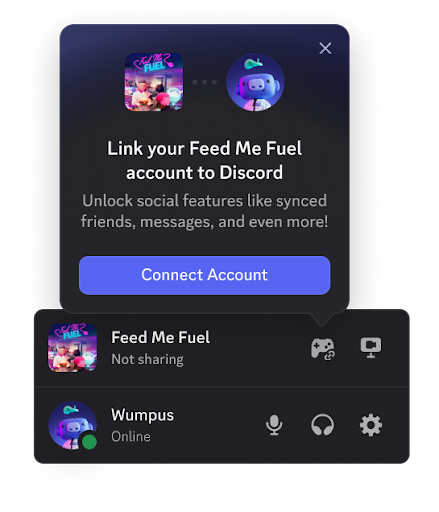
Some of the current Discord entry points include:
**Game Detection**
Discord detects the player is playing your game and provides an entry point to link if they haven't already.
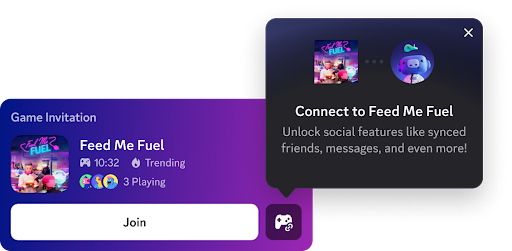
**Game Invites**
Players are optionally able to link when receiving an invite for your game, which helps them get set up and playing with their friends faster.
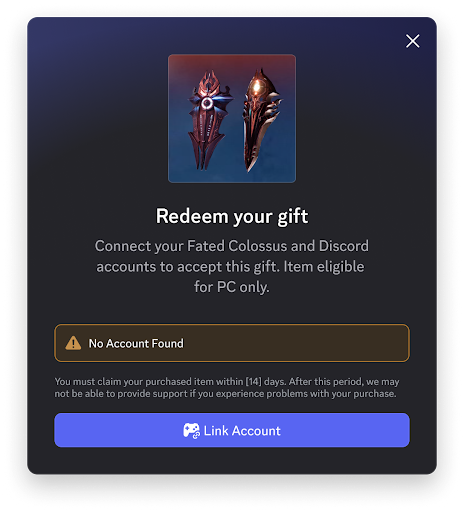
**Claiming Game Shop Items**
Players need to account link when redeeming items from your Game Shop to be able to receive their in-game rewards.
### Account Linking Flows
At this time, Discord provides two different flows for account linking from the client, the connected game flow and the web flow. When a user clicks on one of the entry points within their Discord client, it will choose one of the currently available flows to send the user through. To provide a good user experience, flows are chosen in the following priority order:
* [Connected game flow](/developers/discord-social-sdk/development-guides/account-linking-from-discord#connected-game-flow)
* [Web flow](/developers/discord-social-sdk/development-guides/account-linking-from-discord#web-flow)
Choose which flows work best for your game and follow the implementation guides below. You can implement one or both flows to give your players more options for linking their accounts.
***
## Connected Game Flow
This is our preferred account linking flow as we think it provides the best user experience when it's available. The connected game flow will send the user into your game client to begin the account linking flow.
### Prerequisites
* Upgrade to SDK version 1.6 or higher
* Implement [account linking](/developers/discord-social-sdk/development-guides/account-linking-with-discord) in your game
### Implementing the Connected Game Flow
Once you have adopted SDK version 1.6 or higher, there will be two new methods on the Client object, [`Client::RegisterAuthorizeRequestCallback`] and [`Client::RemoveAuthorizeRequestCallback`]. These two new methods will allow you to enable and disable this flow while your game is running.
Before calling [`Client::RegisterAuthorizeRequestCallback`], ensure
[`Client::SetApplicationId`] has been called. This ensures that your game is
properly identifying itself to the Discord client and that all requests are
associated with the correct application.
Calling [`Client::RegisterAuthorizeRequestCallback`] with a callback function will signal to the Discord client that your game is running and able to start the account linking process. You should run this as soon as your game is able to handle an account link, for instance just after your user has logged in or reached the main menu.
When a user clicks one of the account linking entry points in their Discord client, the SDK will run your callback. Treat this as if the user had just clicked one of your in-game account linking buttons and begin the authorization flow right away.
When your game receives this callback, the user is most likely focused on the
Discord client, not the game client. Make sure to pull focus or otherwise
alert the user that something is happening in the game. The Discord client
will notify them to check the game as well. For a more seamless
experience, you should pull them back into the game.
Calling [`Client::RemoveAuthorizeRequestCallback`] will signal to the Discord client that your game is no longer able to start the account linking process. Call this whenever your game client is entering a state where starting the account linking process wouldn't work, for instance if the player enters a match, logs out, or is in some other full screen flow like a cutscene.
This is all you need to enable the connected game flow, you can test and debug this flow using our new [built-in developer tools](/developers/discord-social-sdk/how-to/debug-log#client-tools) in the Discord client.
```cpp theme={"system"}
// If you haven't already
client.SetApplicationId("123456789");
client.RegisterAuthorizeRequestCallback([client, myGameAuthorizationHandler]() {
// Pull focus into your game using native APIs
// ...
// Run your normal authorization flow
myGameAuthorizationHandler.StartDiscordAccountLink();
});
```
### Connected Game Best Practices
When a user clicks the account link button in their Discord client, this is a high intent action. We recommend skipping any extra upsells you have until after the user has linked their account, as any extra steps added to this linking flow increases the areas where users may drop off. Show them any upsells after they've linked to reaffirm all the new features and any rewards they may have unlocked by linking their account.
Ensure you're enabling and disabling the callback at the appropriate times. If a user clicks an entry point in their Discord client and it launches the account linking flow in the middle of a match, this can interrupt gameplay and pull them out of your intended experience.
Don't worry about checking if the user is already linked, the Discord client will handle hiding the entry point for users that have already linked their accounts. This will keep your implementation simpler and reduce surface for issues.
## Web Flow
The web flow is an alternative to the connected game flow, allowing you to send users to a webpage to begin the account linking process.
At this time, this flow is only available to select partners.
### Prerequisites
* Implement the [standard OAuth2 flow](/developers/topics/oauth2) on your website
* Set your **Connection Entrypoint URL** in the [Developer Portal](https://discord.com/developers/applications) to the URL that starts your OAuth2 web flow
### Implementing the Web Flow
Ensure your webpage meets the following requirements:
* If the user isn't signed in to their game account, it should prompt them to sign in and then take them immediately back to the authorization flow.
* The authorization should request the same scopes that you request in your game
* After authorization is complete, the token should be saved to the user's account the same way you would during in-game authorization so that it's ready the next time the user launches their game
* If the user is currently in game, send an update to their client with the token and call [`Client::UpdateToken`] to sign them in right away without needing to restart their game
***
## Next Steps
Now that you've successfully implemented account linking with Discord, you can integrate more social features into your game.
}>
Design guidelines for account linking and user authentication
}>
Combine Discord and game friends into a single list for easy management.
}>
Display game status and information to Discord friends.
Need help? Join the [Discord Developers Server](https://discord.gg/discord-developers) and share questions in the `#social-sdk-dev-help` channel for support from the community.
If you encounter a bug while working with the Social SDK, please report it here: [https://dis.gd/social-sdk-bug-report](https://dis.gd/social-sdk-bug-report)
***
## Change Log
| Date | Changes |
| ----------------- | --------------- |
| December 16, 2025 | initial release |
[`Client::RegisterAuthorizeRequestCallback`]: https://discord.com/developers/docs/social-sdk/classdiscordpp_1_1Client.html#a5f34b873e127a446c9ab549e4588ccd7
[`Client::RemoveAuthorizeRequestCallback`]: https://discord.com/developers/docs/social-sdk/classdiscordpp_1_1Client.html#ab7e48864b0cedf3e8572a228ca401f2a
[`Client::SetApplicationId`]: https://discord.com/developers/docs/social-sdk/classdiscordpp_1_1Client.html#ad452335c06b28be0406dab824acccc49
[`Client::UpdateToken`]: https://discord.com/developers/docs/social-sdk/classdiscordpp_1_1Client.html#a606b32cef7796f7fb91c2497bc31afc4
 Some of the current Discord entry points include:
**Game Detection**
Discord detects the player is playing your game and provides an entry point to link if they haven't already.
Some of the current Discord entry points include:
**Game Detection**
Discord detects the player is playing your game and provides an entry point to link if they haven't already.
 **Game Invites**
Players are optionally able to link when receiving an invite for your game, which helps them get set up and playing with their friends faster.
**Game Invites**
Players are optionally able to link when receiving an invite for your game, which helps them get set up and playing with their friends faster.
 **Claiming Game Shop Items**
Players need to account link when redeeming items from your Game Shop to be able to receive their in-game rewards.
**Claiming Game Shop Items**
Players need to account link when redeeming items from your Game Shop to be able to receive their in-game rewards.
 ### Account Linking Flows
At this time, Discord provides two different flows for account linking from the client, the connected game flow and the web flow. When a user clicks on one of the entry points within their Discord client, it will choose one of the currently available flows to send the user through. To provide a good user experience, flows are chosen in the following priority order:
* [Connected game flow](/developers/discord-social-sdk/development-guides/account-linking-from-discord#connected-game-flow)
* [Web flow](/developers/discord-social-sdk/development-guides/account-linking-from-discord#web-flow)
Choose which flows work best for your game and follow the implementation guides below. You can implement one or both flows to give your players more options for linking their accounts.
***
## Connected Game Flow
This is our preferred account linking flow as we think it provides the best user experience when it's available. The connected game flow will send the user into your game client to begin the account linking flow.
### Prerequisites
* Upgrade to SDK version 1.6 or higher
* Implement [account linking](/developers/discord-social-sdk/development-guides/account-linking-with-discord) in your game
### Implementing the Connected Game Flow
Once you have adopted SDK version 1.6 or higher, there will be two new methods on the Client object, [`Client::RegisterAuthorizeRequestCallback`] and [`Client::RemoveAuthorizeRequestCallback`]. These two new methods will allow you to enable and disable this flow while your game is running.
### Account Linking Flows
At this time, Discord provides two different flows for account linking from the client, the connected game flow and the web flow. When a user clicks on one of the entry points within their Discord client, it will choose one of the currently available flows to send the user through. To provide a good user experience, flows are chosen in the following priority order:
* [Connected game flow](/developers/discord-social-sdk/development-guides/account-linking-from-discord#connected-game-flow)
* [Web flow](/developers/discord-social-sdk/development-guides/account-linking-from-discord#web-flow)
Choose which flows work best for your game and follow the implementation guides below. You can implement one or both flows to give your players more options for linking their accounts.
***
## Connected Game Flow
This is our preferred account linking flow as we think it provides the best user experience when it's available. The connected game flow will send the user into your game client to begin the account linking flow.
### Prerequisites
* Upgrade to SDK version 1.6 or higher
* Implement [account linking](/developers/discord-social-sdk/development-guides/account-linking-with-discord) in your game
### Implementing the Connected Game Flow
Once you have adopted SDK version 1.6 or higher, there will be two new methods on the Client object, [`Client::RegisterAuthorizeRequestCallback`] and [`Client::RemoveAuthorizeRequestCallback`]. These two new methods will allow you to enable and disable this flow while your game is running.