

Sending Data
When to Send Data
At minimum, send data in these two cases to keep a player’s profile up to date:- When the user connects their account via OAuth2: Ensures users see data immediately after linking, even if the game isn’t running.
- When the user finishes playing: Ensures up-to-date data after each session.
Additional Sync Strategies
Depending on your game, you may also want to send data:- When the user first logs in: Useful if data may have changed since the last session (e.g. a new season started).
- At regular intervals while playing: Sending every 10 minutes or so keeps the widget feeling current.
- After each match: Aligns with when players naturally expect their stats to update.
Choosing Stable Player IDs
Theprovider_issued_user_id you send to the Application Identity Profile API should be a stable account-level ID for the player identity your widget represents. If your game has multiple characters under the same player account, use the game account ID and let the player select which character’s data to send for that account.
Avoid IDs that can change during normal play, such as display names, temporary session IDs, or IDs tied to whichever character is currently featured. Profile data is stored on an application identity, so changing the provider_issued_user_id changes which identity the profile data belongs to.
Resolving External ID Conflicts
If you first send profile data using oneprovider_issued_user_id and later need to send data for a different provider_issued_user_id, stale application identity data can block writes for the new ID. The same can happen if the Discord account linked to a given provider_issued_user_id changes.
These failures can appear as "Application identity for this external account already exists for another user" or "Provider user ID <user_id> does not match existing identity record".
When a user’s canonical account ID changes, or when a user intentionally switches which game account should appear on their Discord profile:
- Confirm on your server that the Discord user is linked to the current game account.
- Call Get Application Identities by User ID to list the user’s application identities for your application.
- If an old identity no longer represents the user’s selected account, call Delete Application Identity for that identity. Use the
provider_type,provider_issued_user_id, and optionalprovider_idreturned by the list endpoint. - Call Update Application Identity Profile with the current
provider_issued_user_id.
provider_issued_user_id, migrate to a stable game account ID. List the user’s identities, delete the stale character-based identity when it no longer represents the desired profile, then write the profile with the game account ID. If no application identity remains for the user and application, the next successful profile update creates a profile-only identity with provider type NONE.
Sometimes you may know the stale provider_issued_user_id but no longer know which Discord user ID owns it. This can happen if your system changes which Discord user is linked to a game account and loses the old Discord user ID before cleanup. In that case:
- Confirm on your server that the
provider_issued_user_idshould be linked to the current Discord user. - Call Get Application Identities by External ID with your application ID, the stale
provider_type,provider_issued_user_id, andprovider_idif the identity uses one. For profile-only identities created by game data profile writes, use provider typeNONEand omitprovider_id. - Use the returned
user_idwith the sameprovider_type,provider_issued_user_id, and optionalprovider_idto call Delete Application Identity. - Call Update Application Identity Profile for the current Discord user and current
provider_issued_user_id.
provider_id.
If Discord reports that the external account already exists for another user, verify account ownership in your own system before cleanup. Only delete a stale record when your server can determine it no longer belongs to the Discord user that currently owns it. If the external account truly belongs to another Discord user, treat it as an account-linking conflict instead of deleting it.
Do not delete identities as part of routine stat refreshes. Treat deletion as a cleanup step for relinking, account migration, or user-driven identity changes. If the old identity is still valid, keep it and write profile data for the correct identity instead.
Current-Period vs. Total Fields
This section applies if your game’s stats map to thetotal_* and current_period_* primary fields (wins, games, kills, assists, deaths). Skip it if your game doesn’t model seasons or doesn’t fit these fields.
total_* and current_period_* are both primary field keys you choose between when sending data — there’s no widget setting that switches modes. Your game decides which keys to populate based on what you track. The naming convention reflects how your game is expected to maintain them: total_* is a lifetime value, current_period_* resets when your game’s season or period resets.
You only need to populate the fields you’re displaying in the widget. Populating both is forward-looking, it gives you flexibility to swap the widget config later without re-sending data, and supports future Discord features that may surface these fields outside the widget. For games without seasons, just use total_* fields.
In the widget editor, configure separate stat fields with whichever User Data key you want. For example, one stat referencing current_period_wins and another referencing total_wins.
Designing Your Widget
How you design the content of your widget, what stats to show, how to mix primary and dynamic fields, and when to use Application Assets, depends on your game’s style. A competitive shooter, a co-op puzzle game, and an RPG all have different stats players care about. Use this section to decide what to display and how to keep the widget feeling polished.Stats That Work Well on Profiles
Stats that are easy to read out of context perform best:- Rank (
rank_name+rank_image): Players understand what Platinum or Gold means without knowing your game’s details. - Wins and playtime: Signals dedication and experience.
- Character/hero images (
featured_played_character_image): Lets players express their identity through their character or class. Image-forward layouts make profiles feel personal and visually distinct.
Choosing Between Primary and Dynamic Fields
Primary fields are a predefined set with keys defined by Discord (rank_name, total_wins, playtime_hours, etc.). Use them when your game has a matching concept so your data stays consistently structured. If no primary field matches what you want to show, reach for a dynamic field instead.
Dynamic fields are custom fields you define with your own name and value. The name is the data key you reference in the widget editor, not the label players see (labels are configured on the widget’s fields). Use dynamic fields for stats that don’t map to any primary field:
- Primary field candidates: rank, wins, kills, playtime, assists
- Dynamic field candidates: “Dungeons Cleared”, “Crafting Level”, “Longest Kill Streak”
data.primary and data.dynamic). In the widget editor they look the same — set a field’s Value Type to User Data and enter the key.
Designing for Games That Don’t Fit the Primary Fields
Not every game maps cleanly to the primary field set:- An RTS or strategy game might have no
total_kills - A puzzle or casual game might have no
rank_nameorrank_image - A co-op game might track something entirely different like “Missions Completed”
featured_played_character_image (or similar image fields) to anchor the widget visually. A strong character or class image often does more for a profile than a row of unfamiliar stats.
Application Assets
Our comprehensive Image Asset Guidelines covers best practices for images in the game stats widget with visual examples of how they show up. Use Application Assets for static widget images (rank badges, hero art, logos) rather than raw URLs from your own CDN. Discord serves and caches them, reducing your infrastructure dependency and improving load reliability. Configure Application Asset fallbacks in the widget editor for any image field that might be missing from a player’s data, for example, a generic placeholder when no character is set. This keeps the widget looking polished even when player data is sparse.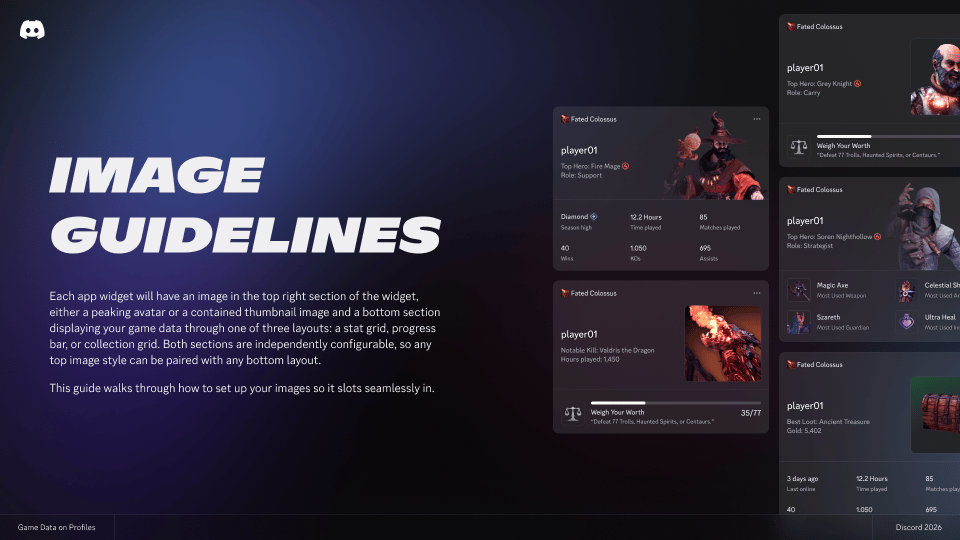
Download Image Asset Guidelines
Application Guidelines
- Match your application name to your game name: The application name is what users see during OAuth2 authorization and on the widget. If you also use this application for a Discord bot, you can set the bot’s username separately from the application name.
- Use your game’s official logo as the application icon: Helps users recognize your game during authorization and on their profile.